AI models for Blender: our GPT tests and the current alternatives


Start with GPT-6.1 Sol for a balanced scripting workflow, then test whether Astra's extra capability is worth it for your scene. Our Blender showcases provide concrete examples; Claude Opus 5.5, Grok 4.7 and restricted-preview Gemini 4 Argon need a separate evaluation.
For everyday Blender scripting, our starting recommendation is GPT-6.1 Sol: try the balanced coding model first, then move to GPT-6 Astra when a difficult scene or debugging problem justifies the extra cost. This is an editorial starting point, not a claim that one model wins every Blender task. OpenAI positions Sol around capability and cost balance, while Astra targets more demanding work. Sol documentation, Astra documentation.
The trick is defining the job. Writing a bpy scene generator, interpreting a viewport screenshot and creating a polished asset are different skills. A model can write plausible Python and still give your cottage the architectural instincts of a startled beaver. Here is how to choose without mistaking a launch headline for a Blender driving licence.
What our Blender showcases actually measure
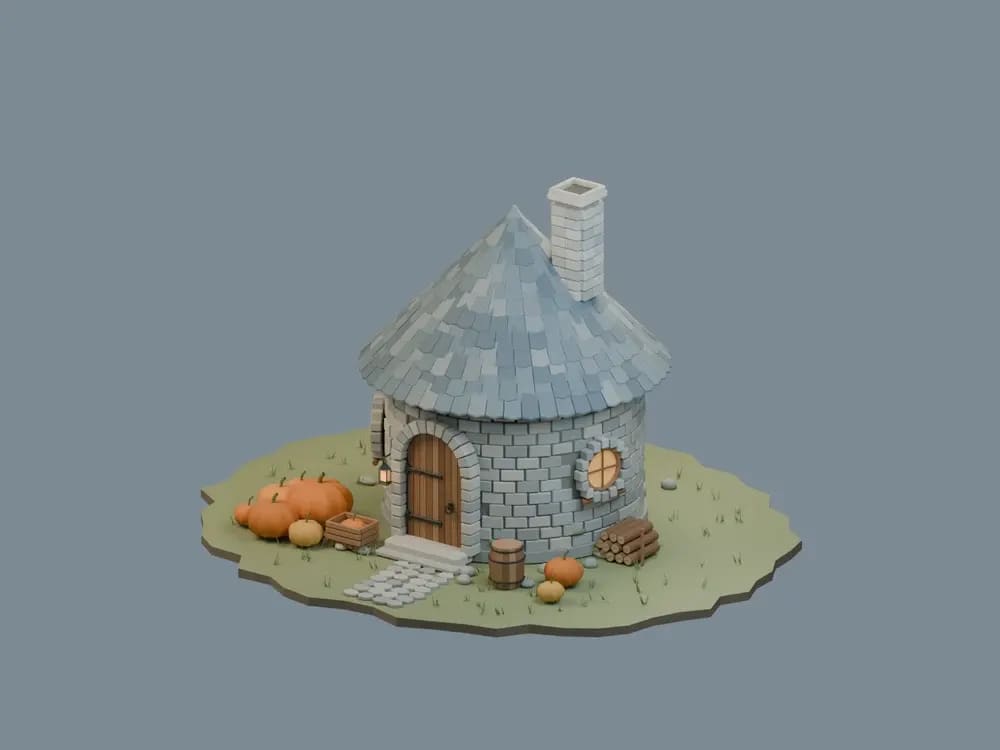
Our Blender showcases expose real scenes: Hagrid's Hut, a skeleton archer and a Mammoth Tank. The published comparisons contain GPT-6 Sol, GPT-6 Luna, GPT-6 Astra and GPT-6.1 Sol runs. You can inspect the renders, rotate previews, watch construction and read the original brief and methodology.
The shared brief used Blender 5.1.2, fresh agents and high reasoning. Published examples are exploratory runs, not repeated trials establishing a statistical ranking. The older GPT runs and the newer Sol 6.1 runs were also produced on different dates. We have not run an equivalent Claude, Gemini or Grok comparison here.
The Hut detail page provides one concrete example:
| Published model run | Authoring time | Estimated API-equivalent cost |
|---|---|---|
| GPT-6 Sol | 4m 38s | $0.3595 |
| GPT-6 Luna | 3m 26s | $0.0165 |
| GPT-6 Astra | 5m 48s | $1.4915 |
| GPT-6.1 Sol | 7m 1s | $0.2539 |
Sol 6.1 was not the fastest authoring run in this example. That is precisely why we prefer showing the result over advertising a universal speed winner. These costs use API rates and cache adjustments; they are not subscription spending, and exclude local rendering and shared coordination. Authoring time, visible staged construction, Python execution and render time are separate measures. A cheap run that needs three repair rounds might not be your cheapest finished asset.
Choose the model around your workflow
| Model | A sensible starting use | What still needs checking |
|---|---|---|
| GPT-6.1 Sol | General Blender Python, scene generators and repeatable automation | Run the script and inspect the mesh; our examples are not universal performance proof |
| GPT-6 Astra | Harder reasoning, complex debugging or detail-sensitive work | Whether the improvement on your task justifies the cost |
| Claude Opus 5.5 | Long coding/tool-use workflows, especially if you already use Claude Code | We have no equivalent Blender run to rank it against our GPT outputs |
| Grok 4.7 | An alternative for coding and image-assisted technical questions | Test API correctness and scene quality on the same brief |
| Gemini 4 Argon | Not included in our Blender tests | Check Google's access details before considering it |
The cross-vendor rows are workflow hypotheses informed by official capabilities, not results from our showcase. Anthropic describes Opus 5.5 around long-running agents, coding and professional work, with access through Claude and developer platforms. Grok 4.7 supports text/image input, reasoning and function calling. Those are relevant ingredients, not a certificate for excellent topology.
Judge the scene, not just the screenshot
For procedural modelling, check silhouette, proportions, materials, object organization and how easily you can edit the result. A beautiful camera angle can be surprisingly diplomatic about a mesh's problems. Use our Mammoth Tank and skeleton pages to inspect different subject types rather than declaring a champion from one attractive hut.
For debugging and automation, successful execution is only the first check. Can the script be rerun safely? Does it rely on the currently selected object or an editor context? Are assumptions explained? Keep a copy of the scene before running generated scripts and verify questionable API calls against your Blender version.
A small acceptance test beats a big model argument
Give each candidate the same bounded brief: your Blender version, scene scale, object budget, required materials and deliverables. Ask for modular Python and an explanation of assumptions. Then record errors, repair rounds, authoring time and the usable final result. Keep model settings and evaluation criteria consistent; add repeated runs before making statistical claims.
Our practical conclusion is to start with Sol 6.1 for a balanced workflow, evaluate Astra when the task gets demanding, and consider Opus or Grok on equal terms when their tools fit your setup. The showcases are a useful starting point because you can inspect the work. Let the mesh, not the marketing copy, have the final vote.
Try the related loot
Linkwarden: self-hosted bookmarks with page archiving