Linear Agent public beta: what product teams can actually use it for


Linear Agent is now available in public beta, bringing AI chat, issue drafting, Slack actions, skills, and automations into Linear workspaces. Here is where it helps and what teams should verify before relying on it.
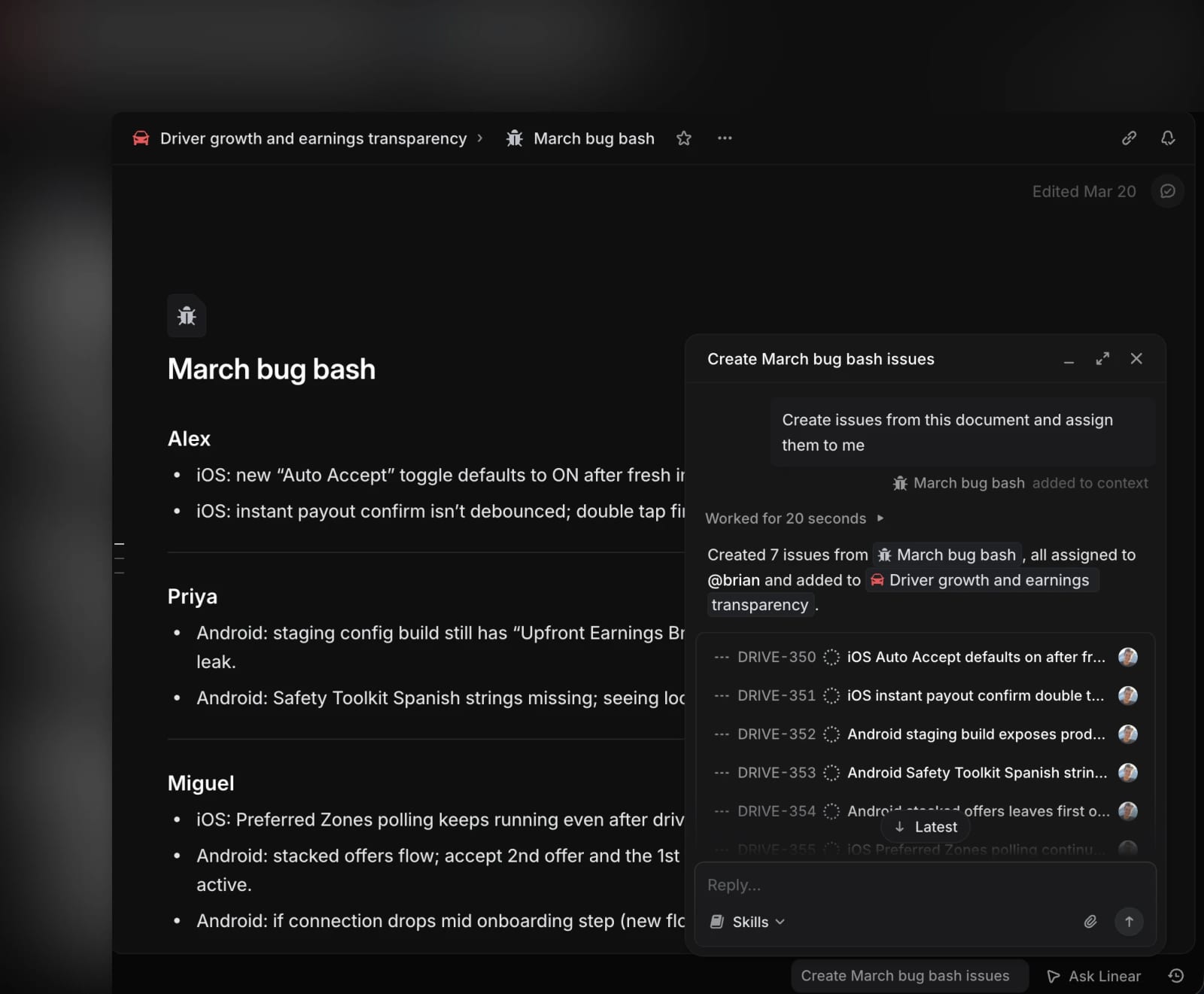
Linear Agent is Linear’s public-beta AI assistant for product and engineering workspaces. It can use Linear workspace context to answer questions, summarize projects, draft or update issues, work in comments, and respond through Slack or Microsoft Teams. The most useful early angle is not replacing product judgment, but reducing the manual work of turning scattered context into clearer issues, updates, and planning inputs.
Key takeaways
- Linear says Agent is available in public beta for all teams, with chat and skills included across plans during the beta period.
- The agent can work from Linear context such as issues, projects, teams, activity history, comments, and documents.
- Linear’s docs describe concrete actions: create or update issues, summarize ongoing work, answer workspace questions, and post or edit its own comments.
- Slack support lets teams mention
@Linearin conversations to create issues, extract feature requests, or answer workspace-context questions. - Automations and future Code Intelligence are aimed at higher-compute workflows, so pricing and availability may change after beta.
Practical LinkLoot angle
Linear Agent is most interesting for teams that already use Linear as their source of truth. If your roadmap, bugs, customer requests, and project updates are scattered across chats and documents, an agent will only summarize the mess. If Linear already contains the context, the agent can act more like an operational layer: draft the weekly project update, pull repeated themes out of a backlog, convert Slack discussion into issues, or create a reusable skill for a recurring planning workflow.
A useful way to evaluate it is by task risk. Low-risk summarization and drafting can be adopted quickly. Write actions, issue creation, and automations should start with review steps, clear team conventions, and a small set of templates.
| Workflow | Good first use | Risk to watch | Suggested guardrail |
|---|---|---|---|
| Project updates | Draft concise status, risks, and next steps | Missing context or overstated progress | Require human approval before posting |
| Backlog triage | Group repeated themes and candidate priorities | Prioritizing loud signals over strategic work | Compare against roadmap and customer impact |
| Slack to Linear | Turn a thread into bugs or feature requests | Creating duplicate or vague issues | Use templates and require owner/team fields |
| Skills | Save a repeatable review or planning prompt | Codifying a bad process | Keep skills narrow and revise after use |
| Automations | Refine incoming triage items | Silent changes at scale | Start in one team and audit outputs weekly |
Why it matters
A lot of AI productivity tooling still lives outside the systems where teams actually commit to work. Linear’s approach matters because the agent is embedded where product and engineering decisions already become issues, projects, comments, and updates. That makes the output easier to act on than a generic chatbot summary, but it also raises the bar for permissions, review, and data hygiene.
For managers and founders, the decision is practical: use Linear Agent to compress repeatable coordination work, not to outsource prioritization. The win is faster context assembly and cleaner execution, while the human job remains deciding which trade-offs are worth making.
What to verify before you act
Check whether your Linear workspace already has the right context before enabling agent-heavy workflows. The agent can only work with the workspace data and permissions available to the user, so stale issues, missing customer evidence, and unclear team ownership will produce weaker results. If you plan to use Slack mentions, confirm the Slack integration is configured, invite the Linear app into the right channels, and set guidance for how issues should be created from conversations.
Also review pricing language before building core operations around automations. Linear says Agent and Skills are included on all plans during beta, while automations and Code Intelligence are tied to Business and Enterprise capabilities and may move toward usage-based pricing at general availability. Start with drafts and summaries, then add write actions once your team has confidence in templates, permissions, and review habits.
Linear Agent is a public-beta AI assistant inside Linear that can use workspace context to answer questions, summarize work, draft issues, and take certain Linear actions.
For more ways to compare embedded agents with standalone tools, see LinkLoot’s guide to AI agent tools.
Try the related loot
Scrape Changing Websites with Anansi Self-Healing Selectors and MCP