Topic

#automation

Loot, blog posts and adjacent themes connected to this topic. Follow the tag to keep it in your orbit.

#automation
Loot

More from this topic

Explore all loot

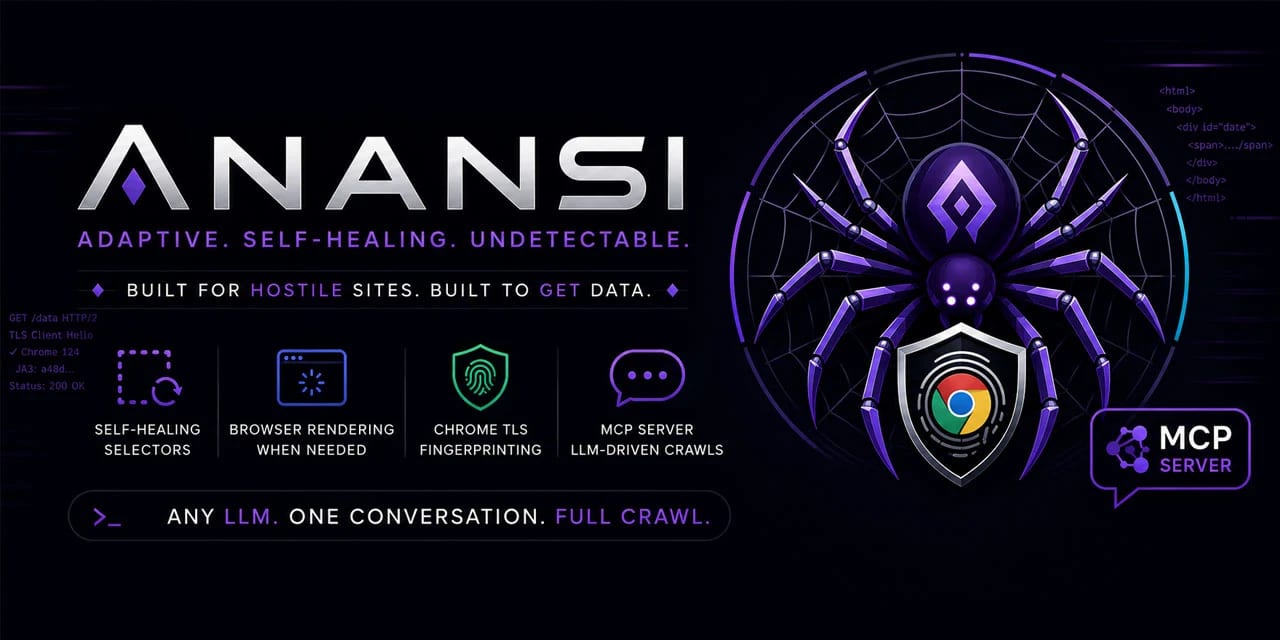
Scrape Changing Websites with Anansi Self-Healing Selectors and MCP

0
#web scraping#mcp#python#crawler#ai agents#data extraction#automation
A Python crawler for unstable or JavaScript-heavy sites, with selector healing, structured-data extraction, adaptive rate limiting, and an MCP server for agent-driven crawling. Use only for authorized scraping. Anansi is a Python web scraping toolkit designed for sites that change often or need browser rendering. It combines adaptive parsing, structured-data extraction, incremental crawling, proxy support, and an MCP server so an LLM or agent workflow can drive fetch, extract, crawl, pause, resume, export, and metrics actions. Why it is useful Self-healing selectors: stores selector confidence and attempts fallback strategies when a layout changes. Structured extraction first: pulls JSON-LD, Open Graph, and Microdata before relying on brittle CSS selectors. Browser upgrade path: can switch from HTTP fetching to Playwright rendering for JavaScript-heavy pages. Crawler durability: includes an async crawler, SQLite-backed queue, incremental recrawls, ETag/Last-Modified handling, and resumable jobs. Agent-ready interface: ships with an MCP server so compatible LLM tools can operate crawls through tool calls. Best fit Use Anansi when you need a resilient research or data-extraction crawler for websites you are allowed to access, especially where pages change structure or require JavaScript rendering. It is most relevant for developers building data pipelines, monitoring workflows, competitive research dashboards, or agentic browsing systems. Quick evaluation checklist Confirm the target website permits your intended crawling use case. Start with structured data extraction before custom selectors. Enable browser rendering only where HTTP fetching is insufficient. Keep adaptive rate limiting active and respect Retry-After responses. Use the MCP server when you want an agent to orchestrate crawl tasks instead of manually scripting every step. Source notes The GitHub repository describes Anansi as a self-healing web scraper with selector repair, browser rendering fallback, Chrome-like TLS fingerprinting, Pydantic validation, incremental crawling, and an MCP server. The project is written primarily in Python and is licensed under Apache-2.0.
View
Free
Open

Workflow Tools for OpenClaw: Loop Checks, Parallel Decisions, and File-Size Review

0
#openclaw#skill#agent#free#workflow#automation#runner-review
An OpenClaw skill candidate that bundles TODO/FIXME loop scans, parallel-vs-serial planning, file-size review, and subworkflow handoff into one local workflow surface. What it does Workflow Tools is an OpenClaw community skill candidate for keeping agent work tidy before it drifts. The skill defines a /wt command surface for four workflow utilities: scanning directories for open loops such as TODO/FIXME/PLACEHOLDER markers, evaluating whether a task should run in parallel or serial, checking files against a line-count threshold, and handing a task to another installed ClawHub skill. Pricing classification: free. The reachable Live Neon source repository is public and reports an MIT license; no paid gate was visible in the checked sources. Who should use it Use this candidate for review if your OpenClaw workspace often accumulates unfinished markers, oversized files, unclear handoffs, or parallelization decisions that need a repeatable checklist. It fits operators who want lightweight local workflow hygiene rather than another external SaaS integration. Setup surface The skill declares config files under .openclaw/workflow-tools.yaml and .claude/workflow-tools.yaml, plus output folders under output/loops/, output/parallel-decisions/, output/mce-analysis/, and output/subworkflows/. Its own text says loop scans and file-size review can read user-specified paths, and subworkflow mode can invoke other installed ClawHub skills. No installation or execution was performed on this Raspberry Pi. Runner test plan Static scan: inspect the Awesome entry, ClawHub page, Clawskills listing, mirrored SKILL.md, Live Neon source tree, raw SKILL.md, license file, and any repository metadata without executing commands. Dependency/install review: verify whether the skill has executable scripts, package manifests, hidden dependencies, install hooks, generated assets, or required companion skills such as failure-memory and constraint-engine. Prompt-injection/tool-poisoning review: check the SKILL.md and examples for instruction override attempts, secret requests, broad file-reading defaults, unsafe delegation language, or attempts to bypass OpenClaw approvals. Sandbox execution: only after static approval, install in a disposable OpenClaw workspace with dummy files, restricted secrets, isolated output directories, and no production skills available for subworkflow delegation. Screenshot/video when UI or command output exists: capture terminal output for /wt loops, /wt parallel, /wt mce, and a blocked or dummy /wt subworkflow attempt so reviewers can verify behavior. Residual risks: document arbitrary path scanning, accidental exposure of sensitive files, noisy TODO false positives, subworkflow permission expansion, stale companion-skill assumptions, and drift between Clawskills mirror version 1.4.0 and Live Neon source version 1.5.0. Risk notes This Loot is a review candidate, not a safety endorsement. Community skill text is untrusted input. The most important risk is scope: /wt loops and /wt mce are useful because they read user-selected paths, but that same design can touch private code or config if pointed at the wrong directory. Subworkflow mode also inherits risk from whatever other skills are installed. Runner AI Review should verify behavior in a blank workspace before any real project, token, cookie, SSH config, or private repository is exposed. Source links Awesome OpenClaw Skills category entry: https://raw.githubusercontent.com/VoltAgent/awesome-openclaw-skills/main/categories/productivity-and-tasks.md ClawHub page: https://clawhub.ai/leegitw/workflow-tools Clawskills listing: https://clawskills.sh/skills/leegitw-workflow-tools Clawskills SKILL.md mirror: https://clawskills.sh/skills-markdown/leegitw/workflow-tools.md Underlying Live Neon source tree: https://github.com/live-neon/skills/tree/main/agentic/workflow-tools Raw SKILL.md source: https://raw.githubusercontent.com/live-neon/skills/main/agentic/workflow-tools/SKILL.md License evidence: https://raw.githubusercontent.com/live-neon/skills/main/LICENSE
View
Free
Open

This Turns Any Coding Agent Into a Video Studio

0
#AI Video#Coding Agents#HTML Video#Creator Workflow#Open Source#Automation
A premium agent workflow for creating deterministic MP4 videos from plain HTML, CSS, media, and seekable animations. This premium Loot gives you a ready-to-run workflow for using HyperFrames as an agent-first video production engine. The core idea is simple: let an AI coding agent write normal HTML/CSS, wire frame-accurate animation timing, preview it locally, then render a deterministic MP4. What the source confirms HyperFrames is open source and Apache 2.0 licensed. It turns HTML, CSS, media, and seekable animations into deterministic MP4 videos. It supports local CLI preview/render flows and AI-agent skill workflows. It requires Node.js 22+ and FFmpeg. The npm package exposes the hyperframes CLI. Agent Brief: Product Launch Video Use this prompt when you want a coding agent to create a short launch clip from scratch. Agent Brief: Website-to-Video Explainer Use this when you have a landing page, docs page, or product URL and want a social-ready explanation video. Agent Brief: Data Story Clip Use this prompt for chart races, metric reveals, or launch traction videos. QA Checklist Before Rendering Copy this into your agent session before final render. Fast start When not to use it You need a no-code editor only. You do not want to install Node.js and FFmpeg. Your video depends on complex manual editing, live camera work, or a traditional timeline-first workflow. You need a fully hosted SaaS render pipeline without touching code. Source links GitHub: heygen-com/hyperframes Docs: HyperFrames introduction npm: hyperframes
View
29
Open

Agent Browser for OpenClaw: Ref-Based Browser Automation Candidate

0
#openclaw#skill#agent#free#browser#automation#testing
A high-utility OpenClaw skill candidate for deterministic browser automation using accessibility snapshots and ref-based element targeting. Not yet tested by Runner AI Review. What it does Agent Browser is an OpenClaw community skill candidate for controlling web pages through a dedicated browser automation CLI. Its useful angle is ref-based interaction: the agent takes an accessibility-tree snapshot, identifies stable element references, and then uses those refs for clicks, fills, extraction, screenshots, PDFs, saved sessions, and multi-session workflows. Pricing classification: free. Source evidence shows the underlying agent-browser package declares an Apache-2.0 license and the public repository exposes an Apache License file. Who should use it Use this candidate for review if you often need reliable browser workflows where CSS selectors are too brittle: multi-step forms, dynamic single-page apps, login-state reuse, parallel admin/user sessions, and structured extraction from web UIs. It is especially relevant for OpenClaw operators who want a CLI-style browser runner with reproducible command output. Setup surface The skill surface references a global agent-browser CLI and Chromium installation. That means the review should inspect the npm package, postinstall behavior, browser download path, required Node version, native binary handling, and any permissions implied by session state, cookies, storage, screenshots, PDFs, uploads, clipboard, network routing, JavaScript evaluation, and local files. No installation or execution has been performed on this Raspberry Pi. Risk notes This Loot is a candidate, not a safety endorsement. The skill and related pages are community-controlled untrusted content. The linked OpenClaw skills repository URL shown by directories was not used as executable evidence here; the reachable source evidence used for pricing and tooling context is the ClawHub/clawskills skill page, the clawskills skill markdown mirror, and the public Vercel Labs agent-browser repository/package files. Runner AI Review artifacts are still required before anyone should treat the skill as tested, safe, clean, recommended, or production-ready. Source links Awesome OpenClaw Skills list: https://raw.githubusercontent.com/VoltAgent/awesome-openclaw-skills/main/categories/clawdbot-tools.md ClawHub page: https://clawhub.ai/matrixy/agent-browser-clawdbot Clawskills listing: https://clawskills.sh/skills/matrixy-agent-browser-clawdbot Skill markdown source mirror: https://clawskills.sh/skills-markdown/matrixy/agent-browser-clawdbot.md Underlying tool repository: https://github.com/vercel-labs/agent-browser Package/license evidence: https://raw.githubusercontent.com/vercel-labs/agent-browser/main/package.json and https://raw.githubusercontent.com/vercel-labs/agent-browser/main/LICENSE
View
Free
Open
Blog

Related reads

Browse blog
AI & Automation

Hugging Face Shows How to Benchmark Whether Tools Are Agent-Friendly

Hugging Face published an agent-evaluation harness that tests whether coding agents can use a library efficiently, not only whether they rea

AI & Automation

GitHub expands Copilot Agent Tasks API to paid individual plans

GitHub now lets Copilot Pro, Pro+, and Max users start and track Copilot cloud agent tasks through the Agent Tasks REST API. The practical v

Tools & Apps

Novu Connect turns one AI agent into a multi-channel teammate

Novu Connect is a new Agent Communication Infrastructure layer for connecting Claude Managed Agents and custom agents to Slack, Microsoft Te

Tools & Apps

VS Code 1.124 makes agent sessions easier to queue, navigate, and govern

Visual Studio Code 1.124 sharpens the Agents window with background sessions, keyboard navigation, restored layouts, smarter Autopilot, brow

AI & Automation

GitHub Agentic Workflows Moves Into Public Preview

GitHub Agentic Workflows is now in public preview, letting teams define AI-driven repository automation in Markdown and run it through GitHu

Deals & Freebies

Albato's AppSumo deal adds AI agents to no-code automation

Albato is back on AppSumo with a lifetime automation offer, and the June update adds Albato Copilot plus autonomous AI Agents for building a

AI & Automation

Claude Fable 5: What Anthropic's Public Mythos-Class Model Changes for AI Workflows

Anthropic has released Claude Fable 5, its first generally available Mythos-class model, while keeping Claude Mythos 5 limited to approved p

AI & Automation

Turn ChatGPT Into Your Homey Smart Home Control Panel

Homey is now available as a ChatGPT app, so users can connect their Homey account, control devices, start Flows, set Moods, and ask ChatGPT

AI & Automation

Microsoft Build 2026 puts agent context, Scout, and MAI models into one developer stack

Microsoft used Build 2026 to frame its agent platform around Microsoft IQ, the Scout personal agent, new MAI models, Frontier Tuning, Agent

Tools & Apps

GitHub Copilot app opens wider as Copilot CLI adds scheduled prompts

GitHub widened the Copilot app technical preview to existing paid Copilot customers and updated Copilot CLI with experimental scheduled prom

AI & Automation

Microsoft Build 2026 Puts Agent Controls Into Policy Files

Microsoft's Build 2026 agent stack centers on ASSERT, Agent Control Specification, and Agent 365 controls for safer production agents.

AI & Automation

Microsoft Build 2026 puts agent containment into Windows

Microsoft used Build 2026 to push Windows toward governed agent execution with MXC, Windows 365 for Agents and local AI APIs.

Tools & Apps

Firecrawl /monitor pings AI agents only when watched web pages change

Firecrawl /monitor gives AI agents signed webhooks and structured diffs when watched pages or sites change, reducing repeated scraping loops

AI & Automation

Open Envelope proposes a portable schema for AI agent teams

Open Envelope is positioning an Apache-licensed schema for AI agent teams as a portable way to define roles, handoffs, schedules, access pol

Business & Karriere

Claude Managed Agents add dreaming, outcomes, and multiagent orchestration

Anthropic has expanded Claude Managed Agents with dreaming, outcomes, multiagent orchestration, and webhooks, pushing the platform toward lo

AI & Automation

Google A2UI gives agents a safer way to render interactive interfaces

Google has made A2UI public as an open project for agent-driven user interfaces, giving AI agents a declarative way to request rich UI witho

AI & Automation

Proton Pass adds access tokens for AI agents

Proton Pass now offers AI access tokens so users can share selected credentials with agents while applying permissions, time limits, and aud

AI & Automation

OpenAI Privacy Filter brings on-device PII masking to Hugging Face workflows

OpenAI Privacy Filter is a Hugging Face model card for bidirectional token classification that detects and masks PII, giving teams a local o

AI & Automation

Cloudflare Workers AI adds Kimi K2.5 for larger agent workloads

Cloudflare says Workers AI now runs Kimi K2.5, giving builders a hosted open-source model with long context, tool calling, vision inputs, an

Business & Karriere

Linear Agent public beta: what product teams can actually use it for

Linear Agent is now available in public beta, bringing AI chat, issue drafting, Slack actions, skills, and automations into Linear workspace

Tools & Apps

Prisma Next turns database work into agent-readable contracts

Prisma Next is an early-access TypeScript rewrite of Prisma ORM that adds data contracts, migration graphs, and agent-facing skills for safe

Tools & Apps

GitHub Issue Fields bring structured metadata to every organization

GitHub has expanded Issue Fields to public preview for all organizations, giving teams typed, organization-level metadata for issues across

AI & Automation

Gemini 3.5 Flash arrives for agentic coding workflows

Google says Gemini 3.5 Flash is its latest Flash-tier model for agentic and coding tasks, while GitHub confirms the model is rolling out in

AI & Automation

Google Antigravity 2.0: Google turns agentic coding into a full developer stack

Google Antigravity 2.0 expands from an AI coding app into an agentic development ecosystem with a standalone desktop app, CLI, SDK, Managed

AI & Automation

GitHub Copilot App Technical Preview: What Agentic Desktop Coding Changes

GitHub's Copilot app technical preview brings agent sessions, GitHub context, validation, and pull request follow-through into a desktop wor