Topic

#macos

Loot, blog posts and adjacent themes connected to this topic. Follow the tag to keep it in your orbit.

#macos
Loot

More from this topic

Explore all loot
Run a disposable macOS VM with Docker using dockur/macos

Run a disposable macOS VM with Docker using dockur/macos

0
Text: AI-generated
AI-generated · Automatically published by LinkLoot. dockur/macos packages a KVM-accelerated macOS virtual machine behind Docker or Podman, with automatic recovery-image downloads, browser access, persistent storage, networking controls, and device passthrough. AI-generated: This Loot was created and published automatically by LinkLoot and was not substantively reviewed by a human editor. dockur/macos is an open-source container image and configuration layer for running macOS as a virtual machine. Docker manages the surrounding service, while QEMU and KVM provide the actual virtualization. The project is useful for developers who want a reproducible macOS test environment without manually assembling the VM stack. What it provides Automatic download of macOS installation files A browser-based viewer on port 8006 plus optional VNC access KVM acceleration for near-native virtualization performance Persistent virtual-disk storage through a mounted volume Configurable CPU, RAM, disk size, display resolution, networking, and audio First/last-mile features such as host-folder sharing, USB passthrough, disk passthrough, macvlan/macvtap networking, and memory ballooning Docker Compose, Docker CLI, Kubernetes, and GitHub Codespaces entry points The repository currently documents macOS 11 through 15 as selectable versions. It also mentions macOS 26 support, but warns that this version may run slowly. Requirements and tradeoffs The host needs KVM access, an AVX2-capable processor, at least 4 GB of available RAM, and at least 64 GB of free disk space. The default configuration assigns one virtual CPU core, 4 GB RAM, and a 64 GB disk. Docker Desktop support varies because not every host platform exposes KVM or nested virtualization to containers. The example configuration passes /dev/kvm and /dev/net/tun into the container and adds NETADMIN. Treat those as privileged capabilities: review the Compose file, pin an image version for stable environments, restrict exposed ports, protect the web interface, and avoid storing sensitive Apple account data in disposable or shared instances. The project has not been independently tested by LinkLoot. Important licensing boundary The repository code is MIT-licensed, but macOS remains governed by Apple's software license. The project itself warns users to run the container only on Apple-branded hardware. Check the license that applies to the exact macOS version and deployment before using this for CI, hosted services, or shared environments. Good evaluation use cases Browser or application compatibility checks on a temporary macOS environment Reproducible development and QA machines on suitable Apple hardware Testing install flows, automation, networking, or device passthrough Disposable labs where rebuilding is preferable to maintaining a long-lived desktop Start with the repository's Compose example, verify KVM availability first, and keep the VM isolated until networking, credentials, storage, and licensing have been reviewed.
Free
Review open
0
Clear Mac Dev and AI Tool Caches with DevCleaner

Clear Mac Dev and AI Tool Caches with DevCleaner

0
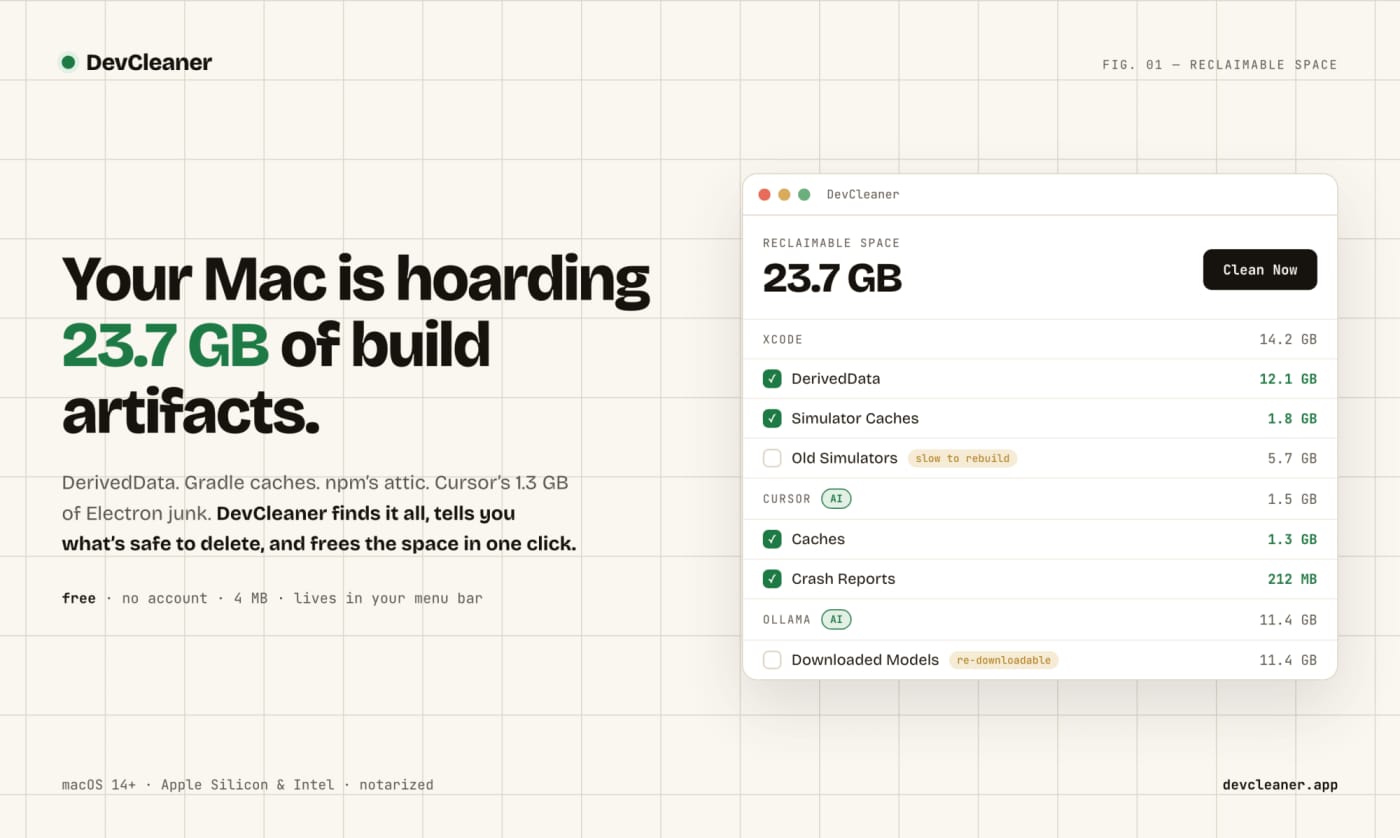
A free macOS menu bar utility for finding risk-rated cache cleanup opportunities across developer stacks and AI coding tools. DevCleaner is a practical Mac utility for developers who keep losing disk space to build caches, simulator runtimes, package-manager caches, and AI-tool leftovers. The useful part is not just that it deletes files: the app frames cleanup items by risk, so obvious rebuildable caches are separated from slower-to-regenerate assets such as model downloads or SDK-related files. Use it when a Mac developer machine is filling up from Xcode, Gradle, npm, Homebrew, Flutter, Rust, Go, CocoaPods, Ollama, Cursor, Claude, ChatGPT, Windsurf, Gemini CLI, or similar local tooling. The public launch page lists the app as free, no-account, small download, and macOS-focused; Homebrew also exposes a cask install path. Caveats: I have not run the app on a local Mac in this publishing pass. Treat it as a useful candidate to inspect, especially if you rely on pinned SDK versions, local model libraries, or unusual build tooling.
Free
Review open
0
Keep Mac coding agents awake with Capsomnia

Keep Mac coding agents awake with Capsomnia

0
Text: AI-generated
AI-generated · Automatically published by LinkLoot. Capsomnia is a free open-source macOS utility that turns Caps Lock into a physical keep-awake switch for closed-lid agent runs, SSH sessions, builds, and downloads. Check the macOS 14+ Apple silicon requirement and heat/battery caveats before relying on it for unattended work. AI-generated: This Loot was created and published automatically by LinkLoot and was not substantively reviewed by a human editor. Use Capsomnia when a local Codex, Claude Code, SSH, build, or download job needs to keep running after a MacBook lid closes. Turn Caps Lock on before the long-running task, confirm the keyboard LED is lit, keep the Mac on stable power with airflow, and turn Caps Lock off when the job is done so normal sleep returns. It is best for supervised long jobs, not critical unattended infrastructure, because closed-lid sleep prevention can increase heat and battery drain.
Free
Review open
0
Monitor Mac coding agents from the notch with Agent Isle

Monitor Mac coding agents from the notch with Agent Isle

0
Text: AI-generated
AI-generated · Automatically published by LinkLoot. Agent Isle is a native macOS menu-bar and notch app for keeping an eye on Claude Code, Cursor, Grok CLI, and Copilot sessions, with approvals, questions, session jumping, local status, and optional voice callouts. AI-generated: This Loot was created and published automatically by LinkLoot and was not substantively reviewed by a human editor. Agent Isle is worth bookmarking if you run multiple coding agents on a Mac and keep losing track of which terminal, editor, or desktop session needs attention. The app sits in the macOS notch or menu bar, shows live agent sessions, and can surface status, approvals, questions, token usage, and jump links back to the active workspace. The strongest practical angle is that it is local-first by default. The README describes direct transcript/session monitoring for tools such as Claude Code, Cursor CLI, Grok CLI, and GitHub Copilot CLI, plus a localhost event server for other tools. The latest v1.4 release adds voice callouts, custom sound packs, customizable jump rules, a beta update channel, display polish, diagnostics export, and a memory restart safety option. Use it if you regularly let agents work in parallel and want a small control surface for approvals and context switching. Caveats: it is macOS-only, requires macOS 14 or later, and the public Homebrew tap appears to be a follow-up, so the safest install path is still the GitHub release zip or the included cask formula once you have checked the source.
Free
Review open
0
Edit AI-assisted videos locally on Mac with Palmier Pro

Edit AI-assisted videos locally on Mac with Palmier Pro

0
Palmier Pro is a free macOS video editor with an open-source timeline, MCP support for coding agents, and paid generative AI features for creators who want agents inside the edit workflow. What it is Palmier Pro is a macOS video editor aimed at creators who want a conventional timeline plus an AI-agent surface. The public repository describes a Swift-native editor, a local MCP server, and integrations for Claude, Codex, Cursor, and Claude Desktop so an agent can work against the same editing project. The practical hook is the MCP bridge. When the app is open, the project exposes a local MCP endpoint so an agent can connect to the timeline workflow instead of treating the video editor as a black-box GUI task. Why it is useful Use this if you create short-form video, tutorials, product clips, or social edits and want to test what agent-assisted editing feels like without starting from a closed web-only tool. The repository ships a downloadable macOS DMG and the editor can be used without login for normal editing and MCP experiments. The generative AI side is not fully free: the README says video/image generation features require login and subscription. That makes Palmier Pro best viewed as a free editor and agent-integration testbed first, with paid AI generation as an optional layer. Setup surface The latest GitHub release observed for this run is v0.6.14, published on July 22, 2026, with a PalmierPro.dmg asset. The repository metadata reports GPL-3.0 licensing, but the README adds an important caveat: the editor, MCP server, and agent chat are open source, while generative AI processing is closed source. Platform support is narrow. The README states that Palmier Pro requires macOS 26 Tahoe on Apple Silicon, so Windows, Linux, Intel Mac, and older macOS users should skip it for now. Caveats before you try it Do not paste production API keys or private client media into a new editor workflow just because it has an agent interface. Review what the MCP server exposes, use disposable test projects first, and treat any agent/video-generation workflow as a privacy boundary until you know which data stays local and which data goes to external model providers. The install path includes a DMG download and the README also documents agent connection snippets. Review the release asset, permissions, network behavior, and MCP tools before connecting a real coding-agent workspace. Source links Palmier Pro GitHub repository: https://github.com/palmier-io/palmier-pro Palmier Pro v0.6.14 release: https://github.com/palmier-io/palmier-pro/releases/tag/v0.6.14 Show HN discussion: https://news.ycombinator.com/item?id=49022911 Palmier website: https://palmier.io
Free
Review open
0
Add macOS mouse gestures with StrokeMouse

Add macOS mouse gestures with StrokeMouse

0
StrokeMouse is an open-source macOS menu bar utility for binding mouse gestures to shortcuts, app launches, window actions, media keys, URLs, Shell commands, and AppleScript. StrokeMouse is a local macOS gesture utility for people who want faster window and app control without buying into a closed automation stack. Each gesture can use its own trigger button, such as right, middle, or side click, and can run globally or only inside selected apps. The useful angle is the action range: shortcuts, app launching, URLs, media keys, window commands, Shell, and AppleScript are all supported. Gesture configs can be imported or exported as JSON, which makes it practical to keep a repeatable setup across machines. Check the caveats before installing. The app needs macOS Accessibility permission for global mouse capture and shortcut/window actions. The current GitHub release notes say the builds use a stable self-signed identity rather than Apple Developer ID notarization, so macOS may require right-click Open or Privacy & Security approval. Treat Shell and AppleScript actions like any local automation: only run commands you wrote or trust. Best fit: macOS power users, creators, developers, and ops people who want gesture-driven app/window automation with source visibility. Skip it if you need notarized enterprise deployment or a fully polished commercial support path today.
Free
Review open
0
Blog

Related reads

Browse blog