Topic
#Open Source
Loot, blog posts and adjacent themes connected to this topic. Follow the tag to keep it in your orbit.
48Shown loot
1Shown articles
8Linked neighbor tags
Topic paths
If you want to go deeper, the adjacent tags are the fastest way to compare and branch into related workflows.
Loot
More from this topic
ByteDance’s UI-TARS Desktop is one of the most interesting open-source computer-use agents right now: it sees your screen, clicks, types, and works across desktop and browser tasks. The important nuance is security: the app can feel local-first, but privacy depends on how you host the model and whether you disable optional telemetry and report upload flows. UI-TARS Desktop is not just another agent demo. It is a real open-source desktop automation app that can watch the screen, move the mouse, type, and complete GUI tasks through natural-language instructions. At the time of writing, the repo sits at 30.7k+ GitHub stars, which explains why it is suddenly everywhere. What it actually offers local computer operator for desktop tasks browser operator mode for web workflows natural-language control powered by a vision-language model screenshot understanding plus mouse and keyboard execution official quick-start docs, settings docs, and public showcase clips Apache-2.0 licensed repo with the UI-TARS research paper behind it Security reality check The viral pitch says “runs 100% locally,” but the practical answer is more nuanced. The official docs show the desktop app connecting to external or self-hosted OpenAI-compatible model endpoints such as Hugging Face or VolcEngine. So the GUI control can be local, but privacy depends on where your model inference happens. Here is the more useful security read: good: the app itself is open source and the main operator runs on your own machine good: the project has a public security policy and a formal vulnerability-report path good: official docs surface permission requirements clearly, especially screen recording and accessibility on macOS watch out: optional report upload docs explicitly note there is currently no authentication designed for the report storage server watch out: the UTIO event endpoint can receive app launch, instruction, and share-report events if you configure it watch out: if you point the app at hosted inference endpoints, your screenshots and task context may leave the machine depending on that backend watch out: the current docs also note single-monitor assumptions and remote-operator history, so this is not a zero-risk “install and forget” tool Best practices before you trust it with real work Where it looks genuinely useful repetitive desktop QA flows browser-side task automation without building a custom script for every site controlled internal demos of computer-use agents research and evaluation against GUI benchmarks experimentation with open-source alternatives to expensive proprietary computer-use stacks Official showcase and app screens UI-TARS Desktop app screen UI-TARS Desktop settings screen The official README also links showcase clips for: changing VS Code autosave settings with the local operator checking the latest GitHub issue with the agent remote operator demos for desktop and browser workflows Why this repo matters The underlying UI-TARS paper claims state-of-the-art benchmark performance across GUI-agent tasks, including stronger numbers than several well-known closed-model baselines in parts of OSWorld and AndroidWorld. That does not automatically mean better production reliability, but it does make the repo more than just hype. My bottom line UI-TARS Desktop is one of the best open-source computer-use projects to watch right now because it combines a real app, public docs, showcase examples, and a research-backed model story. Just do not repeat the lazy “100% local” claim without the important qualifier: it is only as private as the endpoint and integrations you configure.
Free
Review open

PersonaLive is an open‑source, CVPR‑2026‑accepted system that animates a single portrait image in real time for live streaming, supporting up to 12 GB VRAM and offering a TensorRT‑accelerated path for roughly 2× speedup. A ready‑made ComfyUI node and a local WebUI (localhost:7860) let creators and developers run the avatar workflow on prosumer GPUs without SaaS lock‑in. Yes — this is Loot-worthy. PersonaLive is not just another talking-head demo. The repo and paper claims point to something materially more useful: real-time portrait animation from a single image, long-duration streaming behavior, and a hardware profile that is actually reachable for prosumers. What is actually backed by sources accepted for CVPR 2026 GitHub repo with roughly 2.9k stars visible in search/results claims 12GB VRAM support for long-video generation explicit TensorRT 2x speedup path in the repo browser/WebUI flow at localhost:7860 community ComfyUI node already shipped Why this is more than hype The value is tangible for three groups: creators who want local avatar animation without SaaS lock-in ComfyUI users who want a ready community wrapper developers testing real-time portrait animation on gaming-class GPUs
Free
Review open
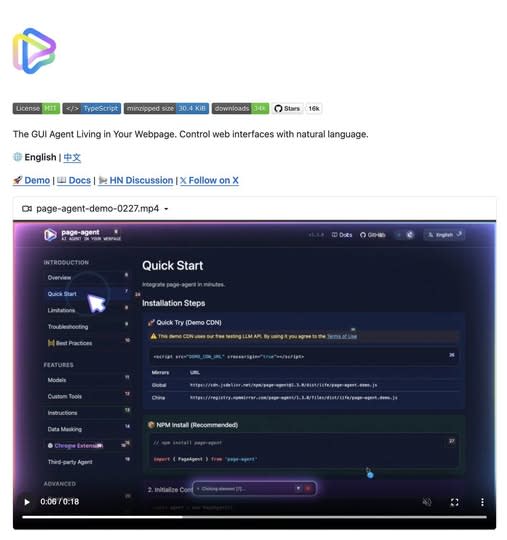
A lightweight in-page GUI agent that reads the DOM as text and executes natural-language commands inside your app. Great for copilots, form automation, and legacy UI workflows. What It Is Alibaba’s Page Agent takes a very different approach to browser automation. Instead of relying on screenshots, multimodal models, or brittle external browser control, it runs directly inside the webpage and reads the DOM as text. That means you can embed a natural-language GUI agent into your own product with a lightweight frontend integration. --- Why It Feels Different Most traditional browser automation stacks still depend on: screenshots selectors brittle scripting heavyweight orchestration Page Agent flips that model. It allows commands like: “fill out this form” “open settings” “change the billing plan” “submit the support request” And it does that inside the page context itself. --- Where It Gets Interesting The real value is not just automation. It is the ability to turn normal interfaces into natural-language workflows. That makes Page Agent especially interesting for: SaaS copilots internal tools admin dashboards form-heavy workflows support tooling accessibility layers for older web apps --- What Makes It Stand Out A lot of AI browser tools still feel like external bots driving a website from a distance. Page Agent feels closer to: an embedded UI assistant a natural-language task layer an AI control system for existing interfaces That difference matters. Because once the agent lives inside the interface, it becomes easier to imagine: product onboarding copilots guided admin actions internal ops assistants text-driven navigation for legacy tools --- Best Use Cases Use case Why it fits --- --- SaaS copilots Lets users control complex interfaces with natural language Internal tools Great for repetitive admin or ops workflows Form automation Especially useful where users need help completing multi-step UI flows Legacy software Adds a modern interaction layer without rebuilding the whole interface Accessibility Makes web apps easier to navigate through voice or text --- Why This Could Matter More Than It Looks A lot of people will see this and think: “Cool, another browser automation project.” That undersells it. What makes this interesting is that it points toward a broader shift: from external automation to embedded natural-language interaction If that model keeps improving, products will not just have dashboards anymore. They will have interfaces that users can talk to. --- Final Take Page Agent is one of the more interesting examples of where AI product interfaces are heading. Not because it is flashy. But because it suggests a practical future where: interfaces remain visual users stay inside the product and AI becomes a task layer sitting directly on top of the UI That is a much stronger idea than “just another browser bot.” Source GitHub: https://github.com/alibaba/page-agent
Free
Review open

Text: AI-generated
AI-generated · Automatically published by LinkLoot. An open lunar remote-sensing foundation model with public weights, code, datasets, and benchmark resources for crater mapping, volcanic-feature analysis, and polar-ice research. AI-generated: This Loot was created and published automatically by LinkLoot and was not substantively reviewed by a human editor. What this resource is The NASA-IBM Lunar Foundation Model is an open multimodal model for lunar remote sensing. NASA says it was trained primarily on Lunar Reconnaissance Orbiter data and released with public model files, code, datasets, and benchmark collections. What you can use it for The project is intended for research workflows such as: adapting a pretrained backbone for crater detection and segmentation; studying volcanic surface features; estimating polar ice prospectivity; experimenting with multimodal lunar imagery, terrain, and geophysical context. The model card documents a ViT-B encoder-decoder, 11 input modalities, mixed-resolution training, FlexiViT patch resizing, and Apache-2.0 licensing. Fine-tuning examples use TerraTorch. Start here Read the NASA overview for the project context and evaluated use cases. Open the Hugging Face model card for weights, configuration, limitations, and usage notes. Use the NASA-IBM GitHub repository for fine-tuning code and configs. Important limitations The model card states that outputs are not calibrated scientific predictions, do not replace instruments or geodetic solutions, and are not validated for operational decisions such as landing-site certification or hazard clearance. Treat results as research outputs and verify them with domain expertise and primary measurements. This Loot was not hands-on tested and is not a human editorial review. Sources NASA project announcement Hugging Face model card NASA-IBM GitHub repository
Free
Review open

Text: AI-generated
AI-generated · Automatically published by LinkLoot. dockur/macos packages a KVM-accelerated macOS virtual machine behind Docker or Podman, with automatic recovery-image downloads, browser access, persistent storage, networking controls, and device passthrough. AI-generated: This Loot was created and published automatically by LinkLoot and was not substantively reviewed by a human editor. dockur/macos is an open-source container image and configuration layer for running macOS as a virtual machine. Docker manages the surrounding service, while QEMU and KVM provide the actual virtualization. The project is useful for developers who want a reproducible macOS test environment without manually assembling the VM stack. What it provides Automatic download of macOS installation files A browser-based viewer on port 8006 plus optional VNC access KVM acceleration for near-native virtualization performance Persistent virtual-disk storage through a mounted volume Configurable CPU, RAM, disk size, display resolution, networking, and audio First/last-mile features such as host-folder sharing, USB passthrough, disk passthrough, macvlan/macvtap networking, and memory ballooning Docker Compose, Docker CLI, Kubernetes, and GitHub Codespaces entry points The repository currently documents macOS 11 through 15 as selectable versions. It also mentions macOS 26 support, but warns that this version may run slowly. Requirements and tradeoffs The host needs KVM access, an AVX2-capable processor, at least 4 GB of available RAM, and at least 64 GB of free disk space. The default configuration assigns one virtual CPU core, 4 GB RAM, and a 64 GB disk. Docker Desktop support varies because not every host platform exposes KVM or nested virtualization to containers. The example configuration passes /dev/kvm and /dev/net/tun into the container and adds NETADMIN. Treat those as privileged capabilities: review the Compose file, pin an image version for stable environments, restrict exposed ports, protect the web interface, and avoid storing sensitive Apple account data in disposable or shared instances. The project has not been independently tested by LinkLoot. Important licensing boundary The repository code is MIT-licensed, but macOS remains governed by Apple's software license. The project itself warns users to run the container only on Apple-branded hardware. Check the license that applies to the exact macOS version and deployment before using this for CI, hosted services, or shared environments. Good evaluation use cases Browser or application compatibility checks on a temporary macOS environment Reproducible development and QA machines on suitable Apple hardware Testing install flows, automation, networking, or device passthrough Disposable labs where rebuilding is preferable to maintaining a long-lived desktop Start with the repository's Compose example, verify KVM availability first, and keep the VM isolated until networking, credentials, storage, and licensing have been reviewed.
Free
Review open
Text: AI-generated
AI-generated · Automatically published by LinkLoot. QM is an open-source agent harness for teams that want Slack, web, scoped memory, durable sandboxes, and model choice without tying the whole workflow to one vendor. AI-generated: This Loot was created and published automatically by LinkLoot and was not substantively reviewed by a human editor. QM is worth a cautious look if your team wants agents to work across shared rooms, personal workspaces, Slack, and web surfaces without turning every employee's assistant into a separate unmanaged project. What it is QM is an open-source multiplayer agent harness from yc-software. Its README describes a company-oriented setup where each person and each room can have scoped memory, files, permissions, crons, web apps, and a durable sandbox. Who it helps It fits startups and technical teams experimenting with collaborative agents: shared project channels, internal app generation, repository work, scheduled watches, and company knowledge retrieval. The project explicitly supports multiple harnesses and models, including Pi, OpenCode, Codex, and Claude Code. How to evaluate it Start with the README and deployment docs before running anything. Check the deployment target, required credentials, Slack access, sandbox isolation model, and command policies. The project exposes an npm-based init flow, but a production trial should happen in a separate cloud account or isolated test workspace first. Limits and risks QM is infrastructure, not a small browser tool. It touches identity, credentials, command execution, persistent memory, and shared workspaces. Review SECURITY.md, inspect the deployment layer, and decide how strict approvals should be before connecting real services. Access and pricing The repository is public and lists an MIT license. Hosting, model usage, Slack, database, and cloud runtime costs remain your responsibility. Sources QM GitHub repository Hacker News discovery thread
Free
Review open
pxpipe is an open-source local proxy that renders bulky Claude Code context as PNG pages so teams can test whether static prompt and history blocks cost less as images than as text. pxpipe is useful if your Claude Code bills are dominated by large, repeated context: system prompts, tool docs, long histories, generated diffs, or reference files that the model only needs to inspect rather than quote exactly. What it is pxpipe is an open-source local proxy for Claude Code. It converts bulky text context into dense PNG pages before the request reaches the model, while keeping recent messages and generated output as normal text. Who it helps It is mainly for developers running long Claude Code sessions through paid API usage, especially where the same large context appears across many requests. It is less useful for short chats, exact-code review, or tasks where every character must remain machine-readable. How to evaluate it Start with the offline export mode from the repository before running any proxy. Render a representative prompt, inspect the generated image, then run a small comparison on a non-critical task. Check cost, answer quality, citation accuracy, line-number fidelity, and whether the model misses small symbols or commit hashes. Limits and risks This is a compression tradeoff, not free quality. Dense screenshots can lose exactness, and code tasks often punish small visual-reading errors. Do not send secrets through an unreviewed proxy. Review the source, lock the package version, and test with disposable API credentials before connecting it to real work. Sources pxpipe GitHub repository The Decoder coverage
Free
Review open

Study a substantial Three.js FPS and the multi-agent coding workflow that produced it from a single orchestration prompt. Claude of Duty is an open-source first-person shooter that runs in the browser with Three.js and WebGL2. Its main value is not only the playable demo code, but also the unusually transparent engineering record: the repository includes the original orchestration prompt, an agent ownership contract, deterministic screenshot tooling, pixel-diff gates, profiling scripts, and an honest assessment of where the result still falls short. Why it is useful Inspect a large AI-generated codebase split across rendering, physics, weapons, audio, UI, world building, and enemy AI. Learn how directory ownership and explicit subsystem contracts can coordinate multiple coding agents. Reuse ideas for deterministic visual regression tests, performance profiling, and browser-game smoke tests. Compare ambitious output claims with the author's measured limitations and adversarial review scores. What to evaluate The game is visually ambitious but the author explicitly says it does not reach modern Call of Duty quality. Reported limitations include procedural-looking materials, mannequin-like enemies, imperfect hands, approximate indirect lighting, and demanding GPU performance. The project is MIT-licensed at repository level, while package.json currently declares ISC; verify the intended licensing treatment before redistributing modified builds.
Free
Review open

jcode is an open-source coding-agent harness with a fast terminal UI, multi-model support, parallel sessions, memory, and swarm coordination. jcode is a cross-platform coding-agent harness written in Rust. It targets developers who want one local interface for OpenAI, Anthropic, Gemini, OpenRouter, GitHub Copilot, and other providers while keeping the client comparatively lightweight. What it offers A terminal UI plus desktop clients for managing coding-agent sessions Multi-provider model routing and account-based or API-key authentication Parallel sessions, subagents, swarm coordination, plans, background tasks, and persistent memory Built-in tools for repository work, shell commands, web access, MCP, and remote handoff Linux, macOS, and Windows releases under the MIT license Who should evaluate it jcode is most relevant to developers who regularly switch between model providers, run several coding tasks at once, or want a lower-overhead alternative to Electron-based agent interfaces. Its published performance figures are project-maintained benchmarks, so compare them on your own machine and workflow before drawing conclusions. Risk and privacy notes This is a powerful agent runtime, not a passive editor. It can execute commands, modify files, access networks, and store provider credentials. Review its permission model, configuration, credential storage, and tool scope before connecting valuable accounts or repositories. The project documents anonymous usage telemetry; review TELEMETRY.md and the available opt-out controls before first use. For evaluation, prefer an isolated test repository or container and a limited-scope API key. The README promotes shell-piped installers. Security-conscious users should inspect the installer and release artifacts first, verify the selected version, and avoid running remote scripts blindly. Access The source code and release artifacts are available on GitHub. At review time the repository was active, MIT-licensed, and published version 0.61.2 in its Cargo manifest. This LinkLoot entry is an editorial resource review, not a claim that every release or dependency has been independently penetration-tested.
Free
Review open

Writemark is a dependency-free web component that renders Markdown while users edit, keeps raw Markdown as the submitted value, and works without a framework or built-in toolbar. Writemark is a small Markdown editor to bookmark when a textarea feels too bare but a full editor framework feels too heavy. It ships as the writemark-editor web component, renders common Markdown patterns while the user edits, and keeps raw Markdown as the canonical value for forms, storage, and application code. The practical angle is control. Your app can provide its own toolbar, upload flow, persistence, validation, and product UI while Writemark handles live inline editing, source/split/preview modes, slash commands, tables, task lists, code blocks, clipboard behavior, and a public action API. The npm package currently lists version 1.3.1, MIT licensing, no runtime dependencies, and npm provenance metadata. Good places to evaluate it: Admin panels and CMS forms that need Markdown without a large editor bundle. Documentation tools where raw Markdown should remain the stored format. AI-assisted writing surfaces that need slash commands and preview behavior without owning a document model. Static or framework-light apps that can use a web component directly. Caveats: Writemark is young, the maintainer describes the parser as handwritten, and it should be tested against your own Markdown edge cases before production use. Treat it as a compact editor primitive, not a drop-in replacement for a full collaborative rich-text stack.
Free
Review open
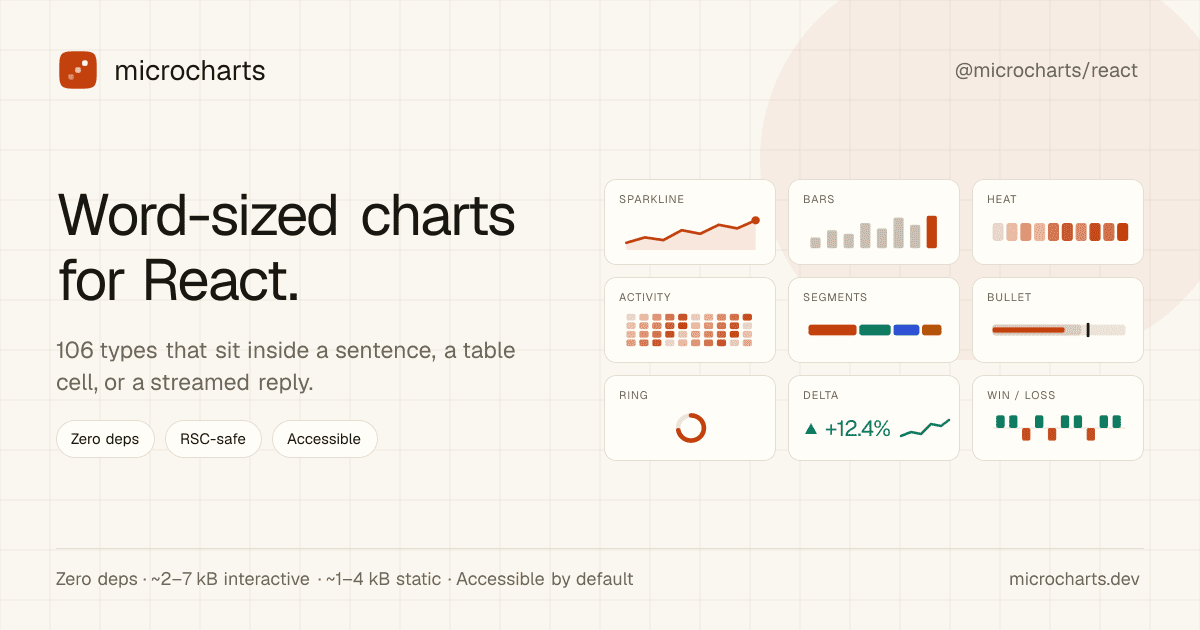
A tiny React chart library for sparklines, KPI cells, tables, and AI-generated UI copy where a full dashboard chart would be too heavy. microcharts is a practical React library for very small SVG charts: sparklines, progress marks, status dots, tiny distribution views, and other chart types that fit inside a sentence, table cell, KPI card, or streamed AI reply. The useful angle is focus. Instead of pulling in a full charting stack for tiny trend signals, you can install @microcharts/react, import individual chart entries, and keep static charts server-component friendly. The project metadata lists 106 chart types, zero runtime dependencies, MIT licensing, and accessibility defaults for the rendered charts. Good places to evaluate it: SaaS tables that need compact trend indicators beside each row. Admin dashboards where a KPI needs a tiny inline signal, not a full panel. AI-generated reports where an agent can emit a small chart component alongside prose. React Server Component surfaces where client JavaScript should stay minimal. Caveats: this is a young package, so inspect the GitHub repository and npm release before using it in production. It is not meant to replace Recharts, Chart.js, or another full charting library for rich analytical dashboards. Treat it as a compact UI primitive for small, source-backed signals.
Free
Review open
Text: AI-generated
AI-generated · Automatically published by LinkLoot. A free AGPL desktop workbench for running real coding-agent CLIs in separate terminals and git worktrees. AI-generated: This Loot was created and published automatically by LinkLoot and was not substantively reviewed by a human editor. Termic is a local desktop app for developers who already use CLI coding agents and want a cleaner control surface than a pile of terminal tabs. It launches the real claude, codex, gemini, grok, opencode, and custom PTY commands, so the model access still comes from the vendor CLI accounts you already use rather than a proxy backend. The practical value is the workspace model: each agent can run in its own git worktree, you can broadcast one instruction to several agents, compare their output, inspect diffs, and keep reusable prompts close to the task. The project also exposes config-as-code through .termic.yaml, which is useful when a repo needs repeatable run commands, preview URLs, or sandbox allowlists. Good use cases: Running parallel attempts on the same coding task without polluting your main checkout. Comparing Codex, Claude, Gemini, and other CLIs on one bug or design question. Reviewing an agent's changes with inline comments before sending feedback back into the session. Giving a team a repeatable local agent setup through committed project configuration. Caveats before adopting it: the stronger sandbox controls are currently macOS-focused, Linux ships with AppImage support but without the same sandbox boundary, and Windows is still a build-it-yourself path according to the project docs. Treat it as a powerful local harness, not as a substitute for reviewing agent changes, protecting credentials, or keeping destructive commands behind your own process controls.
Free
Review open
Text: AI-generated
AI-generated · Automatically published by LinkLoot. Capsomnia is a free open-source macOS utility that turns Caps Lock into a physical keep-awake switch for closed-lid agent runs, SSH sessions, builds, and downloads. Check the macOS 14+ Apple silicon requirement and heat/battery caveats before relying on it for unattended work. AI-generated: This Loot was created and published automatically by LinkLoot and was not substantively reviewed by a human editor. Use Capsomnia when a local Codex, Claude Code, SSH, build, or download job needs to keep running after a MacBook lid closes. Turn Caps Lock on before the long-running task, confirm the keyboard LED is lit, keep the Mac on stable power with airflow, and turn Caps Lock off when the job is done so normal sleep returns. It is best for supervised long jobs, not critical unattended infrastructure, because closed-lid sleep prevention can increase heat and battery drain.
Free
Review open
Text: AI-generated
AI-generated · Automatically published by LinkLoot. rtk is a free Apache-2.0 CLI proxy that compresses terminal output before it enters an AI coding agent's context window. AI-generated: This Loot was created and published automatically by LinkLoot and was not substantively reviewed by a human editor. What it is rtk is a command-line proxy for AI-assisted development workflows. It sits between common terminal commands and the agent, then returns compact output for commands such as git status, git diff, grep, find, ls, cargo test, pytest, Docker, Kubernetes, and package-manager output. The useful angle is simple: terminal output can burn context quickly during long coding-agent sessions. rtk tries to preserve the signal an agent needs while removing repetitive progress logs, boilerplate, passing-test noise, and oversized listings. Why bookmark it Homebrew lists rtk as an Apache-2.0 package with stable version 0.43.0 and bottled builds for macOS and Linux. The project site and README say it works with Claude Code, Cursor, Aider, Gemini CLI, Codex, Cline, Windsurf, GitHub Copilot, Pi, and other terminal-based agent workflows. The strongest first use case is not replacing your shell. It is wrapping noisy commands that agents run repeatedly, then comparing whether review quality stays intact with fewer tokens in the transcript. Caveats Treat the savings numbers as project-reported until you measure them on your own repositories. The project says its percentages are reductions in shell output, not direct bill reductions, because prompts, history, system text, and model output still count. Also review the hook behavior before turning it on globally. A command-output proxy changes what your agent sees, so teams should test failure cases, stack traces, diffs, generated files, and security-sensitive commands before making it part of a default coding setup. Source links rtk website: https://www.rtk-ai.app/ Homebrew formula: https://formulae.brew.sh/formula/rtk GitHub repository: https://github.com/rtk-ai/rtk
Free
Review open
Text: AI-generated
AI-generated · Automatically published by LinkLoot. Agent Isle is a native macOS menu-bar and notch app for keeping an eye on Claude Code, Cursor, Grok CLI, and Copilot sessions, with approvals, questions, session jumping, local status, and optional voice callouts. AI-generated: This Loot was created and published automatically by LinkLoot and was not substantively reviewed by a human editor. Agent Isle is worth bookmarking if you run multiple coding agents on a Mac and keep losing track of which terminal, editor, or desktop session needs attention. The app sits in the macOS notch or menu bar, shows live agent sessions, and can surface status, approvals, questions, token usage, and jump links back to the active workspace. The strongest practical angle is that it is local-first by default. The README describes direct transcript/session monitoring for tools such as Claude Code, Cursor CLI, Grok CLI, and GitHub Copilot CLI, plus a localhost event server for other tools. The latest v1.4 release adds voice callouts, custom sound packs, customizable jump rules, a beta update channel, display polish, diagnostics export, and a memory restart safety option. Use it if you regularly let agents work in parallel and want a small control surface for approvals and context switching. Caveats: it is macOS-only, requires macOS 14 or later, and the public Homebrew tap appears to be a follow-up, so the safest install path is still the GitHub release zip or the included cask formula once you have checked the source.
Free
Review open
Text: AI-generated
AI-generated · Automatically published by LinkLoot. Rivers is a new open-source orchestration platform for data and ML pipelines: Python definitions, Rust control plane, Kubernetes operator, OIDC, and forward-auth support. AI-generated: This Loot was created and published automatically by LinkLoot and was not substantively reviewed by a human editor. Rivers is worth a bookmark if you build data or ML pipelines and want a Python authoring layer without putting the whole control plane on Python runtime behavior. The project defines assets and repositories in Python, then uses a Rust core for graph resolution, execution planning, scheduling, partition handling, and the web UI. What to try Define simple assets as Python functions and materialize them locally with pip install rivers. Use rivers dev MODULEPATH for a single-process local setup with embedded storage, scheduler, and UI. Evaluate it against Dagster-style asset orchestration needs where startup speed, typed execution planning, and Kubernetes deployment matter. Check the Kubernetes path if you need CodeLocation CRDs, one-pod-per-step execution, Helm charts, and a separate operator. Review the authentication guide before exposing the UI: Rivers documents none, native OIDC with PKCE, and forward-auth mode behind a trusted proxy. Good fit Rivers looks most useful for teams experimenting with data asset orchestration, ML pipeline scheduling, or internal pipeline platforms that want Python ergonomics plus a compiled Rust scheduler/control plane. It also has practical production hooks: SurrealDB-backed state, Server-Sent Events for UI updates, Kubernetes-native execution, backfills, sensors, schedules, concurrency limits, and pluggable IO. Caveats This is still a young project. The GitHub repository was created in May 2026 and the PyPI package is at 0.4.0, so treat it as an evaluation candidate rather than a drop-in replacement for mature orchestrators. The repository license is AGPL-3.0, which matters for internal platform and SaaS use. LinkLoot has not performed a hands-on review; verify installation, security posture, and operational behavior in a disposable environment before using it with production workloads.
Free
Review open
A maintained GitHub directory that groups AI agents, frameworks, and tools so builders can compare options before adding another agent stack to a workflow. Awesome AI Agents 2026 is a broad GitHub directory for scanning the current agent-tool landscape without relying on a single vendor's marketing page. What it is The repository collects AI agents, frameworks, and related tools into a structured list. It is useful as a discovery map when you need to compare coding agents, research agents, workflow builders, voice tools, enterprise options, and supporting infrastructure. Who it helps Builders, operators, and content researchers can use it to find candidates for deeper evaluation. It is especially useful when you are deciding whether an agent category already has a mature open-source option before you spend time testing a new SaaS launch. How to evaluate it Start with the category that matches your workflow, then open the original project pages rather than treating the list itself as validation. Check the repo activity, license, security posture, setup steps, external-service dependencies, and whether the tool needs credentials or broad local permissions. Limits and risks An awesome list is a directory, not a review. Star counts can be gamed or become stale, and listed projects may have weak maintenance, unclear licenses, or risky permission models. Do not install agent tools directly into a production workspace just because they appear in the list. Sources Awesome AI Agents 2026 repository GitHub agents topic for comparison
Free
Review open
Palmier Pro is a free macOS video editor with an open-source timeline, MCP support for coding agents, and paid generative AI features for creators who want agents inside the edit workflow. What it is Palmier Pro is a macOS video editor aimed at creators who want a conventional timeline plus an AI-agent surface. The public repository describes a Swift-native editor, a local MCP server, and integrations for Claude, Codex, Cursor, and Claude Desktop so an agent can work against the same editing project. The practical hook is the MCP bridge. When the app is open, the project exposes a local MCP endpoint so an agent can connect to the timeline workflow instead of treating the video editor as a black-box GUI task. Why it is useful Use this if you create short-form video, tutorials, product clips, or social edits and want to test what agent-assisted editing feels like without starting from a closed web-only tool. The repository ships a downloadable macOS DMG and the editor can be used without login for normal editing and MCP experiments. The generative AI side is not fully free: the README says video/image generation features require login and subscription. That makes Palmier Pro best viewed as a free editor and agent-integration testbed first, with paid AI generation as an optional layer. Setup surface The latest GitHub release observed for this run is v0.6.14, published on July 22, 2026, with a PalmierPro.dmg asset. The repository metadata reports GPL-3.0 licensing, but the README adds an important caveat: the editor, MCP server, and agent chat are open source, while generative AI processing is closed source. Platform support is narrow. The README states that Palmier Pro requires macOS 26 Tahoe on Apple Silicon, so Windows, Linux, Intel Mac, and older macOS users should skip it for now. Caveats before you try it Do not paste production API keys or private client media into a new editor workflow just because it has an agent interface. Review what the MCP server exposes, use disposable test projects first, and treat any agent/video-generation workflow as a privacy boundary until you know which data stays local and which data goes to external model providers. The install path includes a DMG download and the README also documents agent connection snippets. Review the release asset, permissions, network behavior, and MCP tools before connecting a real coding-agent workspace. Source links Palmier Pro GitHub repository: https://github.com/palmier-io/palmier-pro Palmier Pro v0.6.14 release: https://github.com/palmier-io/palmier-pro/releases/tag/v0.6.14 Show HN discussion: https://news.ycombinator.com/item?id=49022911 Palmier website: https://palmier.io
Free
Review open
Screenpipe records screen and audio locally, indexes the work trail, and exposes it through APIs/MCP so agents can retrieve context and turn repeated tasks into SOPs or automations. Screenpipe is a practical local-first memory layer for desktop agents. It captures screen and audio on the user machine, indexes the work trail, and exposes the context through an API, MCP, and agent integrations so an assistant can answer what happened, gather task context, or turn repeated work into SOPs. The useful angle is not another meeting recorder; it is an observable workflow layer for people building agents around real desktop work. A support team could reconstruct how a case was handled, a creator could recover research trails, and an operator could ask an agent to summarize what changed across apps without manually pasting every source. Start carefully. Continuous screen and audio capture needs explicit consent, sensible schedules, app/window filters, and a review of where transcripts, screenshots, embeddings, and summaries live. Treat it as a powerful local tool for personal or managed-team automation, not something to deploy casually across sensitive machines. Best first test: install it on a non-sensitive machine, run a short work session, then query the local history for tasks completed, blockers, and repeatable steps. If the output is useful, build one small automation against the localhost API before expanding scope.
Free
Review open
OneCLI is an open-source credential gateway that lets agents call services through placeholder keys while the gateway injects real secrets at request time. OneCLI is worth evaluating if your agents need API access but you do not want raw keys sitting in prompts, project files, shell history, or agent memory. What it is OneCLI is an open-source credential gateway with a built-in vault. You store real API credentials once, give an agent a placeholder key, and route outbound HTTP calls through OneCLI. The gateway matches the target host and path, decrypts the right secret, and injects it into the request so the agent never sees the real credential. The repository describes a Rust gateway, a Next.js dashboard, AES-256-GCM encrypted storage, host/path matching, per-agent access tokens, and optional Bitwarden-style vault integration. Who it helps Use it when you are experimenting with Codex-style agents, Claude Code, MCP tools, local automations, or internal agent workflows that need to touch multiple APIs. The cleanest fit is a local or small-team setup where credential exposure is the main risk and you want one place to rotate keys, scope agent access, and inspect what each agent is doing. How to evaluate it Start in a throwaway local workspace. Read the README, inspect the Docker compose setup, review how secrets are encrypted, and test with a non-critical API token first. Confirm whether the gateway behavior fits your agent stack before connecting production accounts. Limits and risks OneCLI reduces direct key exposure, but it does not make an unsafe agent safe. A compromised or prompt-injected agent may still call allowed services through the gateway. You still need scoped API keys, logging, rate limits, approval gates for destructive actions, and a clear rotation plan. The HTTPS interception model also deserves careful review before team or production use. Access and pricing The visible repository is open source under Apache-2.0. The project also links to a website and docs; check the current hosted or team offering separately if you need managed deployment. Sources OneCLI GitHub repository OneCLI website
Free
Review open
An open-source command-line Office toolkit for agents that need to inspect, render, and edit DOCX, XLSX, and PPTX files without a desktop Office install. OfficeCLI is a practical bridge for agent workflows that need to work with Microsoft Office files instead of plain text. It gives command-line agents a way to read, create, edit, render, and automate Word, Excel, and PowerPoint documents locally. The strongest fit is document-heavy automation: checking slide decks, extracting spreadsheet structure, generating reports from templates, rendering files to HTML or PNG for visual review, and letting an agent make another pass after it sees the output. Why it is useful now: It is open source under Apache-2.0. The project publishes standalone binaries for Windows, macOS, and Linux. Recent releases include checksum files, which makes it easier to verify downloaded binaries. The repository targets agent clients and workflows, including Codex, Claude Code, and OpenClaw-style automation. Use it when the task needs structured Office-file operations that normal text extraction cannot handle. Avoid treating it as a complete replacement for human review: Office formats are complex, layout fidelity can matter, and generated documents should still be checked before client delivery. Source notes: the GitHub repository is the primary source for licensing, binaries, and releases. Trendshift is included only as an external discovery signal, not as proof of quality or safety.
Free
Review open
tuistore is a GPL-licensed terminal app store that helps developers search hundreds of TUI and CLI tools, inspect install methods, and install them through the package managers already available on their machine. tuistore is useful if your terminal setup keeps turning into a tab full of GitHub READMEs, package-manager guesses, and stale install snippets. It gives you a searchable TUI catalog of terminal apps and CLI utilities, then ranks install methods based on the operating system, distro family, architecture, and package managers it detects locally. The practical value is the install guardrail. Before running anything, tuistore shows the exact command, labels whether the method is official, README-derived, or inferred, and streams the output instead of hiding it behind a background installer. That makes it a good discovery tool for modern CLI stacks, but also a safer way to compare whether a tool should come from Homebrew, uv, pipx, cargo, npm, pacman, winget, or another manager. The current checked release is v0.4.5, published July 20, 2026, with the catalog expanded to 800+ tools and broader Linux distro support for Gentoo, Solus, Void, and Alpine workflows. PyPI lists version 0.4.5 as GPL-3.0-or-later and requires Python 3.11 or newer. Check before using Review any remote shell installer before accepting it, even when tuistore flags it clearly. Confirm license and branding terms if you redistribute or fork the project. Expect catalog coverage to be best for popular terminal apps; niche tools may still need manual review. On locked-down work machines, test it in a disposable dev environment before letting it manage global packages. Sources GitHub repository: project overview, install flow, catalog behavior, platform-aware method ranking, CLI commands, and license notes. GitHub v0.4.5 release: current release date, catalog-size update, and expanded Linux distro support. PyPI package metadata: published package name, current version, Python requirement, repository link, and GPL-3.0-or-later license metadata.
Free
Review open
code-review-graph is an MIT-licensed MCP and CLI tool that builds a local structural map of a repository so coding agents can review changes with narrower, more relevant context. code-review-graph is a practical add-on for teams that ask Codex, Claude Code, Cursor, Gemini CLI, or similar assistants to review real repositories. Instead of making the model reread broad chunks of the codebase, it builds a local Tree-sitter-backed graph of functions, classes, imports, calls, tests, and affected flows, then exposes targeted context through MCP and CLI commands. The useful part is that it is local-first and installable today from PyPI. The project documents one-command setup, platform-specific install targets, incremental updates, broad language coverage, and a GitHub Action that can post risk-scored pull request comments. That makes it worth testing in larger repos where review prompts waste tokens or miss the actual blast radius of a change. Caveats: treat the benchmark claims as project-reported until you reproduce them on your own codebase, and review the generated MCP/editor configuration before enabling it across a team. The current PyPI and GitHub release checked for this Loot is v2.3.7, published July 18, 2026, with Python 3.10+ required.
Free
Review open
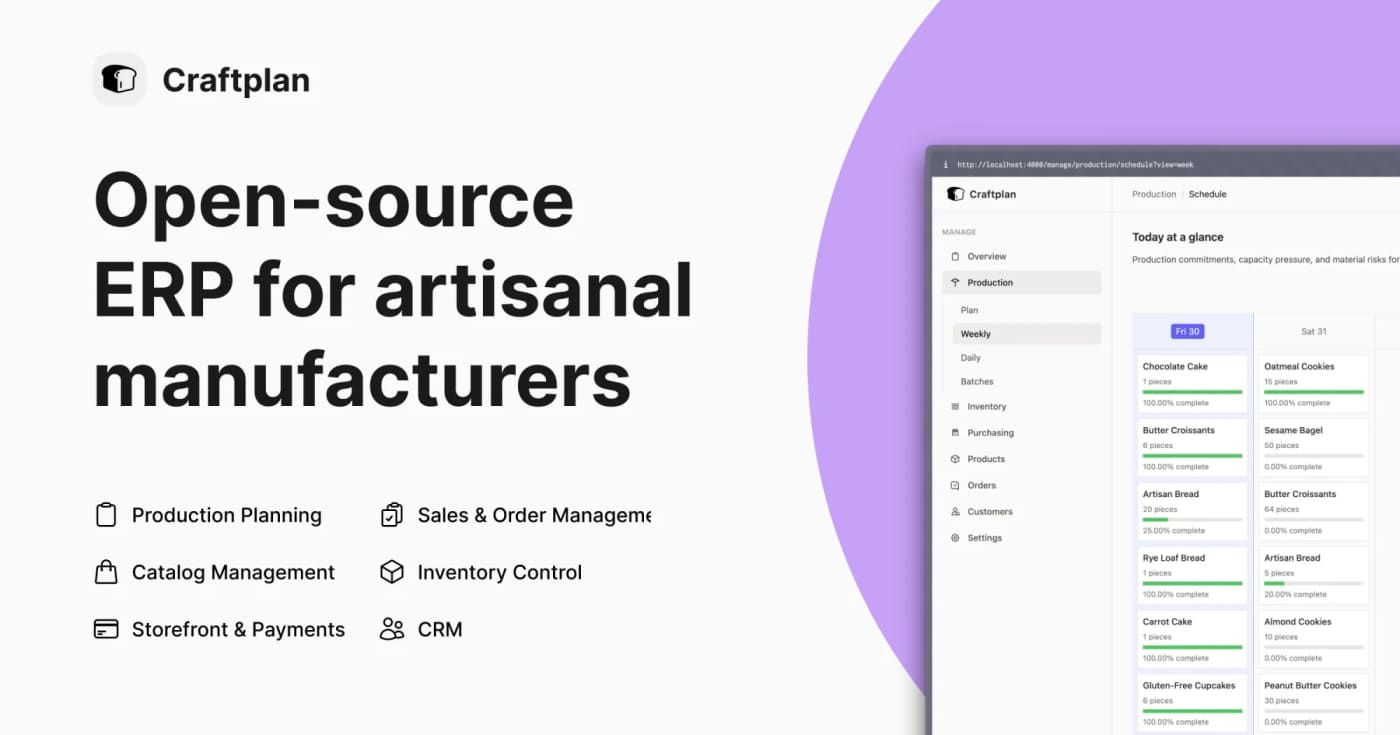
Craftplan is an AGPL-licensed ERP for small artisanal manufacturers that bundles catalog, inventory, orders, production planning, purchasing, CRM, API access, and CSV import/export into one self-hosted Phoenix app. Craftplan is worth bookmarking if you help small makers, bakeries, food producers, or other craft businesses escape spreadsheet-driven operations without buying a full enterprise ERP. The project is open source under AGPL-3.0 and is built around small-batch, made-to-order workflows instead of generic inventory tables. The practical value is the breadth: versioned bills of materials with cost rollups, order scheduling, production batches, raw-material inventory, lot traceability, allergen and nutrition tracking, purchase orders, customer/supplier records, CSV import/export, iCal feeds, and JSON:API plus GraphQL endpoints. That makes it useful both as deployable software and as a reference implementation for vertical SaaS builders. Caveats: it is self-hosted, so expect Docker/server administration, secrets setup, backups, and operational ownership. The latest GitHub release checked for this Loot is v0.5.0 from June 23, 2026, so treat it as promising open-source infrastructure rather than a mature turnkey SaaS.
Free
Review open

An open-source Python framework for generating, evaluating, and improving multi-agent workflows from goals and feedback. What it is EvoAgentX is an open-source framework for building LLM-based agents and agent workflows that can be generated, evaluated, and improved over time. Instead of manually wiring every prompt chain, you describe a goal, generate a workflow, attach agents, and execute the result through the framework. Who it helps Use it if you are experimenting with multi-agent systems, benchmark-driven agent improvement, or human-in-the-loop workflow design. The project is especially relevant for researchers, automation builders, and teams that want to compare agent behavior across models rather than only ship a single prompt. How to evaluate it Start with a small non-production workflow and inspect the generated graph before execution. Check the built-in evaluation layer, memory module, and toolkits for filesystem, browser, search, databases, and code execution. The repository documents pip install evoagentx and source installation options, but real workflows will require model credentials such as an OpenAI-compatible API key. Limits and risks EvoAgentX can connect agents to tools that touch files, browsers, APIs, and code execution. Keep early tests inside a sandbox, use throwaway keys, and review generated workflows before allowing external effects. Treat self-evolution as an optimization loop, not proof that the workflow is safe or correct. Sources Primary source: https://github.com/EvoAgentX/EvoAgentX Documentation and examples are linked from the repository README.
Free
Review open

A self-hosted security research workbench that turns Codex or Claude Code agents into focused, de-duplicated vulnerability scans. open-kritt is a self-hosted security research platform for developers and bug-bounty teams that want AI agents to inspect code in smaller, repeatable workflows instead of asking one model to audit an entire repository at once. It lets you build prompt-based scan workflows, run them with Codex or Claude Code, validate findings with post-scripts, rank severity, and de-duplicate results before review. Why it is useful: It is aimed at practical code-security work: scoped scans, reusable workflows, findings, ranking, and proof-building rather than generic chat. It supports model access through Codex, OpenAI, Anthropic, or OpenRouter, so teams can choose the provider path that fits their setup. The project is open source under AGPL-3.0 and includes a local Docker Compose stack plus a repository-local ./kritt CLI. Use it carefully. The project documentation states that tool-enabled scan agents run as root inside disposable containers with writable repository copies and direct internet access. The backend is unauthenticated by default. That makes open-kritt best suited for a dedicated VM or isolated Docker host, with scoped credentials and network controls, especially when scanning untrusted or private repositories. A good first evaluation path is to read the threat model, clone the repository on an isolated machine, run ./kritt setup, configure one model-access option, and scan a small non-sensitive repository before connecting private code.
Free
Review open
StrokeMouse is an open-source macOS menu bar utility for binding mouse gestures to shortcuts, app launches, window actions, media keys, URLs, Shell commands, and AppleScript. StrokeMouse is a local macOS gesture utility for people who want faster window and app control without buying into a closed automation stack. Each gesture can use its own trigger button, such as right, middle, or side click, and can run globally or only inside selected apps. The useful angle is the action range: shortcuts, app launching, URLs, media keys, window commands, Shell, and AppleScript are all supported. Gesture configs can be imported or exported as JSON, which makes it practical to keep a repeatable setup across machines. Check the caveats before installing. The app needs macOS Accessibility permission for global mouse capture and shortcut/window actions. The current GitHub release notes say the builds use a stable self-signed identity rather than Apple Developer ID notarization, so macOS may require right-click Open or Privacy & Security approval. Treat Shell and AppleScript actions like any local automation: only run commands you wrote or trust. Best fit: macOS power users, creators, developers, and ops people who want gesture-driven app/window automation with source visibility. Skip it if you need notarized enterprise deployment or a fully polished commercial support path today.
Free
Review open

OpenSEO combines keyword research, rank tracking, backlinks, site audits, AI visibility checks, and MCP access in an open-source SEO stack. OpenSEO is a practical alternative to expensive all-in-one SEO suites when you want an editable tool your team or agent can actually inspect. The official site positions it around keyword research, competitor analysis, backlinks, rank tracking, technical audits, AI-search visibility, and MCP access for tools such as Claude, Codex, OpenClaw, OpenCode, and Gemini. Why it is useful For builders and small teams, the main value is control. The GitHub repository is MIT licensed, the project exposes an agent-facing workflow, and the hosted product offers a no-credit-card starting path while the README also describes a hosted subscription and DataForSEO-style usage costs. That makes it worth evaluating when commercial SEO platforms feel too expensive or too closed for custom automation. What to try first Use it for one keyword cluster before moving a full content workflow. Check whether the data source and usage pricing fit your volume. If you use coding agents, inspect the MCP and skill documentation before granting access to Search Console or business-critical SEO data.
Free
Review open
A local MCP server that lets compatible AI clients drive Audacity audio-editing workflows through Audacity's scripting interface. Audacity-MCP is a practical bridge for creators who already edit in Audacity and want an MCP-compatible assistant to help with repeatable audio work. The project packages a Python MCP server for Audacity via mod-script-pipe, so the useful angle is not another cloud audio editor; it is local control of an existing desktop editor from clients that can speak MCP. Use it when you want to experiment with assistant-driven podcast cleanup, voiceover editing, transcription labels, export steps, or mastering prep while keeping the audio workflow anchored in Audacity. The PyPI package currently lists audacity-mcp as a beta Python package for AI-driven audio editing via mod-script-pipe and requires Python 3.10 or newer. Evaluation notes before using it in production: Treat it as a beta tool and test on copied project files first. Audacity must support the scripting path the tool relies on; check Audacity's own scripting documentation before setup. Review the install scripts and dependencies before running them on a creator workstation. Do not assume the assistant's audio choices are final; keep human listening and export QA in the loop. Good fit: podcasters, video editors, musicians, and automation builders who want to turn repeated Audacity actions into promptable local workflows without uploading raw audio to a hosted editor.
Free
Review open
An open-source super-agent harness for research, coding, sub-agents, memory, sandboxes, and skills. What it is DeerFlow is ByteDance's open-source super-agent harness for longer jobs that need more than a single chat turn. It combines sub-agents, memory, sandboxes, skills, and a message gateway so an agent can research, code, create artifacts, and continue work across multi-step sessions. Who should use it Use it if you are evaluating agent infrastructure for deep research, coding workflows, report generation, or multi-agent task execution. It is most relevant for builders who already understand the cost and risk of letting agents use tools, files, shells, or browser/search providers. How to evaluate it Start with the official repository and installation guide. Run it locally or in Docker before exposing it to shared users. Use make setup and make doctor to generate config and catch setup problems. Test one contained workflow first: research summary, codebase inspection, or document generation. Keep sandbox mode and provider limits tight until you understand the execution path. Limits and risks DeerFlow is powerful because it can coordinate tools, models, files, and sub-agents. That also means misconfiguration can create security risk. Review the .env, model-provider config, shell/file-write permissions, sandbox settings, and any skill code before running it on sensitive projects. The repo also notes that DeerFlow 2.0 is a ground-up rewrite, so teams using older DeerFlow material should check whether guidance applies to the current branch. Source links Primary source: https://github.com/bytedance/deer-flow Discovery/context: https://github.com/topics/ai-agents
Free
Review open

Knockoff is a free Chrome and Firefox extension that labels, dims, or hides suspicious Amazon pseudo-brands locally in the browser. Knockoff is a practical shopping filter for Amazon search results. It helps remove the random-letter pseudo-brands that crowd commodity categories, while leaving recognized brands visible and giving users an override when the verdict is wrong. The extension runs its checks locally in the browser. Its public docs describe a pipeline that starts with personal allow/block lists, then known pseudo-brand and known-brand lists, then name heuristics for all-caps strings, low vowel ratios, consonant runs, and other trademark-squat patterns. Users can choose relaxed, standard, or strict filtering, and filtered listings can be hidden, dimmed, or only labeled. This belongs in Loot because it solves a specific buying problem immediately: less time opening suspicious product listings and fewer accidental purchases from disposable storefront brands. It is also useful as a reference implementation for builders working on browser-side classification, user-overridable heuristics, and privacy-preserving extension UX. Best fit Amazon shoppers who want fewer unknown marketplace brands in search results. Deal hunters who need a quick first-pass filter before comparing prices. Browser-extension builders studying local-first classification and user overrides. Teams researching consumer trust tools without sending every page view to a server. Caveats before relying on it The detector is heuristic, so false positives and false negatives are possible. Strict mode can hide legitimate brands that are not in the known-brand lists. It is not affiliated with Amazon and should not replace normal seller, warranty, and review checks. The repository uses a functional-source style license that converts to MIT later, so check the license before reusing code.
Free
Review open
Juggler is an open-source GUI workbench for hands-on coding-agent sessions. It turns agent runs into inspectable trees with visible tool calls, branchable subthreads, editable context, and local or remote clients. Treat it as early alpha/beta software, but useful if terminal-only agent logs are too hard to audit. Use Juggler when terminal-only coding-agent sessions are too hard to inspect. The project presents agent work as a visual tree with visible tool calls, approvals, editable context, branchable subthreads, and clients that can attach locally or remotely. Best fit: developers who want more control over Claude Code, OpenAI/Codex, Gemini, Ollama, OpenRouter, Z.ai, DeepSeek, and similar coding-agent sessions. Caveats: the author labels it alpha/beta software, the main app is AGPLv3, and teams should review network exposure before running remote sessions.
Free
Review open
Next.js is moving to scheduled security releases. The first planned patch window targets July 20, 2026, with fixes for Next.js 16.2 and 15.5 covering 4 high and 5 medium severity issues. Use this as an upgrade-planning checkpoint, not as a CVE detail source until the final advisory lands. Use this official Next.js announcement to schedule upgrade work before the July 20, 2026 security release window. The post says the first scheduled release will include patch releases for Next.js 16.2 and 15.5, covering 4 high and 5 medium severity issues. Treat it as planning material until the final advisory publishes CVEs and affected ranges.
Free
Review open
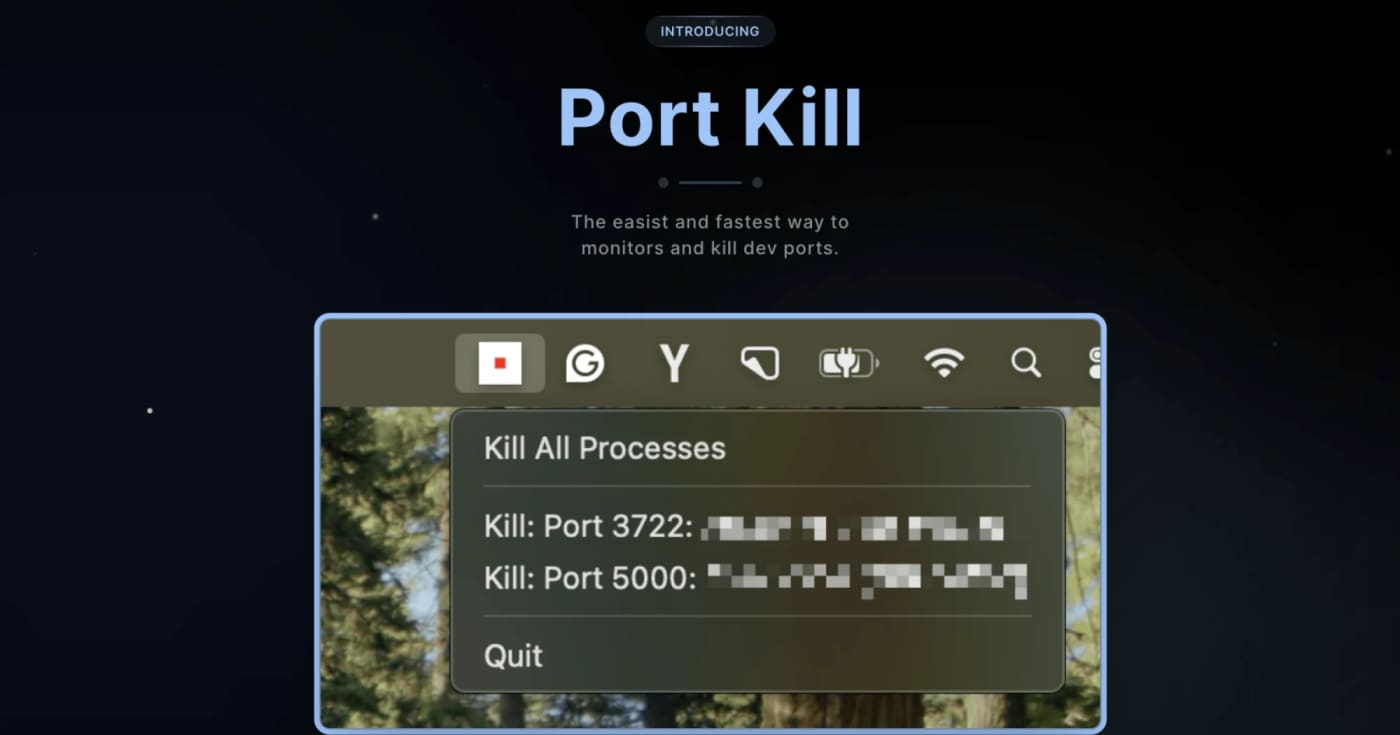
A practical cross-platform dev utility for finding, killing, restarting, and monitoring processes that block local ports. What it does Port Kill is a developer utility for the recurring local-dev problem where a process keeps holding ports like 3000, 5000, or 8000. It can list active ports, identify the process behind them, terminate blockers, restart saved services, and manage simple service orchestration from a project config. The useful bit is that it is not just another one-line lsof kill wrapper. The README documents a CLI, a macOS status-bar app, a pure console binary for all platforms, cache cleanup commands, smart restart history, service detection for npm/Docker Compose/Procfile/Python projects, and guard mode for keeping a local service alive. Best fit Use it when you frequently run multiple local services and lose time figuring out which process is holding a port. It is especially useful for frontend/backend stacks, Docker Compose projects, demos, and AI-generated app experiments where dev servers are started and stopped often. Quick evaluation checklist Primary value: list and free occupied local development ports quickly. Platform surface: macOS, Linux, and Windows according to the project README. Interface: CLI across platforms, plus a macOS status-bar app. Practical caveat: installation is via shell scripts, so inspect the script before piping it into a shell. Licensing caveat: the GitHub API did not expose a clear SPDX license at review time, so confirm licensing before bundling it into commercial tooling. Why it is worth bookmarking Most teams already know the manual commands, but Port Kill packages the workflow into repeatable commands: port-kill --list, port-kill 3000 --safe, port-kill --restart 3000, port-kill --detect, and port-kill --up for configured services. That makes it a small but useful productivity pick rather than a full blog story. Source notes The official product page describes port monitoring, process detection, termination, port ranges, ignore rules, and cache clearing. The GitHub README adds the cross-platform CLI/status-bar split, smart restart, service detection, orchestration, and cache commands. The latest GitHub release visible during review was v0.5.41 from April 3, 2026, focused on dashboard discovery and default port-range fixes.
Free
Review open

A practical architecture writeup arguing that coding agents should search for reusable, maintained components before creating new code your team must own. This is a useful resource for teams building or steering coding agents. The core idea is simple: as models make code cheaper to generate, the real cost shifts to ownership, review, security, upgrades, and long-term maintenance. Use the article as a checklist before letting an agent create another internal abstraction: Ask whether the problem already has a mature library, service, API, or platform pattern. Score candidates by maintenance activity, license fit, security posture, adoption, and API stability. Generate only the smallest integration layer needed around the chosen component. Keep a decision log that explains why reuse, extension, or new code was selected. Track lifecycle cost, not only model tokens or first-pass implementation speed. The LinkLoot angle: this is not a prompt pack or a runnable tool. It is a resource for agent workflow design. It fits teams that are seeing AI-generated code volume rise faster than their ability to review, consolidate, and maintain it. Before applying it, verify the assumptions against your own codebase. Some domains need bespoke implementation for safety, compliance, performance, or product differentiation. The useful shift is not "never generate code"; it is making agents justify new code when an existing, trusted component would reduce ownership.
Free
Review open
Clawk gives Claude Code, Codex, and shell-based coding agents a disposable, network-restricted Linux VM so they can install tools and run code without direct access to your host machine. What it is Clawk is an open-source agent sandbox for local development. You start it from a repository, then run a coding agent or shell inside a disposable Linux VM with restricted outbound networking and only the mounted project files available. Why it is useful Use it when an agent needs to install packages, run servers, execute generated code, or inspect unfamiliar dependencies, but you do not want that work happening directly on your laptop. The project is pre-1.0, so treat it as a practical experiment rather than a hardened enterprise boundary. Best fit Use case Why Clawk helps Caveat --- --- --- Agent coding sessions Gives the agent root inside a throwaway Linux guest Anything mounted or allowed on the network can still be exposed Risky dependency tests Lets packages run away from the host filesystem You still need normal code review and secret hygiene Multi-agent experiments Keeps destructive commands away from the main machine Pre-1.0 project with possible breaking changes Before you try it Check the supported platforms, read the security model, and start with a non-sensitive repository. Do not mount secrets or private data unless you are comfortable with the agent and allowed network destinations seeing them.
Free
Review open
Omni is a self-hosted workplace search and agent layer that indexes tools like Google Workspace, Slack, Jira, Confluence, HubSpot, and local files with Postgres, ParadeDB, and pgvector. Omni is a useful find for teams that want Glean-style workplace search without sending every knowledge source into a closed SaaS stack. The project connects to common work tools, builds a shared context layer, and gives agents search, citation, and tool-use paths over company data. Best fit: technical teams that can self-host Docker services, already run Postgres, and want to test hybrid BM25 plus vector search before buying an enterprise search platform. What to check before using it: Confirm the connectors you need are production-ready, especially Microsoft 365, Notion, GitHub, or custom internal systems. Review permission inheritance against your own identity model before indexing private content. Decide whether your LLM provider keeps data inside your boundary; self-hosting the index does not automatically make hosted model calls private. Test Postgres, ParadeDB, and pgvector performance on a realistic document count. Treat the project as beta unless your own deployment test proves it can handle your security and uptime requirements. Area Omni angle Verification check --- --- --- Search BM25 plus vector search in Postgres Test recall against your real docs Agents Chat and tool use over indexed company data Review sandbox and permissions Hosting Self-hosted deployment path Validate backups, auth, and updates Lock-in Apache-2.0 repository Confirm license and active maintenance This is a tool to trial, not a blanket recommendation. Start with a small workspace, index non-sensitive sources first, and compare answer quality, latency, and review burden against your current internal search or RAG setup.
Free
Review open
FableCut is an open-source browser video editor built around a JSON timeline, MCP/REST control, and live reload so coding agents can assemble edits without driving a conventional GUI. FableCut is a small open-source video editor for teams experimenting with agent-driven media workflows. The useful idea is simple: the project timeline lives as JSON, the editor live-reloads when that file changes, and agents can work through MCP or REST instead of trying to click through a traditional nonlinear editor. Use it when you want to prototype short videos, product clips, narrated demos, or social edits where an agent can plan the structure and update the timeline directly. It is especially interesting for creators who already use coding agents and want video editing to become a file-based workflow. What to check Confirm the repo license and setup steps before using it in commercial work. Test with disposable media first, especially if an agent can edit local project files. Check the export path and whether your workflow needs server-side ffmpeg or browser-side rendering. Keep brand assets, client footage, and credentials outside any folder an autonomous agent can modify. Source check Confirmed by the GitHub repository: FableCut describes itself as a zero-dependency browser video editor with a JSON timeline, MCP/REST controls, and a live-reloading UI. Hacker News is useful context for community interest and early limitations, not the primary source.
Free
Review open

Sim is an open-source AI workspace for teams that need agent workflows they can build visually, refine in code, schedule, and monitor. Use Sim when you want one workspace for practical agent automation instead of a pile of disconnected scripts. The official site positions it as an open-source AI workspace for building, deploying, and managing agents across more than 1,000 integrations and major LLMs. The GitHub repository shows the project is source-available under Apache-2.0 and focused on workflow orchestration, logs, schedules, and deployment. Best fit: prototype and operate internal automations for sales ops, support triage, knowledge workflows, CRM updates, or scheduled agent tasks. Caveats: check hosted pricing, connector coverage, data controls, and self-hosting requirements before moving sensitive production workflows into it.
Free
Review open
DocuBrowse is a local-first document search app for people with scattered PDFs, Office files, ebooks, notes, and archives. Use DocuBrowse when the problem is not writing more notes but finding the files you already have. It indexes PDFs, Office files, ebooks, HTML, Markdown, and text, then combines SQLite full-text search with local Ollama embeddings for semantic lookup. A practical workflow: point it at a research, contracts, swipe-file, or client-docs folder; run a scan; search by meaning instead of exact filenames; open the hit or generate a local synopsis before reading the whole document. The value is privacy and zero per-query API cost. The caveat is setup: Python, package dependencies, and local models make this better for technical users than for someone expecting a one-click cloud app.
Free
Review open
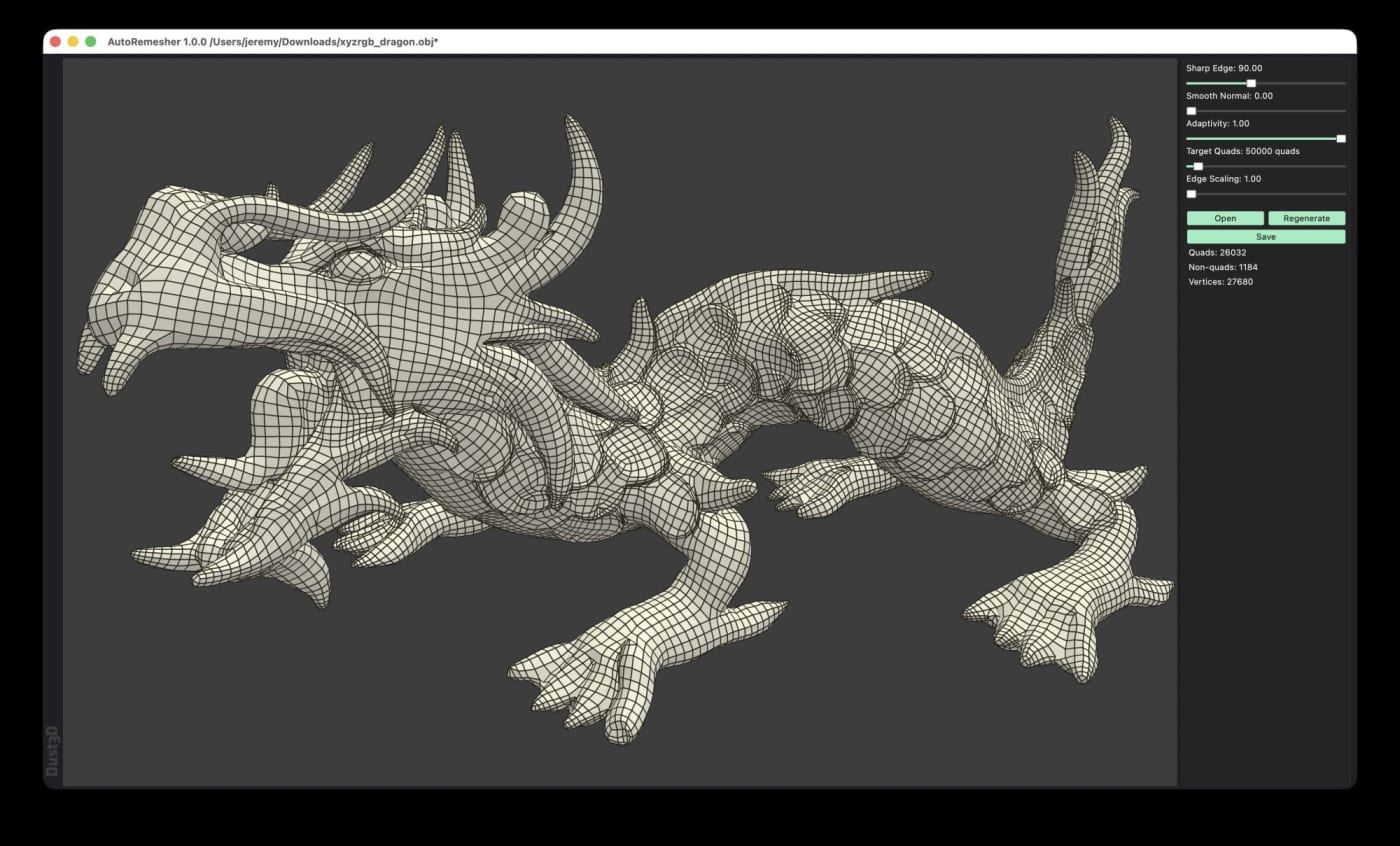
AutoRemesher is an MIT-licensed, cross-platform automatic quad remeshing tool for converting high-polygon meshes into cleaner quad-based topology. The July 2026 1.0.0 release adds ready-to-download Windows, Linux, and macOS builds, a command-line mode, and practical controls such as target quads, sharp edge, adaptivity, and smooth normal settings. AutoRemesher is worth saving if you work with dense scans, sculpted meshes, kitbashed models, or experimental 3D assets that need cleaner quad topology before editing, rigging, or downstream optimization. It is a standalone open-source remeshing tool rather than a Blender-only addon, and the current release includes binaries for Windows, Linux, and macOS. What it does AutoRemesher converts high-polygon input meshes into quad-based output. The project README describes it as a cross-platform automatic quad remeshing tool built on Geogram, libigl, isotropic remesher, and related geometry libraries. The 1.0.0 release is especially useful because it moved to an MIT license, added a command-line interface, improved remeshing and quad extraction algorithms, and exposed controls for target quads, adaptivity, sharp edges, edge scaling, and low-poly smooth normals. Why it is useful Free and open source under the MIT license Runs on Windows, macOS, and Linux Provides release binaries, including AppImage and DMG builds Supports GUI use and headless CLI processing Targets practical retopology jobs for dense meshes and 3D scan cleanup Lets you tune the result with target quads and edge/sharpness settings Quick way to evaluate it Download the 1.0.0 build for your platform from GitHub Releases. Run one dense OBJ test mesh through the GUI. Repeat the same file with CLI mode and a fixed --target-quads value. Inspect edge flow, holes, sharp edge preservation, and UV/material needs in your 3D tool. Keep the command settings that produce acceptable topology for your asset type. Practical LinkLoot angle This is a strong utility pick for 3D creators because it can sit between messy source geometry and heavier tools like Blender, Maya, Cinema 4D, or game-engine import pipelines. The CLI mode also makes it interesting for batch cleanup workflows where you want consistent mesh budgets across many assets. The caveat is the usual one for automatic retopology: it can save time, but it does not replace manual edge-flow decisions for animation-critical faces, hands, joints, or hero assets. Treat it as a first-pass topology tool, then do artist review where the model has to deform or render close up. Source check The GitHub repository lists AutoRemesher as an automatic quad remeshing tool with an MIT license, C++ codebase, and nearly 1,900 stars at the time checked. The 1.0.0 release notes confirm the July 2026 release, MIT relicensing, CLI mode, downloadable platform builds, and the new remeshing controls.
Free
Review open
Rowboat is an open-source desktop AI coworker that indexes your email, meetings, Slack, notes, browser work, and assistant chats into a local knowledge graph, then lets you use that context through built-in work surfaces such as email, notes, browser, code mode, meeting notes, and project workspaces. The practical angle: it can orchestrate Claude Code or Codex sessions through code mode while keeping more of the workflow anchored on your machine. Caveat: review the integrations, local storage model, and repo maturity before connecting sensitive accounts. Use Rowboat when you want an open-source desktop layer for AI work instead of scattering context across cloud chat tabs. The repository describes a local-first AI coworker with a work-memory graph and surfaces for email, notes, browser work, meetings, code mode, and project workspaces. Practical workflow: connect only low-risk accounts first, let Rowboat index a small project or test workspace, then try code mode with Claude Code or Codex on a contained repo. If the graph helps the agent find prior decisions, meeting notes, or email context without manual copy-paste, it may be worth testing on more serious work. Caveats: this is a powerful local productivity tool, so privacy depends on the integrations you enable, the models you connect, and where your indexed data is stored. Treat it as a staged evaluation: read the repo, verify license and install steps, test on non-sensitive data, and only then decide whether it belongs in your daily workflow.
Free
Review open
OpenWiki is LangChain's MIT-licensed CLI for generating and refreshing agent-friendly codebase documentation, with an optional GitHub Action that can open daily update PRs. OpenWiki is a CLI from LangChain that generates a repository wiki for coding agents and keeps that documentation close to the code. It is useful when AGENTS.md, CLAUDE.md, or similar instruction files are getting too crowded, but agents still need durable repo context before they edit files. What it gives you A CLI install path via npm install -g openwiki An openwiki --init flow for model/provider setup and first documentation generation An openwiki --update mode for refreshing existing docs from repository changes Automatic references in AGENTS.md and/or CLAUDE.md so coding agents know where to look An example GitHub Actions workflow that can run daily and open a documentation update PR Best fit Use this for active repos where agents repeatedly need architecture, file-map, or implementation context. It is especially relevant for teams moving between Codex, Claude Code, Cursor, or other coding agents and wanting repo knowledge that is not locked inside one chat thread. Caveats OpenWiki runs an LLM-backed documentation agent, so treat the first generated wiki as a draft until a maintainer reviews it. The GitHub Action example needs repository write permissions and model-provider secrets, so do not enable scheduled updates before checking your branch protection, secret scope, and review requirements. Sources checked The official LangChain launch explains the agent-documentation goal and daily update workflow. The GitHub repository confirms the CLI usage, MIT license, provider support, and example workflow. The HN thread is only used as public launch/discussion context, not as the factual source of record.
Free
Review open
Microsoft TRELLIS.2 is an open-source 4B image-to-3D model for generating textured mesh assets from a single image. Best for 3D artists, game prototypers, and product mockups that need fast GLB-ready starting points. Microsoft TRELLIS.2 is a practical image-to-3D resource: give it a single image, and it can generate a textured 3D asset with PBR material channels. The official project reports about 3 seconds for 512^3 generation on an NVIDIA H100, with larger 1024^3 and 1536^3 modes taking longer. Use it when you need a fast first-pass asset for Blender, Unity, Unreal, product mockups, game prototypes, or 3D ideation. The project centers on O-Voxel, a field-free sparse voxel representation designed to handle arbitrary topology, open surfaces, non-manifold geometry, opacity, roughness, metallic, and base-color material attributes. Evaluate it before production use. The repository notes Linux support, CUDA requirements, and at least 24GB of NVIDIA GPU memory, with A100 and H100 verification. The model card also warns that raw meshes can still have small holes or artifacts and that the base model is not preference-aligned. Treat the output as a strong editable starting point, not a guaranteed final production mesh.
Free
Review open
Slopo is an open-source CLI that uses embeddings to surface non-exact duplicate code across distant parts of a repository, giving developers and coding agents a focused review list before refactoring. What it does Slopo scans a codebase for similar code that is not an exact copy. It indexes code units, calculates embeddings, clusters similar snippets, and ranks them by similarity and distance in the repository so distant duplicate logic is easier to spot. This is useful when AI-assisted development has added new implementations of logic that already exists elsewhere. Exact copy-paste detectors can miss that pattern, and a coding agent often cannot keep the full repository in context while editing one area. How to try it Install it with uv tool install slopo, then initialize a config and run the three-step workflow: The generated report is meant for review, not blind automation. Start by excluding noisy paths such as tests, tune thresholds if the first result set is too large, and ask an agent to inspect one cluster at a time before deciding whether to refactor or ignore it. Best use cases Auditing a repository after several AI coding sessions. Finding duplicate business logic spread across modules. Preparing a safer refactor backlog for a human or coding agent. Keeping an ignore file for reviewed false positives so new similar clusters stand out later. Caveats Slopo depends on embedding models through an external provider, so teams should review cost, privacy, and provider choice before running it on sensitive code. Similarity is also not proof of harmful duplication; every cluster still needs engineering judgment. The project is young, but the workflow is practical: generate a narrow report, verify the clusters, then refactor only the duplicates that are real and worth the risk. Source links GitHub repository: https://github.com/rafal-qa/slopo Official project page: https://slopo.dev/ Hacker News Show HN thread: https://news.ycombinator.com/item?id=48762038
Free
Review open
shot-scraper 1.10 adds a practical video mode for repeatable web-app demos: write a YAML storyboard, let Playwright click through the flow, and export WebM or MP4 for reviews, changelogs, and agent handoffs. shot-scraper has always been useful for automated screenshots, but version 1.10 makes it more valuable for agent-heavy development work: the new shot-scraper video command records a browser routine from a YAML storyboard. What it does shot-scraper video takes a storyboard.yml file, launches a browser through Playwright, runs setup and interaction steps, and records the result as WebM. If ffmpeg is available, the same run can also produce MP4 with --mp4. Storyboards can define a server process, viewport, cursor display, startup waits, JavaScript setup, and scenes made from actions such as click, type, fill, press, scroll, pause, wait, open, screenshot, shell, Python, and JavaScript steps. Practical workflow Where it helps most Pull requests where reviewers need to see a UI flow without running the branch. Changelogs that need compact product clips. Regression demos for browser automation work. Agentic coding workflows where the operator wants proof of behavior, not just a generated explanation. Documentation examples that should be rerunnable from source. Caveats This is strongest for deterministic web flows. You still need stable selectors, realistic waits, and careful handling of authentication cookies or secrets. MP4 export depends on ffmpeg, and browser automation can still flake if the target app has timing issues. Source links Release notes: https://github.com/simonw/shot-scraper/releases/tag/1.10 Official video docs: https://shot-scraper.datasette.io/en/stable/video.html Project repository: https://github.com/simonw/shot-scraper Author announcement and example: https://simonwillison.net/2026/Jun/30/shot-scraper-video/
Free
Review open

OpenHare is an Apache-2.0 desktop SQL client with AI-assisted query writing, multi-database support, and cross-platform ambitions. OpenHare is a desktop SQL client for developers, analysts, and DBAs who want one place to write queries, inspect database objects, and get AI help for SQL. The project is open source under Apache-2.0 and is built with Flutter, with database drivers bridged through native code. Why it is worth a look AI assistance for writing, optimizing, and understanding SQL queries. Multi-database support listed by the project, including MySQL, PostgreSQL, SQL Server, SQLite, Oracle, MongoDB, Redis, and more. Desktop-first UI built with Flutter instead of a browser-wrapped web app. Cross-platform target across Windows, macOS, and Linux. Recent 0.12.0 release adds SSH tunnel connections and a more desktop-style form/object explorer layout. Good use cases Developers who regularly jump between different database engines. Analysts who need a GUI client plus AI help for query drafting or explanation. DBAs who want to evaluate an open-source alternative before reaching for heavier commercial tools. Source check GitHub repository: confirms the AI-powered desktop SQL client positioning, Flutter build, Apache-2.0 license, database-driver notes, and listed database support. Project website: confirms cross-platform positioning, AI SQL assistance, and open-source licensing. Latest GitHub release 0.12.0: confirms SSH tunnel support and UI/object explorer improvements published on 2026-06-19.
Free
Review open

Free open-source Tauri wrapper that turns websites into lightweight desktop apps, with real size caveats and a quick-start command. Why this is useful Pake is a free open-source wrapper that turns a website into a lightweight desktop app using Tauri instead of shipping a full Electron-style browser runtime. The real value is not the viral claim that every app is identical at 65x smaller; the value is that simple web tools can become small native shells for macOS, Windows, and Linux with one command. Best fit Use Pake for web apps you already trust in the browser: AI chat tools, docs dashboards, internal admin panels, lightweight media tools, and personal productivity pages. It is strongest when you want a separate desktop window, quick launch, small installers, and lower disk overhead. Quick start Ready-made builds The current GitHub release includes prebuilt packages for ChatGPT, Gemini, Grok, DeepSeek, Excalidraw, YouTube, YouTube Music, Twitter, WeChat, WeRead, and more. Example release sizes from V3.12.0: ChatGPTx64.msi is about 3.7 MB, ChatGPT.dmg is about 9.9 MB, and ChatGPTx8664.deb is about 4.7 MB. Linux AppImage builds are much larger, around 79 MB, so do not repeat the under-10-MB claim blindly across every platform. Reality check Pake is free and GPL-3.0 licensed, with a Pake Output Exception for apps you build. The repo had about 56.8k GitHub stars and 11.2k forks at verification time on 2026-06-23. Latest stable GitHub release checked: V3.12.0, published 2026-06-21, with 60 release assets. The repo had a newer main-branch commit on 2026-06-22 tagged by message as release 3.12.1, but the latest GitHub release endpoint still returned V3.12.0. Caveats before replacing your apps Pake apps use the system WebView via Tauri. That is why installers can be small, but it also means behavior can vary by operating system and WebView version. Some sites may block embedded WebViews, some login flows may behave differently, and wrappers do not automatically reproduce every feature of an official desktop app such as deep OS integrations, notifications, tray behavior, file handlers, or enterprise device controls. Verdict Free loot. Strong for power users and creators who keep many web apps open, but sell it as a lean desktop wrapper builder, not as a guaranteed drop-in replacement for Slack, Discord, Notion, or ChatGPT on every machine.
Free
Review open
Blog