Topic

#ai-coding

Loot, blog posts and adjacent themes connected to this topic. Follow the tag to keep it in your orbit.

#ai-coding
Loot

More from this topic

Explore all loot
Clear Mac Dev and AI Tool Caches with DevCleaner

Clear Mac Dev and AI Tool Caches with DevCleaner

0
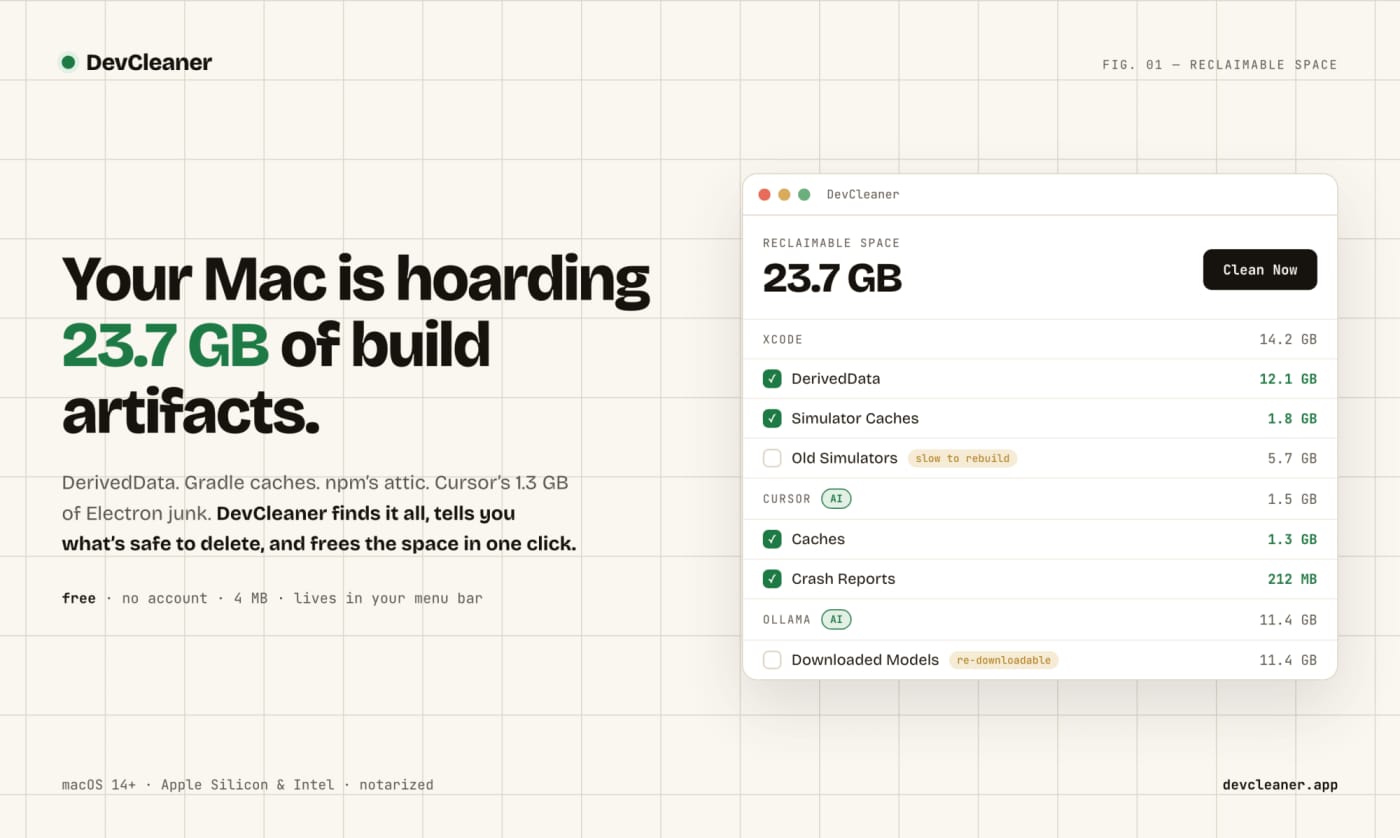
A free macOS menu bar utility for finding risk-rated cache cleanup opportunities across developer stacks and AI coding tools. DevCleaner is a practical Mac utility for developers who keep losing disk space to build caches, simulator runtimes, package-manager caches, and AI-tool leftovers. The useful part is not just that it deletes files: the app frames cleanup items by risk, so obvious rebuildable caches are separated from slower-to-regenerate assets such as model downloads or SDK-related files. Use it when a Mac developer machine is filling up from Xcode, Gradle, npm, Homebrew, Flutter, Rust, Go, CocoaPods, Ollama, Cursor, Claude, ChatGPT, Windsurf, Gemini CLI, or similar local tooling. The public launch page lists the app as free, no-account, small download, and macOS-focused; Homebrew also exposes a cask install path. Caveats: I have not run the app on a local Mac in this publishing pass. Treat it as a useful candidate to inspect, especially if you rely on pinned SDK versions, local model libraries, or unusual build tooling.
Free
Review open
0
Use code-review-graph to give coding agents targeted review context

Use code-review-graph to give coding agents targeted review context

0
code-review-graph is an MIT-licensed MCP and CLI tool that builds a local structural map of a repository so coding agents can review changes with narrower, more relevant context. code-review-graph is a practical add-on for teams that ask Codex, Claude Code, Cursor, Gemini CLI, or similar assistants to review real repositories. Instead of making the model reread broad chunks of the codebase, it builds a local Tree-sitter-backed graph of functions, classes, imports, calls, tests, and affected flows, then exposes targeted context through MCP and CLI commands. The useful part is that it is local-first and installable today from PyPI. The project documents one-command setup, platform-specific install targets, incremental updates, broad language coverage, and a GitHub Action that can post risk-scored pull request comments. That makes it worth testing in larger repos where review prompts waste tokens or miss the actual blast radius of a change. Caveats: treat the benchmark claims as project-reported until you reproduce them on your own codebase, and review the generated MCP/editor configuration before enabling it across a team. The current PyPI and GitHub release checked for this Loot is v2.3.7, published July 18, 2026, with Python 3.10+ required.
Free
Review open
0
Find AI-introduced duplicate logic before refactoring with Slopo

Find AI-introduced duplicate logic before refactoring with Slopo

0
Slopo is an open-source CLI that uses embeddings to surface non-exact duplicate code across distant parts of a repository, giving developers and coding agents a focused review list before refactoring. What it does Slopo scans a codebase for similar code that is not an exact copy. It indexes code units, calculates embeddings, clusters similar snippets, and ranks them by similarity and distance in the repository so distant duplicate logic is easier to spot. This is useful when AI-assisted development has added new implementations of logic that already exists elsewhere. Exact copy-paste detectors can miss that pattern, and a coding agent often cannot keep the full repository in context while editing one area. How to try it Install it with uv tool install slopo, then initialize a config and run the three-step workflow: The generated report is meant for review, not blind automation. Start by excluding noisy paths such as tests, tune thresholds if the first result set is too large, and ask an agent to inspect one cluster at a time before deciding whether to refactor or ignore it. Best use cases Auditing a repository after several AI coding sessions. Finding duplicate business logic spread across modules. Preparing a safer refactor backlog for a human or coding agent. Keeping an ignore file for reviewed false positives so new similar clusters stand out later. Caveats Slopo depends on embedding models through an external provider, so teams should review cost, privacy, and provider choice before running it on sensitive code. Similarity is also not proof of harmful duplication; every cluster still needs engineering judgment. The project is young, but the workflow is practical: generate a narrow report, verify the clusters, then refactor only the duplicates that are real and worth the risk. Source links GitHub repository: https://github.com/rafal-qa/slopo Official project page: https://slopo.dev/ Hacker News Show HN thread: https://news.ycombinator.com/item?id=48762038
Free
Review open
0
Blog

Related reads

Browse blog