Topic

#agents

Loot, blog posts and adjacent themes connected to this topic. Follow the tag to keep it in your orbit.

#agents
Loot

More from this topic

Explore all loot

Keep coding agents oriented with an auto-updating OpenWiki

0
#developer tools#agents#documentation#github actions#open source#langchain
OpenWiki is LangChain's MIT-licensed CLI for generating and refreshing agent-friendly codebase documentation, with an optional GitHub Action that can open daily update PRs. OpenWiki is a CLI from LangChain that generates a repository wiki for coding agents and keeps that documentation close to the code. It is useful when AGENTS.md, CLAUDE.md, or similar instruction files are getting too crowded, but agents still need durable repo context before they edit files. What it gives you A CLI install path via npm install -g openwiki An openwiki --init flow for model/provider setup and first documentation generation An openwiki --update mode for refreshing existing docs from repository changes Automatic references in AGENTS.md and/or CLAUDE.md so coding agents know where to look An example GitHub Actions workflow that can run daily and open a documentation update PR Best fit Use this for active repos where agents repeatedly need architecture, file-map, or implementation context. It is especially relevant for teams moving between Codex, Claude Code, Cursor, or other coding agents and wanting repo knowledge that is not locked inside one chat thread. Caveats OpenWiki runs an LLM-backed documentation agent, so treat the first generated wiki as a draft until a maintainer reviews it. The GitHub Action example needs repository write permissions and model-provider secrets, so do not enable scheduled updates before checking your branch protection, secret scope, and review requirements. Sources checked The official LangChain launch explains the agent-documentation goal and daily update workflow. The GitHub repository confirms the CLI usage, MIT license, provider support, and example workflow. The HN thread is only used as public launch/discussion context, not as the factual source of record.
View
Free
Open

Ship MCP apps without hand-rolling hosting, testing, and store checks

0
#MCP#developer tools#agents#deployment#observability#mcp-use#ChatGPT Apps#Claude Connectors
Manufact combines the open-source mcp-use SDK with a managed cloud for deploying MCP servers and apps, previewing them across clients, checking store-readiness, and monitoring production traffic. What it is Manufact is a practical build-and-deploy lane for teams turning an MCP prototype into something users can actually connect to. The stack pairs the open-source mcp-use SDK with Manufact Cloud, so developers can build MCP servers or app widgets in TypeScript or Python, test them in an inspector, then deploy from a GitHub repo. The useful angle is operational. Manufact Cloud documents project onboarding, GitHub deployments, environment variables, custom domains, runtime logs, analytics, session replay, publish checks, and client connection helpers for Cursor, VS Code, Claude, Gemini CLI, Codex CLI, and SDKs. Why bookmark it Use this when an MCP server has moved beyond a local demo and needs repeatable deployments, preview branches, observability, and a clearer path toward ChatGPT App or Claude Connector submission. The official docs also expose an agent-facing prompt and MCP server reference, which makes it easier to let coding agents scaffold or manage a server without copying a long setup guide into every session. The mcp-use repository is still valuable even if you do not use the hosted cloud. It includes SDK entry points, quickstarts, an inspector, and example MCP apps such as chart, diagram, slide deck, maps, widget gallery, file manager, and media mixer templates. Access and caveats The pricing page lists a Free plan with two projects, seven days of analytics retention, one team member, GitHub organization deploy support, and monthly included credits. Paid plans add more projects, retention, team seats, preview deployments, cold-start prevention, and support. Treat credit consumption and pay-as-you-go details as something to verify before production use because the HN launch thread included questions about pricing transparency. This is best for teams already betting on MCP distribution. If your users only need a local coding-agent helper, a CLI or direct API integration may still be simpler, cheaper, and easier to audit. For any production MCP, review auth scopes, data retention, logs, and client compatibility before connecting customer systems. Quick fit check Need Manufact fit Caveat --- --- --- Build MCP servers/apps mcp-use SDK supports TypeScript and Python Still requires normal code review and auth design Deploy from GitHub Cloud docs describe repo import, deployments, env vars, domains, and logs Hosted service dependency Test across agent clients Platform surfaces inspector, publish checks, sessions, and client setup Verify your target clients before relying on submission readiness Start cheaply Free tier is listed on the pricing page Confirm credit usage for your workload Sources checked Primary sources were the official Manufact site, Manufact Cloud docs, pricing page, and the mcp-use GitHub repository. Hacker News was used only as launch context and not as an instruction source.
View
Free
Open

Give agents live web context without maintaining your own scraper stack

0
#context.dev#web scraping#rag#agents#developer tools
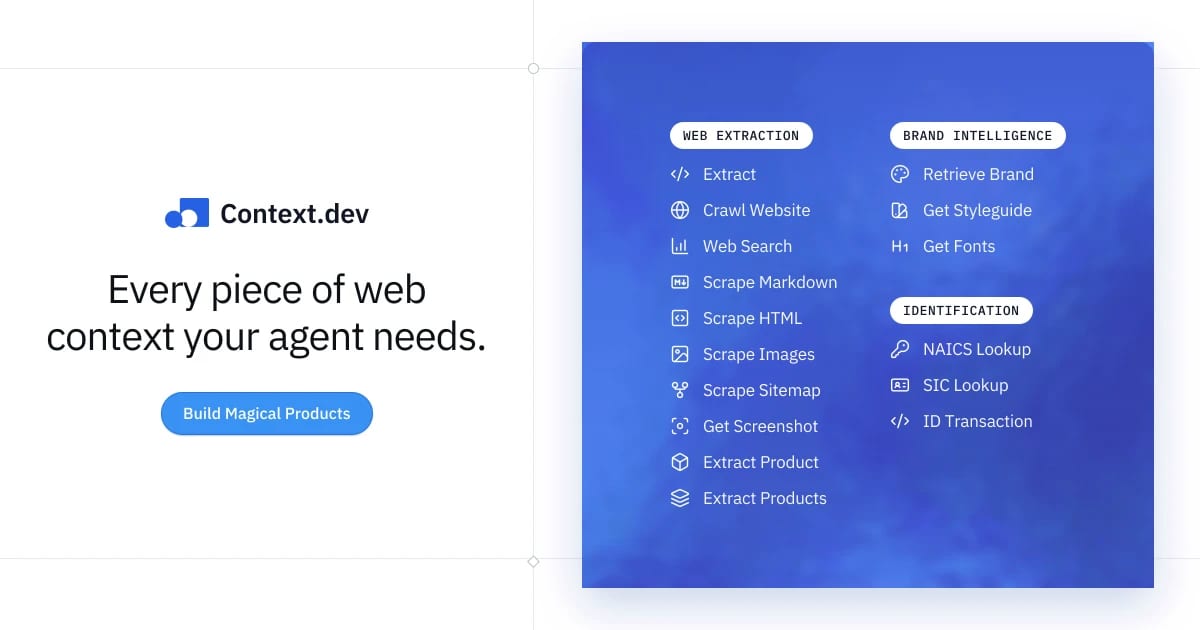
Context.dev bundles clean Markdown scraping, crawling, structured extraction, screenshots, and brand intelligence behind one API, with a free test allowance and clear credit pricing. Context.dev is a practical Loot pick for builders who need fresh web context inside agents, RAG pipelines, enrichment flows, or onboarding products without maintaining a pile of scraping infrastructure. The useful angle is the bundle: clean Markdown or HTML from public URLs, sitemap crawls, screenshots, structured extraction, brand data, styleguide details, and logo delivery under one API key. Use it when the job is closer to product-grade web context than a one-off scrape. Good first tests: feed current docs into a support bot, enrich a company signup from a domain, pull pricing pages into a comparison workflow, or let an internal agent check live web pages before drafting a report. The official docs expose quickstart and API reference paths, and the public pricing page makes the free test limits and paid credit model visible before committing. Caveats: this is still an external data provider, so do not pipe sensitive customer prompts or private pages into it without checking your data controls. For heavy crawling, compare credit cost, rate limits, robots/compliance requirements, and failure behavior against open-source crawlers, Firecrawl, Apify, or your existing browser automation stack. Treat Product Hunt traction as launch context only; the decision should come from testing output quality on your real URLs.
View
Free
Open

Tabstack CLI turns live-web extraction into pipeable agent commands

0
#browser automation#developer tools#web extraction#agents#cli
A Mozilla-backed CLI and API layer for agents that need live web extraction, cited research, or browser task execution without maintaining their own browser stack. Tabstack is useful when an agent or internal tool needs to read live pages, return schema-shaped JSON, produce cited research, or complete a browser task from a script. The practical part for LinkLoot readers is the CLI: it can turn a URL into Markdown or JSON, run research or automation commands, and emit output that pipes cleanly into jq. Best fit: developer teams building agent features, research helpers, competitor monitors, lead enrichment flows, or back-office automations where scraping glue code becomes maintenance debt. Try it by starting with the official docs and the GitHub CLI repo, then test one narrow workflow such as extracting structured pricing data or converting a docs page into clean Markdown. Use the free credits for evaluation, but check pricing, rate limits, data-handling rules, robots.txt behavior, and logged-in workflow risks before putting production tasks behind it.
View
Free
Open

Use GitHub CLI to Read Repo Files Without Cloning

0
#github-cli#developer-tools#automation#agents#cli#free
GitHub CLI 2.95.0 adds preview commands for reading files and directories from remote repositories, useful for agents, audits, and quick config checks. Why this is useful GitHub CLI 2.95.0 adds gh repo read-file and gh repo read-dir, two preview commands for inspecting repository content directly from the terminal. It is a practical upgrade for developers, maintainers, and AI-agent workflows that need to check a README, config file, package manifest, docs folder, or policy file without cloning the full repository first. Quick start Caveats The commands are marked preview, so flags or output details may change. Access still follows the permissions of the authenticated GitHub user, and large or binary files are not a replacement for a proper checkout. For automation, pin your expected gh version and handle missing-command fallback paths. Source check Source What it confirms --- --- GitHub Changelog gh repo read-file and gh repo read-dir are available in GitHub CLI 2.95.0+ GitHub CLI release notes The release date, examples, preview status, and scripting flags GitHub CLI manual Exact command syntax, JSON fields, and terminal escape-sequence behavior
View
Free
Open
Blog

Related reads

Browse blog
AI & Automation

Mistral Robostral Navigate gives robots single-camera navigation

Mistral has introduced Robostral Navigate, an 8B embodied navigation model that uses one RGB camera and plain-language instructions, but pub

Alltag & Produktivität

Use Notion Agents on iPhone when work starts away from your desk

Notion has launched a dedicated Notion Agents iOS app, giving teams a mobile way to chat with workspace-aware agents, capture ideas by text,

AI & Automation

Debug Vercel agent runs from MCP or the CLI

Vercel now exposes eve Agent Runs through MCP tools and CLI commands, so teams can inspect traces, reasoning, tool calls, token usage, lifec

Tools & Apps

Check Vercel deploy files before agents ship them

Vercel CLI now supports dry-run deployments, giving teams and coding agents a JSON manifest of what would ship before a deployment is create

Tools & Apps

Use Vercel Services to Ship Private Backends With Agent Workflows

Vercel's Ship 2026 updates make microservices, containers, agent workflows, scoped credentials, and production investigations first-class pa

Business & Karriere

Make Shopify Storefronts Agent-Ready With Standard Events and Actions

Shopify now gives themes a standard way to expose storefront events and actions, so apps and AI agents can interact with commerce flows with

AI & Automation

Use Claude Sonnet 5 for cheaper agent workflows before moving to Opus

Anthropic has launched Claude Sonnet 5 as a lower-cost agentic model for coding, tool use, and knowledge work, with API access, Claude Code

Tools & Apps

Run Cursor coding agents from iPhone, but check paid-plan and review limits

Cursor for iOS is now in public beta for paid plans, giving developers a mobile control surface for cloud agents, remote sessions, notificat

Alltag & Produktivität

Turn Notion into an agent workspace only after checking Workers limits

Notion's Developer Platform adds Workers, database sync, webhooks, External Agents API, and a CLI, giving teams a way to run agent tools and

Tools & Apps

Run Copilot agent sessions through your own model keys

GitHub Copilot app now supports bring your own key for agent sessions, letting teams connect OpenAI, Azure OpenAI, Anthropic, Ollama, LM Stu

AI & Automation

Use AI SDK 7 to move TypeScript agents from demos to production

Vercel AI SDK 7 is a confirmed major release for production TypeScript agents, adding WorkflowAgent, harness adapters, stricter runtime requ