Topic
#Developer Tool
Loot, blog posts and adjacent themes connected to this topic. Follow the tag to keep it in your orbit.
3Shown loot
0Shown articles
8Linked neighbor tags
Topic paths
If you want to go deeper, the adjacent tags are the fastest way to compare and branch into related workflows.
Loot
More from this topic
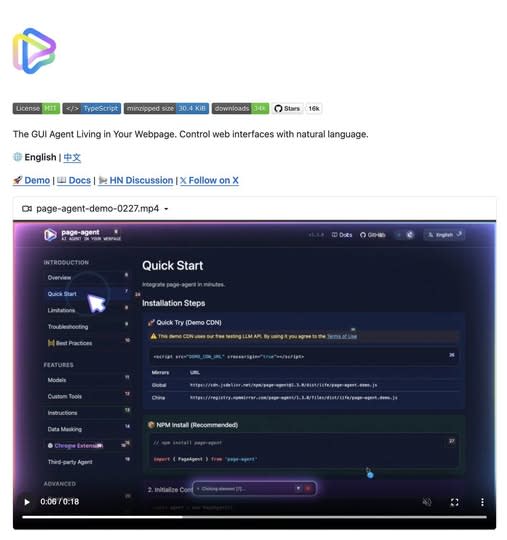
A lightweight in-page GUI agent that reads the DOM as text and executes natural-language commands inside your app. Great for copilots, form automation, and legacy UI workflows. What It Is Alibaba’s Page Agent takes a very different approach to browser automation. Instead of relying on screenshots, multimodal models, or brittle external browser control, it runs directly inside the webpage and reads the DOM as text. That means you can embed a natural-language GUI agent into your own product with a lightweight frontend integration. --- Why It Feels Different Most traditional browser automation stacks still depend on: screenshots selectors brittle scripting heavyweight orchestration Page Agent flips that model. It allows commands like: “fill out this form” “open settings” “change the billing plan” “submit the support request” And it does that inside the page context itself. --- Where It Gets Interesting The real value is not just automation. It is the ability to turn normal interfaces into natural-language workflows. That makes Page Agent especially interesting for: SaaS copilots internal tools admin dashboards form-heavy workflows support tooling accessibility layers for older web apps --- What Makes It Stand Out A lot of AI browser tools still feel like external bots driving a website from a distance. Page Agent feels closer to: an embedded UI assistant a natural-language task layer an AI control system for existing interfaces That difference matters. Because once the agent lives inside the interface, it becomes easier to imagine: product onboarding copilots guided admin actions internal ops assistants text-driven navigation for legacy tools --- Best Use Cases Use case Why it fits --- --- SaaS copilots Lets users control complex interfaces with natural language Internal tools Great for repetitive admin or ops workflows Form automation Especially useful where users need help completing multi-step UI flows Legacy software Adds a modern interaction layer without rebuilding the whole interface Accessibility Makes web apps easier to navigate through voice or text --- Why This Could Matter More Than It Looks A lot of people will see this and think: “Cool, another browser automation project.” That undersells it. What makes this interesting is that it points toward a broader shift: from external automation to embedded natural-language interaction If that model keeps improving, products will not just have dashboards anymore. They will have interfaces that users can talk to. --- Final Take Page Agent is one of the more interesting examples of where AI product interfaces are heading. Not because it is flashy. But because it suggests a practical future where: interfaces remain visual users stay inside the product and AI becomes a task layer sitting directly on top of the UI That is a much stronger idea than “just another browser bot.” Source GitHub: https://github.com/alibaba/page-agent
- LinkLoot access
- Free
- Provider costs
- Unknown
Review open

An open-source command-line Office toolkit for agents that need to inspect, render, and edit DOCX, XLSX, and PPTX files without a desktop Office install. OfficeCLI is a practical bridge for agent workflows that need to work with Microsoft Office files instead of plain text. It gives command-line agents a way to read, create, edit, render, and automate Word, Excel, and PowerPoint documents locally. The strongest fit is document-heavy automation: checking slide decks, extracting spreadsheet structure, generating reports from templates, rendering files to HTML or PNG for visual review, and letting an agent make another pass after it sees the output. Why it is useful now: It is open source under Apache-2.0. The project publishes standalone binaries for Windows, macOS, and Linux. Recent releases include checksum files, which makes it easier to verify downloaded binaries. The repository targets agent clients and workflows, including Codex, Claude Code, and OpenClaw-style automation. Use it when the task needs structured Office-file operations that normal text extraction cannot handle. Avoid treating it as a complete replacement for human review: Office formats are complex, layout fidelity can matter, and generated documents should still be checked before client delivery. Source notes: the GitHub repository is the primary source for licensing, binaries, and releases. Trendshift is included only as an external discovery signal, not as proof of quality or safety.
- LinkLoot access
- Free
- Provider costs
- Unknown
Review open
APXY gives developers and coding agents a local proxy for capturing HTTP traffic, replaying failures, mocking APIs, and exporting network evidence without guessing from logs alone. APXY is a local network debugging and API mocking proxy built for developers who now hand real debugging work to coding agents. It sits between an app and the network, captures HTTP/HTTPS requests, and exposes the evidence through a CLI plus a Web UI. The practical angle is simple: when an agent changes frontend code, auth handling, SDK calls, or mobile flows, APXY can give it concrete request and response data instead of a vague bug report. The official docs list traffic capture, filtering, mock rules, redirects, replay/export, API diagnosis, SSL proxying, network-condition simulation, and SQL-style queries over captured requests. Where it fits Use APXY when a bug depends on network behavior: a backend returns a different shape than expected, a mobile client fails behind HTTPS interception, a flaky API needs to be mocked, or an AI coding agent needs exact evidence before touching code. The project also publishes workflow examples for basic debugging, API mocking, and agent-assisted troubleshooting. The GitHub repository includes an agent skill path, examples, mock templates, docs, and install options via shell script or Homebrew. The public site lists a free tier with Web UI access, 200 traffic records, 3 active mock rules, core CLI commands, and 30-minute sessions. Paid one-time licenses unlock unlimited history and advanced controls. Caveats before use Treat it as a network-inspection tool, so review certificate handling, captured request storage, and team privacy expectations before using it on production traffic or customer data. The GitHub API currently reports no SPDX license for the repository, so do not assume open-source reuse rights beyond normal use of the distributed tool and published docs. For agent workflows, start with non-sensitive local or staging traffic. Install scripts should be reviewed before execution, especially in locked-down environments. If the tool fits your workflow, the biggest value is not another dashboard; it is giving your agent a reproducible network record it can inspect, mock, replay, and use to verify its own fix.
- LinkLoot access
- Free
- Provider costs
- Unknown
Review open
Blog
Related reads
No blog posts for #Developer Tool yet
There is no published article with this tag right now. Browse the blog for adjacent themes or follow the tag for future updates.