Topic

#Browser Automation

Loot, blog posts and adjacent themes connected to this topic. Follow the tag to keep it in your orbit.

#Browser Automation
Loot

More from this topic

Explore all loot
This JS Agent Turns Any Website Into an AI Copilot

This JS Agent Turns Any Website Into an AI Copilot

1
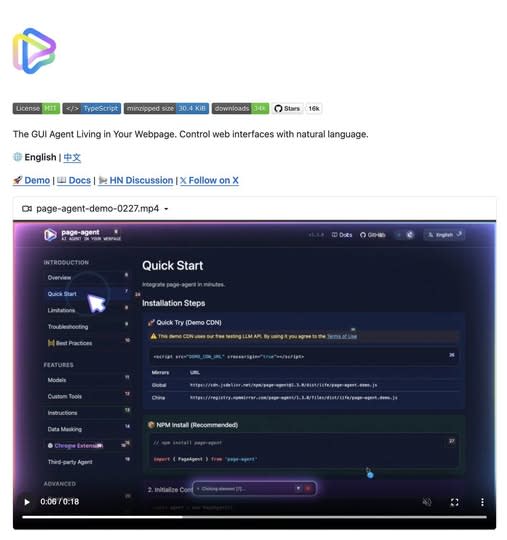
A lightweight in-page GUI agent that reads the DOM as text and executes natural-language commands inside your app. Great for copilots, form automation, and legacy UI workflows. What It Is Alibaba’s Page Agent takes a very different approach to browser automation. Instead of relying on screenshots, multimodal models, or brittle external browser control, it runs directly inside the webpage and reads the DOM as text. That means you can embed a natural-language GUI agent into your own product with a lightweight frontend integration. --- Why It Feels Different Most traditional browser automation stacks still depend on: screenshots selectors brittle scripting heavyweight orchestration Page Agent flips that model. It allows commands like: “fill out this form” “open settings” “change the billing plan” “submit the support request” And it does that inside the page context itself. --- Where It Gets Interesting The real value is not just automation. It is the ability to turn normal interfaces into natural-language workflows. That makes Page Agent especially interesting for: SaaS copilots internal tools admin dashboards form-heavy workflows support tooling accessibility layers for older web apps --- What Makes It Stand Out A lot of AI browser tools still feel like external bots driving a website from a distance. Page Agent feels closer to: an embedded UI assistant a natural-language task layer an AI control system for existing interfaces That difference matters. Because once the agent lives inside the interface, it becomes easier to imagine: product onboarding copilots guided admin actions internal ops assistants text-driven navigation for legacy tools --- Best Use Cases Use case Why it fits --- --- SaaS copilots Lets users control complex interfaces with natural language Internal tools Great for repetitive admin or ops workflows Form automation Especially useful where users need help completing multi-step UI flows Legacy software Adds a modern interaction layer without rebuilding the whole interface Accessibility Makes web apps easier to navigate through voice or text --- Why This Could Matter More Than It Looks A lot of people will see this and think: “Cool, another browser automation project.” That undersells it. What makes this interesting is that it points toward a broader shift: from external automation to embedded natural-language interaction If that model keeps improving, products will not just have dashboards anymore. They will have interfaces that users can talk to. --- Final Take Page Agent is one of the more interesting examples of where AI product interfaces are heading. Not because it is flashy. But because it suggests a practical future where: interfaces remain visual users stay inside the product and AI becomes a task layer sitting directly on top of the UI That is a much stronger idea than “just another browser bot.” Source GitHub: https://github.com/alibaba/page-agent
Free
Review open
0
Record agent demos from YAML storyboards with shot-scraper video

Record agent demos from YAML storyboards with shot-scraper video

0
shot-scraper 1.10 adds a practical video mode for repeatable web-app demos: write a YAML storyboard, let Playwright click through the flow, and export WebM or MP4 for reviews, changelogs, and agent handoffs. shot-scraper has always been useful for automated screenshots, but version 1.10 makes it more valuable for agent-heavy development work: the new shot-scraper video command records a browser routine from a YAML storyboard. What it does shot-scraper video takes a storyboard.yml file, launches a browser through Playwright, runs setup and interaction steps, and records the result as WebM. If ffmpeg is available, the same run can also produce MP4 with --mp4. Storyboards can define a server process, viewport, cursor display, startup waits, JavaScript setup, and scenes made from actions such as click, type, fill, press, scroll, pause, wait, open, screenshot, shell, Python, and JavaScript steps. Practical workflow Where it helps most Pull requests where reviewers need to see a UI flow without running the branch. Changelogs that need compact product clips. Regression demos for browser automation work. Agentic coding workflows where the operator wants proof of behavior, not just a generated explanation. Documentation examples that should be rerunnable from source. Caveats This is strongest for deterministic web flows. You still need stable selectors, realistic waits, and careful handling of authentication cookies or secrets. MP4 export depends on ffmpeg, and browser automation can still flake if the target app has timing issues. Source links Release notes: https://github.com/simonw/shot-scraper/releases/tag/1.10 Official video docs: https://shot-scraper.datasette.io/en/stable/video.html Project repository: https://github.com/simonw/shot-scraper Author announcement and example: https://simonwillison.net/2026/Jun/30/shot-scraper-video/
Free
Review open
0
Tabstack CLI turns live-web extraction into pipeable agent commands

Tabstack CLI turns live-web extraction into pipeable agent commands

0
A Mozilla-backed CLI and API layer for agents that need live web extraction, cited research, or browser task execution without maintaining their own browser stack. Tabstack is useful when an agent or internal tool needs to read live pages, return schema-shaped JSON, produce cited research, or complete a browser task from a script. The practical part for LinkLoot readers is the CLI: it can turn a URL into Markdown or JSON, run research or automation commands, and emit output that pipes cleanly into jq. Best fit: developer teams building agent features, research helpers, competitor monitors, lead enrichment flows, or back-office automations where scraping glue code becomes maintenance debt. Try it by starting with the official docs and the GitHub CLI repo, then test one narrow workflow such as extracting structured pricing data or converting a docs page into clean Markdown. Use the free credits for evaluation, but check pricing, rate limits, data-handling rules, robots.txt behavior, and logged-in workflow risks before putting production tasks behind it.
Free
Review open
0
Blog

Related reads

Browse blog