Topic

#github

Loot, blog posts and adjacent themes connected to this topic. Follow the tag to keep it in your orbit.

#github
Loot

More from this topic

Explore all loot
Use GitHub Copilot slash commands to structure agent sessions

Use GitHub Copilot slash commands to structure agent sessions

0
Text: AI-generated
AI-generated · Automatically published by LinkLoot. GitHub's slash-command guide is a practical reference for planning, challenging, automating, and reviewing work inside the Copilot app. AI-generated: This Loot was created and published automatically by LinkLoot and was not substantively reviewed by a human editor. GitHub's new Copilot app slash-command guide is useful when a team already uses Copilot but still treats every agent session like an open-ended chat. The commands turn common workflow moves into explicit actions: plan the work, challenge an approach, hand off implementation, ask a second model to review, or turn a conversation into a canvas. What it is The guide explains slash commands in the GitHub Copilot app. Commands such as /plan, /spar, /autopilot, /rubber-duck, and /create-canvas map to common agent workflows rather than generic chat prompts. Who it helps It helps developers, tech leads, and reviewers who want more predictable coding-agent sessions. It is most useful for teams that already use the Copilot app and need a shared vocabulary for planning, implementation, risk review, and handoff. How to evaluate it Start by trying /plan on a small bug or refactor, then compare the resulting plan with your normal issue checklist. Use /spar for architecture tradeoffs, /autopilot only on scoped tasks with tests, and /rubber-duck before opening a pull request for larger changes. Limits and risks The commands do not replace review, testing, or repository policy. /autopilot can still make broad changes if the task is vague, and second-opinion commands can miss project-specific constraints. Teams should pair these shortcuts with branch protection, CI, and human review for production code. Sources GitHub Copilot slash-command guide
Free
Review open
0
Review large GitHub changes as stacked pull requests

Review large GitHub changes as stacked pull requests

0
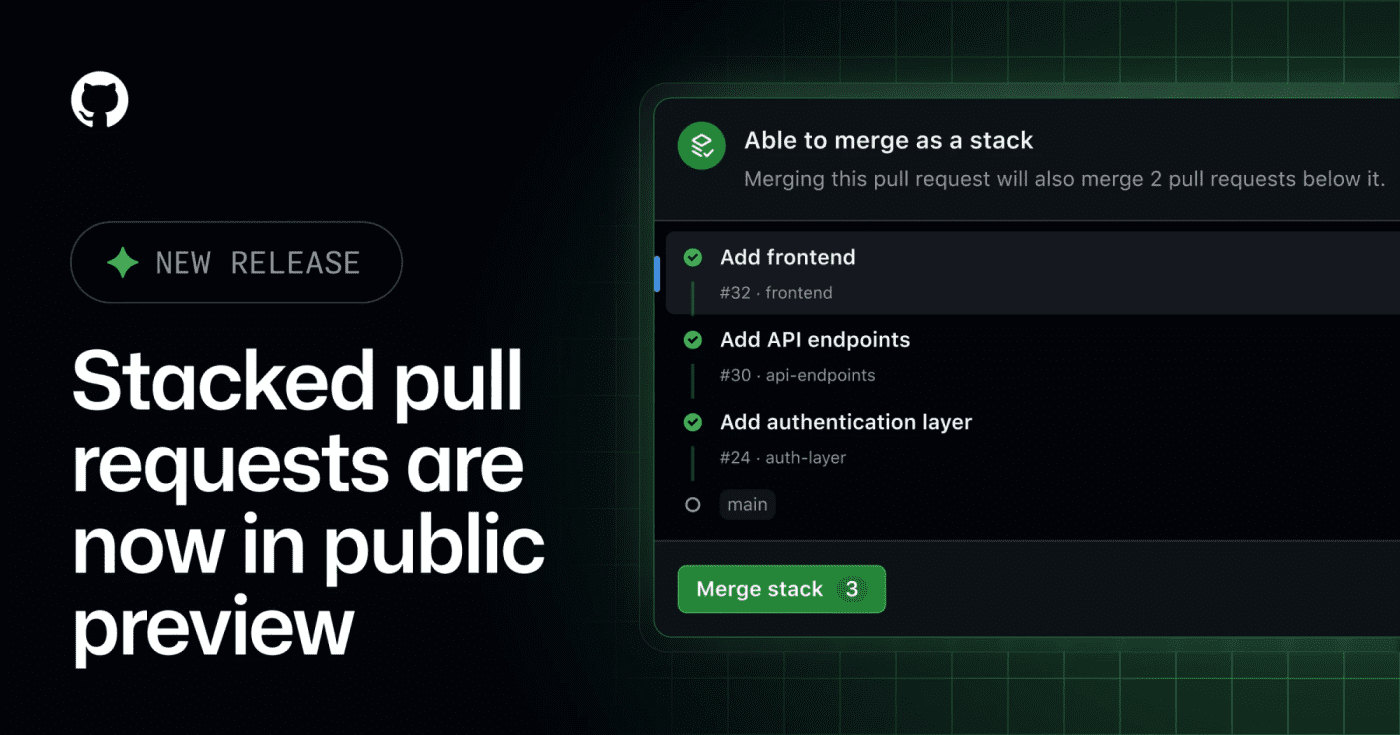
GitHub's public preview for stacked pull requests helps teams split dependent code changes into ordered, reviewable layers. GitHub has opened stacked pull requests in public preview, giving teams a native way to split a large change into smaller dependent PRs without managing the stack entirely by hand. What it is Stacked pull requests are ordered PRs where each pull request represents one focused layer of a larger change. GitHub says reviewers can inspect each layer independently, then merge the stack together when the series is ready. Who it helps This is useful for engineering teams that regularly ship refactors, migrations, feature branches with several dependencies, or AI-assisted changes that are too large for one review. It also matters for teams using Copilot workflows, because the changelog notes Copilot using a gh-stack skill in the stacked-PR flow. How to evaluate it Try it first on a non-critical branch with a small three-PR stack: setup, implementation, and tests. Check how status checks, review comments, rebases, branch protection, and merge order behave in your repository before making it part of your default review workflow. Limits and risks This is a public preview, so workflows may still change. Teams should verify compatibility with required checks, release automation, merge queues, and any bot that assumes every PR can merge independently. Sources GitHub changelog
Free
Review open
0
Let Copilot code review use repo skills and MCP context

Let Copilot code review use repo skills and MCP context

0
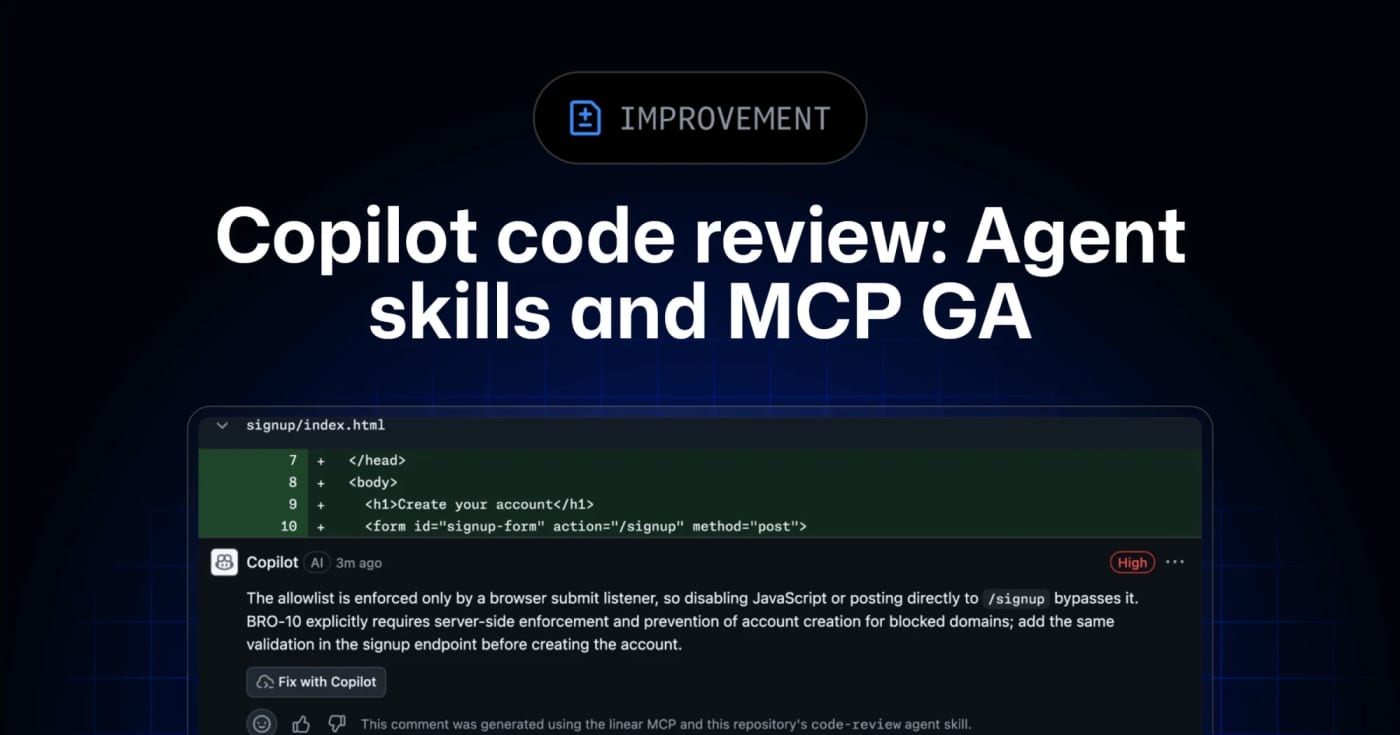
GitHub’s Copilot code review can now use repository agent skills and read-only MCP servers, giving teams a practical way to inject standards and project context into automated reviews. GitHub has moved agent skills and MCP support for Copilot code review to general availability across Copilot Pro, Pro+, Business, and Enterprise. What it is Copilot code review can now use repository-level agent skills and MCP server context when reviewing pull requests. Skills live under .github/skills with a SKILL.md file, while MCP servers can bring in read-only context from tools such as issue trackers, docs systems, service catalogs, or incident systems. Who it helps This is useful for engineering teams that already rely on internal review checklists, service ownership rules, security conventions, or issue metadata. Instead of hoping a generic reviewer catches local standards, teams can encode focused instructions and let Copilot reference external context during review. How to evaluate it Start with one narrow skill, such as API compatibility, migration checks, or test expectations for a specific package. Keep the first MCP connection read-only and low-risk, then inspect whether Copilot’s comments clearly attribute skill or MCP usage. For Business and Enterprise environments, check policy controls and billing behavior before enabling automatic reviews broadly. Limits and risks Copilot code review is still advisory. GitHub’s docs warn that it can miss issues or make mistakes, and human review remains required. MCP tool calls for code review are read-only, but teams should still audit what context each server exposes. Medium review effort and agentic capabilities can also consume more AI credits and GitHub Actions minutes. Sources GitHub changelog announcement GitHub Docs: Copilot code review
Free
Review open
0
Review GitHub issue-agent changes before they apply

Review GitHub issue-agent changes before they apply

0
GitHub's new issue automation controls let teams inspect rationale, confidence, and suggested metadata changes from Copilot cloud agent and Agentic Workflows. GitHub Issues now has a practical review layer for agent-driven triage. It is useful if you let Copilot cloud agent or GitHub Agentic Workflows label, assign, type, close, or update issue fields and want fewer unexplained changes in busy repositories. What it is GitHub added rationale, confidence, and approvals for supported issue automation actions. Agents can attach a reason to a change, rate confidence as high, medium, or low, and leave lower-confidence actions as suggestions instead of applying them immediately. Who it helps Maintainers, support teams, and product squads that use issue automation can use this to keep triage fast without making every metadata change invisible. It is especially relevant for public repositories, large backlogs, and workflows where spam detection, priority labels, or owner assignment need review. How to evaluate it Start with one workflow that touches low-risk fields such as labels or issue type. In GitHub Agentic Workflows, GitHub says issue intents are optional and enabled by default, and can be required per safe output. For Copilot cloud agent, GitHub says no update is needed; test from the Automations pane in the repository Agents tab. Use has:suggestions in issue search to find pending review items, then compare agent rationale against your existing triage rules. Limits and risks GitHub explicitly says approvals are a workflow convenience, not a security control. They do not create a server-side permission boundary, and an agent with permission to change issues can still apply changes directly if configured to do so. Treat this as observability and review UX, not a substitute for least-privilege access. Sources GitHub changelog GitHub Docs: rationale, confidence, and approvals
Free
Review open
0
Use Dependabot's default cooldown before merging fresh package releases

Use Dependabot's default cooldown before merging fresh package releases

0
GitHub now waits three days before opening Dependabot version-update pull requests, reducing exposure to compromised or broken package releases. GitHub has changed Dependabot version updates so new package releases must sit in the registry for at least three days before Dependabot opens a version-update pull request. Security updates still open immediately. Use this as a low-friction supply-chain safety check. The default gives maintainers and the wider ecosystem time to flag compromised, yanked, or broken releases before they land in routine dependency-update PRs. What to do Leave the new default in place for most repositories. Keep security updates immediate; the cooldown applies to version updates, not urgent security fixes. Override the window in .github/dependabot.yml only when your release process has a clear reason. Watch high-risk ecosystems or critical services for packages that should use a longer cooldown. Best fit Repository type Suggested move Caveat --- --- --- Standard app repos Keep the three-day default Review lockfile-only bumps before merge Security-sensitive services Consider a longer cooldown for non-security updates Do not delay patched security advisories Fast-moving libraries Tune per ecosystem in dependabot.yml Document why the shorter window is acceptable
Free
Review open
0
Run Copilot security reviews before code leaves your branch

Run Copilot security reviews before code leaves your branch

0
GitHub's Copilot app now exposes a /security-review command in public preview for scanning in-flight code changes. GitHub has added a /security-review slash command to the GitHub Copilot app, extending the security-focused review flow beyond the earlier Copilot CLI preview. Use it as a pre-PR or pre-merge check when a branch includes authentication, file upload, payment, dependency, or permission changes. What to try: Open a project in the Copilot app. Make or load the code changes you want reviewed. Run /security-review and inspect the findings before you create or merge a pull request. Keep normal SAST, dependency scanning, secret scanning, and human review in place. Limits to remember: GitHub labels the app command as public preview. Copilot code review availability depends on plan and organization policy. AI review can miss issues, especially in framework-specific flows or code paths that need runtime context. Treat findings as triage input, not as a release gate by itself.
Free
Review open
0
Use AI Radar to spot tool hype before it reaches everyone else

Use AI Radar to spot tool hype before it reaches everyone else

0
An OpenClaw skill candidate for tracking AI-native tools, GitHub momentum, launches, funding signals, and repo traction in one briefing. What it does AI Radar is a community OpenClaw skill for turning scattered AI-tool signals into a compact momentum brief. It pairs product news with GitHub indicators such as trending status, star movement, releases, and ecosystem mentions so an agent can explain why a tool matters now instead of only listing links. Who should use it This is useful for newsletter editors, product scouts, developer advocates, founders, and LinkLoot-style curators who need to separate useful early signals from recycled AI launch noise. Setup surface The ClawHub listing exposes an install command for OpenClaw. Do not install it blindly on a production Pi. Review the SKILL.md, check the requested workflow, and run it first in a sandbox or disposable workspace with no secrets. Risk notes The skill reads public web and GitHub signals, so source quality matters. Treat third-party pages, launch posts, and repo READMEs as untrusted content. Verify claims against official project pages, releases, and independent traction signals before publishing or acting on the output. Sources Awesome OpenClaw Skills: https://github.com/VoltAgent/awesome-openclaw-skills ClawHub listing: https://clawhub.ai/lopushok9/skills/airadar Skill mirror: https://clawskills.sh/skills/lopushok9-airadar
Free
Review open
0
Scan AI Apps for System Prompt Injection with CodeQL 2.26.0

Scan AI Apps for System Prompt Injection with CodeQL 2.26.0

0
GitHub's CodeQL 2.26.0 adds a JavaScript/TypeScript query that detects untrusted user values flowing into AI system prompts. CodeQL 2.26.0 is useful for teams shipping AI features in JavaScript or TypeScript. The release adds js/system-prompt-injection, a query for cases where untrusted user-provided values flow into an AI model's system prompt and can manipulate model behavior.\n\nWhy bookmark it: GitHub says every new CodeQL version is automatically deployed to GitHub code scanning users on github.com, so many teams can get the new query through existing security workflows instead of adding a separate scanner. The release also adds prompt-injection sinks for OpenAI, Anthropic, and Google GenAI SDK APIs, plus Kotlin 2.4.0 support and several query accuracy improvements.\n\nUse it for: AI app pull requests, agent backends, prompt-template libraries, Realtime session setup, and GenAI SDK integrations where user content might cross into system-level instructions.\n\nCheck before relying on it: whether your repo uses GitHub code scanning on github.com or a GitHub Enterprise Server version that includes CodeQL 2.26.0, whether the affected language pack runs in your workflow, and whether custom prompt-building helpers need extra modeling.
Free
Review open
0
Find Copilot AI-credit overages before one user drains a shared budget

Find Copilot AI-credit overages before one user drains a shared budget

0
GitHub’s new REST endpoint lets enterprise billing teams pull per-user states for multi-user budgets instead of checking every user one by one. GitHub added a REST endpoint for enterprise owners and billing managers who need to monitor multi-user budgets, including AI-credit and premium-request budgets. What it does The endpoint returns per-user budget state for a multi-user customer scoped budget. Teams can page through users, filter by a specific user, sort results, and filter by threshold percentages so they can find people who are close to a limit without building one API call per user. Who should use it Use this if your organization runs GitHub Copilot or other GitHub metered products under enterprise budgets and needs faster spend checks across many users or cost centers. How to evaluate it Confirm your account is a GitHub Enterprise Cloud enterprise owner or billing manager. Check whether the budget is a multi-user customer scoped budget. Test threshold filters against a non-critical budget before wiring alerts. Decide whether you need separate monitoring for user overrides, because the response can include an override budget ID. Limits and risks The docs state that this endpoint does not work with GitHub App user tokens, GitHub App installation tokens, or fine-grained personal access tokens. Treat the required enterprise billing credentials as sensitive, and do not put the token in client-side scripts or shared dashboards. Sources GitHub changelog: https://github.blog/changelog/2026-07-10-per-user-states-for-multi-user-budgets-in-the-rest-api/ GitHub REST API docs: https://docs.github.com/en/enterprise-cloud@latest/rest/billing/budgets?apiVersion=2026-03-10
Free
Review open
0
Use GitHub innersource advisories to push private dependency fixes inside an enterprise

Use GitHub innersource advisories to push private dependency fixes inside an enterprise

0
GitHub Advanced Security enterprise customers can now publish private innersource security advisories that trigger internal Dependabot alerts and fix PRs. GitHub innersource advisories are now generally available for enterprise security teams that need private vulnerability distribution inside one company. Use them when an internal package, shared service, or private fork has a flaw that should trigger Dependabot alerts and update pull requests without publishing the advisory to the public GitHub Advisory Database. The workflow is narrow and useful: create or withdraw advisories through the REST API, keep visibility scoped to the enterprise, and let Dependabot notify repositories that depend on the affected component. It is a fit for internal platforms, monorepos split into reusable packages, and regulated teams that need coordinated remediation before public disclosure. Check What to verify --- --- License Requires active GitHub Code Security or GitHub Advanced Security. Scope Advisories apply to the entire enterprise, not selected org groups. Limit Each enterprise can have up to 2,000 active innersource advisories. Automation Dependabot can create alerts and version update PRs for affected repos. Disclosure Advisory data stays private to the enterprise unless separately published. Treat this as a private remediation lane, not a replacement for public CVEs or external disclosure when customers or open-source users are affected.
Free
Review open
0
Enforce Copilot CLI guardrails from MDM before agent settings drift

Enforce Copilot CLI guardrails from MDM before agent settings drift

0
GitHub now lets enterprise admins push managed Copilot settings to VS Code and Copilot CLI through MDM, server-managed settings, or a locked local JSON file. GitHub's managed Copilot settings are now useful for endpoint-level governance, not just account-side policy. Enterprise admins can push the same settings into VS Code and Copilot CLI through native MDM, server-managed settings, or a root-owned local managed-settings.json file. Use this when agent policies need to follow the machine, not just the signed-in user. The practical checks are simple: decide which settings must be non-bypassable, choose the delivery channel that matches your fleet, test precedence, and confirm developers cannot override the managed tier locally. Check Why it matters --- --- MDM path Windows uses HKEYLOCALMACHINE\SOFTWARE\Policies\GitHubCopilot; macOS uses managed preferences for com.github.copilot. File ownership File-based settings must live in the expected system path and should not be user-writable. Precedence Native MDM wins over server-managed settings, which win over file-based settings. Supported keys Start with permission bypass controls, model policy, plugin lists, known marketplaces, and telemetry settings. Client coverage Confirm the target VS Code and Copilot CLI versions read the managed settings before broad rollout. This is a resource, not a hands-on review. Treat it as a deployment checklist for Copilot governance across managed developer machines.
Free
Review open
0
Use GitHub Issue Fields to Let Agents Triage Work Without Label Sprawl

Use GitHub Issue Fields to Let Agents Triage Work Without Label Sprawl

0
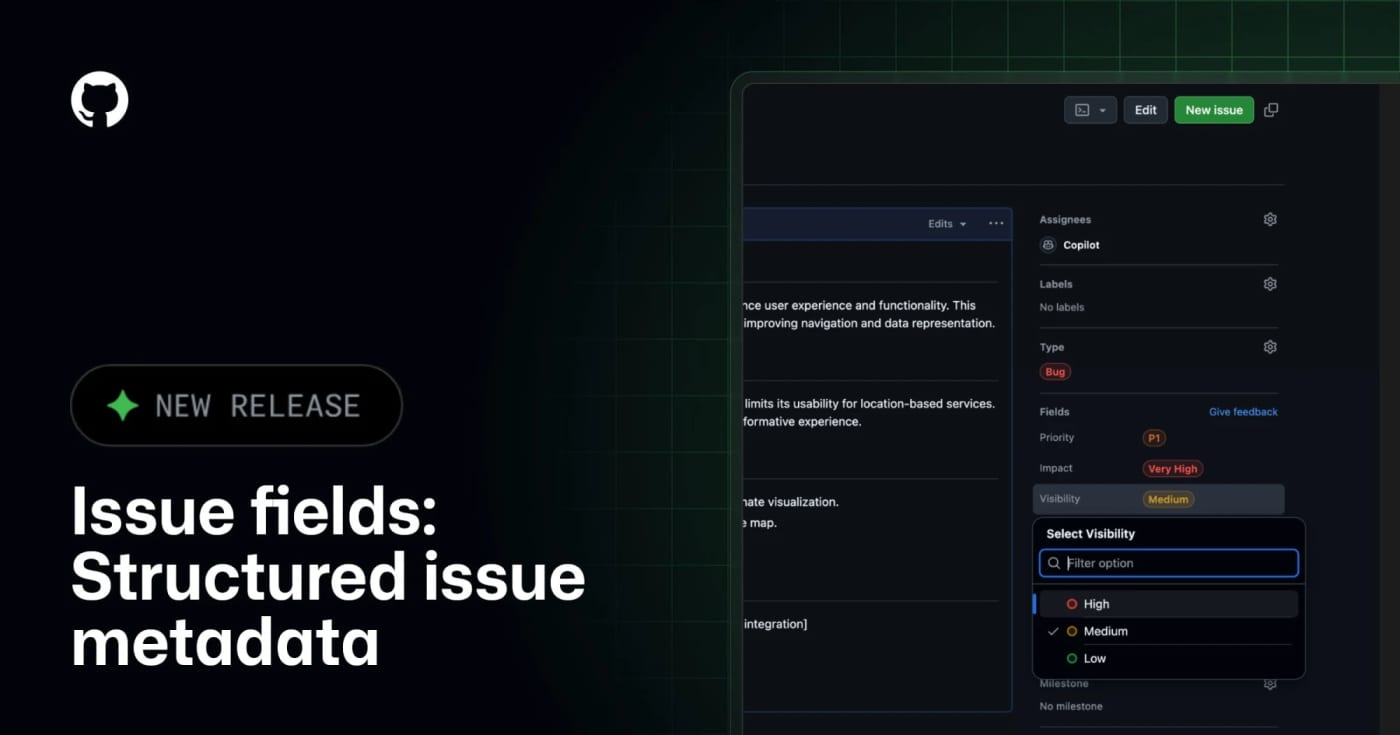
GitHub Issue Fields are now generally available, giving teams typed organization-level issue metadata that humans and MCP-connected agents can read, filter, and update. What it does GitHub Issue Fields give an organization one shared set of typed issue metadata, such as priority, effort, start date, target date, area, or impact. Instead of encoding planning data in labels and project-only custom fields, teams can make the metadata visible on issues, project tables, boards, charts, and issue lists. The practical agent angle is the GitHub MCP integration. GitHub says connected AI tools can read and set issue field values when creating or updating issues, which makes automated triage less dependent on brittle label naming conventions. Best use Use this when a repository or organization has too many labels, inconsistent bug/feature triage, or agents that create issues without enough structured planning context. A simple starting set is Priority, Effort, Area, Start date, and Target date. Setup notes Admins manage issue fields from organization settings under Planning Issue fields. GitHub Docs say fields can be pinned to issue types, visibility can be public or organization-only, and public/internal projects only show fields with public visibility. Projects also have a 50-field total limit, so this should replace noisy metadata rather than add another layer. Caveats This is not a replacement for labels, milestones, or GitHub Projects. Treat it as the durable metadata layer for triage and planning. Before giving agents write access, decide which fields are safe to set automatically, which fields require human review, and which fields should stay organization-only.
Free
Review open
0
Turn Any GitHub Repo Into a Copy-Paste AI Build Prompt

Turn Any GitHub Repo Into a Copy-Paste AI Build Prompt

0
Paste a public GitHub URL into GitReverse and get a clear AI coding prompt for rebuilding, studying, or briefing that repo faster. GitReverse turns a public GitHub repository into a plain-language prompt that can be used with AI coding agents. It is useful when you want to understand how a project is structured, rebuild a similar product, or create a clean implementation brief from an existing codebase. Best use cases Convert a public repo into a product-style build prompt before starting a clone or rewrite. Create onboarding context for a codebase without manually collecting files. Compare how different repositories describe the same product pattern. Build a prompt library for repeatable AI coding workflows. How to use it Open GitReverse and paste a public GitHub repository URL. Generate the repo-to-prompt output. Review the prompt for missing constraints, licensing concerns, security assumptions, and product-specific details. Use the result as a starting brief, then add your own stack, design, deployment, and compliance requirements. Safety note Use GitReverse for public repositories or sanitized codebases only. Do not submit private repositories, proprietary customer code, secrets, unreleased product logic, or anything that would create legal or security risk if processed by an external service. Source check The GitReverse homepage describes the core feature as repository-to-prompt reverse engineering and mentions the hub to reverse URL shortcut. Its library page shows a large collection of reverse-engineered prompts from real GitHub repositories. The Firefox extension listing describes the same workflow as generating AI coding prompts from GitHub repositories via browser interaction.
Free
Review open
0
Blog

Related reads

Browse blog
Tools & Apps

GitHub Models shuts down for all users as inference moves to Foundry

AI-generated · Automatically published by LinkLoot. GitHub Models is now fully retired, removing the playground, model catalog, inference AP

Tools & Apps

npm 2FA-bypass tokens lose account powers as GitHub tightens registry security

GitHub has restricted npm granular access tokens that bypass 2FA from sensitive account, organization, and package-management actions, with

Tools & Apps

GitHub changes bug bounty payouts as AI reports strain triage

GitHub is restructuring its bug bounty program on July 27, adding a permanent VIP tier, fixed public payouts, and a HackerOne signal require

AI & Automation

GitHub MCP Server adds stateless support for the July 28 MCP spec

GitHub has updated its MCP Server for the July 28, 2026 Model Context Protocol release, giving agent-tooling teams an early production signa

Tools & Apps

GitHub makes Copilot cloud agent for Linear generally available

GitHub's Copilot cloud agent integration for Linear is now generally available, letting paid Copilot users assign Linear issues to an autono

Tools & Apps

GitHub Code Quality is GA, and billing now starts automatically

Tools & Apps

GitHub expands secret scanning with Resend tokens and monitoring insights

GitHub is rolling out secret scanning updates that add Resend and APIclub detectors, block VolcEngine Ark API keys by default, expose secret

Tools & Apps

Delay Dependabot Version PRs Before Fresh Packages Hit Your Build

GitHub now delays Dependabot version update pull requests for three days by default, giving maintainers and scanners time to catch compromis

Tools & Apps

Catch AI-era vulnerabilities before merge with GitHub code scanning and Copilot security review

GitHub now surfaces AI-powered code scanning detections on pull requests and added an on-demand /security-review command in the Copilot app,

Tools & Apps

Check GitHub Code Quality costs before July 20 billing starts

GitHub now shows a Code Quality license estimate before the product becomes paid on July 20, 2026. Teams should check active committers, Act

Tools & Apps

Use GitHub's new pulls dashboard to stop losing review work

GitHub's refreshed pull requests dashboard is now generally available, giving developers and managers one place for review requests, CI fail

Tools & Apps

Scan AI App Code for System Prompt Injection with CodeQL 2.26.0

GitHub's CodeQL 2.26.0 adds a JavaScript and TypeScript query for system prompt injection, giving teams a static-analysis check for AI app c

Tools & Apps

Use GitHub Innersource Advisories before internal packages hide security fixes

GitHub Advanced Security enterprise customers can now publish private internal advisories that trigger Dependabot alerts and fixes across re

Tools & Apps

npm v12 turns risky install behavior into explicit opt-in

npm v12 is now tagged latest, turning dependency install scripts, Git dependencies, and remote URL packages into explicit opt-in paths while

Business & Karriere

Cap Copilot agent spend per user from GitHub's billing UI

GitHub Enterprise Cloud admins can now set per-user AI credit budgets inside cost centers from the billing UI, giving teams a cleaner way to

Tools & Apps

Use GitHub secret metadata before leaked tokens become a blind queue

GitHub secret scanning now surfaces extended metadata and multipart validation context, giving security teams better ownership and impact si

Tools & Apps

Lock Down GitHub Review Dismissals Before a Bad Merge Clears Approval

GitHub now lets repository rulesets restrict exactly who can dismiss pull request reviews, giving teams tighter control over approvals befor

Tools & Apps

Check leaked Asana, IBM, and MessageBird tokens faster with GitHub secret scanning

GitHub secret scanning now validates Asana, IBM, and MessageBird secrets, giving security teams a faster signal on whether a leaked credenti

Tools & Apps

Use GitHub Issue Fields GA before agents turn triage into guesswork

GitHub Issue Fields are now generally available, adding organization-wide structured issue metadata, public project support, and MCP access

Tools & Apps

Find leaked company secrets outside your repos with GitHub public monitoring

GitHub public monitoring for secret scanning is now in public preview for eligible enterprises, helping security teams find company-linked s

Tools & Apps

Move off GitHub Models before the July 30 shutdown

GitHub Models is scheduled to shut down for all customers on July 30, 2026. Teams using its playground, model catalog, inference API, or BYO

Tools & Apps

Audit Dependabot alert exports before GitHub moves old closed alerts out of the API

GitHub will move closed Dependabot security alerts older than two years into archival storage on August 25, 2026, changing how security team

Tools & Apps

Stop coverage drops before merge: GitHub adds code coverage rulesets

GitHub now lets Code Quality users block pull requests when test coverage falls below configured thresholds, giving teams an enforceable mer

Tools & Apps

GitHub Adds License Compliance Checks Before Merge

GitHub has put open source license compliance into public preview, giving Enterprise Cloud teams ruleset-based checks that can block pull re

Tools & Apps

Fix Dependabot npm registry scope before private package updates drift

GitHub changed how Dependabot handles npm registry configuration: teams can now make dependabot.yml the authoritative source for scoped npm

Tools & Apps

Use GitHub Desktop 3.6 to keep agent branches out of each other's way

GitHub Desktop 3.6 adds Git worktrees, Copilot-assisted merge conflict resolution, repo-aware commit messages, model choice, and BYOK suppor

Tools & Apps

Protect npm releases: high-impact accounts now get a 72-hour safety pause

GitHub has added a preventive 72-hour read-only state for high-impact npm accounts after sensitive account changes, closing a common supply-

Tools & Apps

Harden GitHub Repos Now That Secret Scanning Blocks More Token Leaks

GitHub expanded secret scanning in June 2026 with new partner detectors, wider default push protection, validity checks, and richer leak met

Tools & Apps

BrowserAct gets Product Hunt momentum for agent browser automation

BrowserAct is drawing attention as a browser layer for AI agents that need to click, extract, handle logged-in sessions, and recover when re

Tools & Apps

Ponytail turns YAGNI into an agent skill with real GitHub momentum

Ponytail is a fast-rising GitHub project that packages minimalist engineering heuristics for coding agents across Claude Code, Codex, Copilo