Topic

#Security

Loot, blog posts and adjacent themes connected to this topic. Follow the tag to keep it in your orbit.

#Security
Loot

More from this topic
Explore all loot

UI-TARS Desktop is a serious local computer-use agent — if you lock down the setup

1
#AI Agents#Desktop Automation#Computer Use#Open Source#GUI Agent#Privacy#Security
ByteDance’s UI-TARS Desktop is one of the most interesting open-source computer-use agents right now: it sees your screen, clicks, types, and works across desktop and browser tasks. The important nuance is security: the app can feel local-first, but privacy depends on how you host the model and whether you disable optional telemetry and report upload flows. UI-TARS Desktop is not just another agent demo. It is a real open-source desktop automation app that can watch the screen, move the mouse, type, and complete GUI tasks through natural-language instructions. At the time of writing, the repo sits at 30.7k+ GitHub stars, which explains why it is suddenly everywhere. What it actually offers local computer operator for desktop tasks browser operator mode for web workflows natural-language control powered by a vision-language model screenshot understanding plus mouse and keyboard execution official quick-start docs, settings docs, and public showcase clips Apache-2.0 licensed repo with the UI-TARS research paper behind it Security reality check The viral pitch says “runs 100% locally,” but the practical answer is more nuanced. The official docs show the desktop app connecting to external or self-hosted OpenAI-compatible model endpoints such as Hugging Face or VolcEngine. So the GUI control can be local, but privacy depends on where your model inference happens. Here is the more useful security read: good: the app itself is open source and the main operator runs on your own machine good: the project has a public security policy and a formal vulnerability-report path good: official docs surface permission requirements clearly, especially screen recording and accessibility on macOS watch out: optional report upload docs explicitly note there is currently no authentication designed for the report storage server watch out: the UTIO event endpoint can receive app launch, instruction, and share-report events if you configure it watch out: if you point the app at hosted inference endpoints, your screenshots and task context may leave the machine depending on that backend watch out: the current docs also note single-monitor assumptions and remote-operator history, so this is not a zero-risk “install and forget” tool Best practices before you trust it with real work Where it looks genuinely useful repetitive desktop QA flows browser-side task automation without building a custom script for every site controlled internal demos of computer-use agents research and evaluation against GUI benchmarks experimentation with open-source alternatives to expensive proprietary computer-use stacks Official showcase and app screens UI-TARS Desktop app screen UI-TARS Desktop settings screen The official README also links showcase clips for: changing VS Code autosave settings with the local operator checking the latest GitHub issue with the agent remote operator demos for desktop and browser workflows Why this repo matters The underlying UI-TARS paper claims state-of-the-art benchmark performance across GUI-agent tasks, including stronger numbers than several well-known closed-model baselines in parts of OSWorld and AndroidWorld. That does not automatically mean better production reliability, but it does make the repo more than just hype. My bottom line UI-TARS Desktop is one of the best open-source computer-use projects to watch right now because it combines a real app, public docs, showcase examples, and a research-backed model story. Just do not repeat the lazy “100% local” claim without the important qualifier: it is only as private as the endpoint and integrations you configure.
View
Free
Open

Skill Vetter for OpenClaw Pre-Install Reviews

0
#openclaw#skill#agent#free#security#clawhub
A ClawHub community skill that gives OpenClaw agents a repeatable checklist for reviewing untrusted skills before installation. What it does Skill Vetter is a compact OpenClaw review checklist for inspecting community skills before installation. It focuses on provenance, file scope, command scope, network behavior, credential access, obfuscation, and risk classification. The useful angle is not automation depth; it gives an agent a repeatable pre-installation review format before any untrusted skill runs. Who should use it Use it when an OpenClaw operator wants a lightweight gate before installing skills from ClawHub, GitHub, or a shared zip. It fits solo agents, small teams, and maintainers who need a consistent report format for community skill review. It is less useful if you already run a full sandboxed review pipeline with dependency scanning and execution tracing. Setup surface ClawHub lists the package as @fatfingererr/azhua-skill-vetter with install command openclaw skills install @fatfingererr/azhua-skill-vetter. The reachable source surface includes the ClawHub skill page, the direct SKILL.md file endpoint, and the ClawHub package download. No separate GitHub repository was visible from the reviewed pages. Treat the package as untrusted until Runner review finishes. Pricing: the ClawHub page shows MIT-0 license metadata and no paid gate, so this Loot is classified as free from available source evidence. Runner test plan Static scan: inspect every file in the downloaded skill package, including meta.json, skill-card.md, and SKILL.md. Dependency/install review: verify whether the package declares scripts, package files, shell helpers, or install-time side effects; compare that surface against the ClawHub metadata. Prompt-injection/tool-poisoning review: treat the skill text as untrusted content and check for instructions that override agent policy, request secrets, broaden file access, or force unsafe verdicts. Sandbox execution: install only in a disposable OpenClaw workspace with no real credentials, no production memory files, and network controls enabled. Screenshot/video: capture the install output and one sample vetting report if command output or UI evidence exists. Residual risks: ClawHub packages can change after publication, the visible source is registry-hosted rather than a GitHub repo with independent commit history, and the skill's own checklist language should not replace human approval for high-risk installs. Risk notes The candidate is security-themed, but that does not make it reviewed or safe. It includes suggested curl commands for GitHub-hosted skills; those should be treated as examples for a sandboxed reviewer, not commands to run blindly. The strongest limitation is source transparency: a direct SKILL.md path is reachable, but no underlying GitHub repository was visible during this pass. Source links Awesome OpenClaw Skills list: https://github.com/VoltAgent/awesome-openclaw-skills/blob/main/README.md?plain=1L240 ClawHub page: https://clawhub.ai/fatfingererr/azhua-skill-vetter Independent index page: https://clawskills.sh/skills/fatfingererr-azhua-skill-vetter Reachable SKILL.md source: https://clawhub.ai/api/v1/skills/azhua-skill-vetter/file?path=SKILL.md Reachable package download: https://wry-manatee-359.convex.site/api/v1/download?slug=azhua-skill-vetter
View
Free
Open

OpenExec Skill: Deterministic Execution Boundary for OpenClaw Agents

0
#openclaw#skill#agent#free#execution#security#governance#runner-review
An OpenClaw Runner-review candidate for separating agent proposals from approved execution, with replay protection, receipts, and offline signature checks. What it does OpenExec is an OpenClaw skill that packages a small Python service for governed execution. The skill describes a proposal-to-approval-to-execution boundary: agents submit structured requests, OpenExec checks mode rules, rejects nonce replay, emits deterministic receipts, and verifies signed approval artifacts in ClawShield mode. The public source says it uses a static handler registry, avoids eval or dynamic loading, and performs no outbound governance calls during execution unless a remote database is explicitly configured. Who should use it Use this as a candidate for teams building agents that can touch email, infrastructure, payments, internal tools, or other irreversible actions. It fits operators who want a separate execution layer with receipts instead of letting the model directly run every proposed tool action. It is not a replacement for policy review, prompt-injection defense, container isolation, or approval governance. Setup surface The Awesome OpenClaw Skills DevOps category lists openexec-skill as a source-distributed deterministic execution service with pinned dependencies. ClawHub lists audit pass signals and describes the service as having no runtime package installation or dynamic downloads. The source tree exposes SKILL.md, SECURITY.md, README.md, main.py, requirements, tests, scripts, and configuration folders. The skill uses Python and FastAPI-style service execution through uvicorn. Pricing evidence: SKILL.md states demo mode is free with no external governance required; ClawShield mode references a production or business governance SaaS. Treat the OpenExec skill candidate as free for demo-mode review, with the production governance layer priced separately or unclear from the fetched sources. Runner test plan Static scan: inspect SKILL.md, README.md, SECURITY.md, main.py, requirements, tests, scripts, config, and handler registry files. Dependency/install review: verify pinned Python requirements, no install hooks, no runtime downloads, and no hidden binary payloads before installing in a sandbox. Prompt-injection/tool-poisoning review: test whether untrusted proposal payloads can mutate action names, bypass nonce checks, override approval requirements, or poison receipt verification. Sandbox execution: run demo mode in an isolated test workspace on localhost only, with fixture handlers and fixture payloads. Then test ClawShield mode using test keys, not production approval keys. Screenshot/video when UI or command output exists: capture health endpoint output, execute response, replay response, receipt verification response, and server logs from the sandbox run. No browser UI is expected. Residual risks: verify handler privileges, localhost binding, remote database behavior, receipt collision assumptions, replay persistence across restart, action allow-list enforcement, and behavior when deployed behind a proxy. Risk notes This is not a tested recommendation yet. OpenExec is an execution boundary, not an OS sandbox. Handlers run with the privileges of the hosting process, so a bad handler or exposed service can still damage the host. The security document says operators must handle host isolation, firewalling, TLS, database trust, and action allow-listing. The fetched GitHub HTML confirms main.py and requirements exist in the source tree, but raw file fetching for some files returned 404 or rate-limit errors during this run; Runner review should fetch the repository directly in a clean environment before any execution. Source links Awesome OpenClaw Skills DevOps category: https://github.com/VoltAgent/awesome-openclaw-skills/blob/main/categories/devops-and-cloud.md Clawskills listing: https://clawskills.sh/skills/trendinghot-openexec-skill ClawHub page: https://clawhub.ai/trendinghot/openexec-skill Source tree: https://github.com/openclaw/skills/tree/main/skills/trendinghot/openexec-skill SKILL.md source page: https://github.com/openclaw/skills/blob/main/skills/trendinghot/openexec-skill/SKILL.md SECURITY.md source page: https://github.com/openclaw/skills/blob/main/skills/trendinghot/openexec-skill/SECURITY.md
View
Free
Open

Run Docker Apps Privately with Tailscale Instead of Opening Router Ports

0
#tailscale#docker#self-hosting#homelab#privacy#security#resource
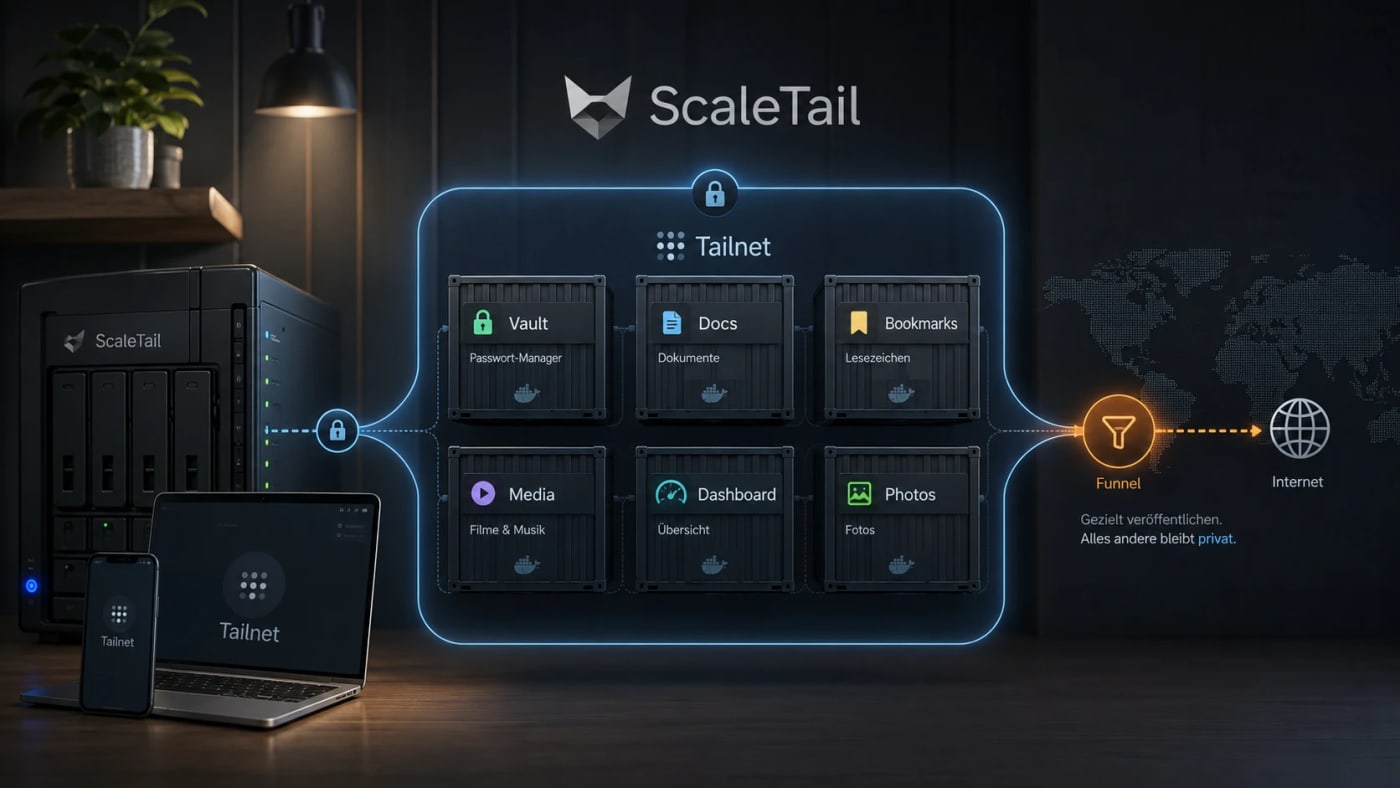
A practical self-hosting resource for exposing Docker apps inside a private Tailnet instead of opening router ports, reverse proxies, and public subdomains by default. What this is ScaleTail is a collection of ready-to-run Docker Compose stacks that attach common self-hosted apps to a Tailscale tailnet through a sidecar container. The useful idea is simple: make private tools reachable from your own devices without turning every dashboard, password vault, document archive, or admin panel into a public web service. Best use case Use this when you run services such as Vaultwarden, Paperless-ngx, Jellyfin, Immich, Pi-hole, AdGuard Home, Home Assistant, Open WebUI, Portainer, or Uptime Kuma and want remote access without a new router port, reverse-proxy rule, or public DNS entry for every app. Workflow Create a reusable Tailscale auth key in the Tailscale admin console. Pick the ScaleTail template matching your service. Review the Docker Compose file before running it, especially volumes, environment variables, and exposed ports. Bind the app container to the Tailscale sidecar network stack with the template's networkmode: service: pattern. Start the stack with Docker Compose and confirm the service appears in your Tailnet. Use Tailscale Serve for private Tailnet access. Only use Funnel when the service is intentionally public. Security notes ScaleTail reduces accidental public exposure, but it does not replace Docker hardening, backups, patching, or least-privilege access controls. Treat every template as code: inspect the image source, tags, volume mounts, environment variables, and update policy before production use. Keep admin panels, password managers, document stores, and local AI interfaces private unless you have a strong reason to expose them publicly. Do not confuse Tailscale Serve with Funnel: Serve is private to the Tailnet, while Funnel publishes a service to the public internet. Quick decision table Need Use ScaleTail? Caveat --- --- --- Private remote access to homelab apps Yes Requires Tailscale and Docker Compose Public webhook endpoint Maybe Funnel can be public; harden it carefully Full site publishing No Use a normal deployment and security model Multi-service homelab on one host Yes Still plan backups, updates, and separation Source check The Tarnkappe article explains the privacy angle, the Serve/Funnel distinction, and why ScaleTail fits self-hosted Docker services that should not be exposed publicly by default. The ScaleTail GitHub repository confirms that the project provides Docker Compose sidecar configurations for connecting self-hosted apps to a Tailnet. Tailscale's own Docker documentation provides the official baseline for running Tailscale with containers.
View
Free
Open

Skill Provenance: Version Tracking for OpenClaw Skill Bundles

0
#openclaw#skill#agent#free#provenance#security#workflow
A free OpenClaw community skill candidate for keeping Agent Skill bundles traceable with manifests, changelogs, SHA-256 hashes, and stale-file checks across chat, CLI, IDE, and registry workflows. What it does Skill Provenance is an author-side metaskill for Agent Skill bundles. It documents a portable MANIFEST.yaml, CHANGELOG.md, per-file version metadata, and SHA-256 hash checks so a skill's SKILL.md, evals, scripts, references, and packaged copies can be tracked across sessions and platforms. The upstream source describes it as free and open with an MIT license. Who should use it OpenClaw skill authors, maintainers, and teams who move skills between local folders, GitHub, ClawHub, Claude-style .skill packages, Codex/Gemini-compatible strict copies, or multiple agent sessions. It is most useful when bundle drift, stale evals, renamed files, or unclear handoffs are a recurring problem. Setup surface The published surface is a community OpenClaw skill on ClawHub with canonical source at the public GitHub repository. The bundle includes SKILL.md, README.md, MANIFEST.yaml, CHANGELOG.md, eval files, validate.sh, and package.sh according to the fetched manifest. Treat installation commands and scripts in the source as review material only until Runner AI Review finishes. Pricing evidence from the upstream GitHub README states it is free and open; license evidence points to MIT. Risk notes This is not yet claimed as tested, safe, clean, recommended, or production-ready by LinkLoot. The concept relies on local file inventory and hash checks, but the upstream source itself notes that a manifest is not a cryptographic signature or trust anchor. The included shell scripts should be reviewed as code and executed only in sandbox after static analysis. Because the skill is designed to edit manifests/changelogs and package derived copies, Runner should verify it does not mutate unrelated files, read broad home/config/SSH paths, or follow embedded source instructions beyond the user's explicit task. Source links Awesome OpenClaw Skills list: https://github.com/VoltAgent/awesome-openclaw-skills and category listing https://raw.githubusercontent.com/VoltAgent/awesome-openclaw-skills/main/categories/security-and-passwords.md ClawHub page: https://clawhub.ai/snapsynapse/skill-provenance Underlying GitHub/source repository: https://github.com/snapsynapse/skill-provenance Source SKILL.md: https://raw.githubusercontent.com/snapsynapse/skill-provenance/main/skill-provenance/SKILL.md Source manifest: https://raw.githubusercontent.com/snapsynapse/skill-provenance/main/skill-provenance/MANIFEST.yaml
View
Free
Open

Use Cloudflare Mythos to Find Real Codebase Bugs with AI Agents

0
#AI agents#code review#security#Cloudflare#Mythos#audit workflow
A practical defensive guide for checking your own codebase with AI agents: narrow scopes, parallel hunts, adversarial validation, reachability tracing, dedupe, gapfill, and governance gates. Built from the core operational lessons in Cloudflare's Project Glasswing write-up. Codebase Audit Harness Guide from Cloudflare Mythos Use this only for repositories you own or are explicitly authorized to test. The goal is defensive codebase review: better coverage, lower false positives, and a cleaner path from suspected bug to fix decision. The core lesson Do not point one generic coding agent at a large repository and ask it to find vulnerabilities. That creates shallow coverage, context loss, noisy findings, and weak triage. Instead, build a harness: a repeatable pipeline that breaks the codebase into narrow tasks, runs many focused agents in parallel, validates findings adversarially, traces reachability, deduplicates root causes, and emits structured reports. The 8-stage audit harness Recon: map the system before hunting Goal: produce shared context for all later agents. Create an architecture note that includes: Repository purpose and key services Build and test commands Entry points: HTTP routes, RPC handlers, CLIs, workers, cron jobs, webhooks, message consumers Trust boundaries: user input, internal service input, admin-only input, third-party callbacks, file uploads, deserialization points Security-sensitive modules: auth, session handling, permissions, payments, secrets, network calls, shell/process execution, templating, SQL/ORM queries, file writes High-risk languages or layers: C/C++, unsafe Rust, native bindings, parsers, compression, protocol handling Output format: Task slicing: make every hunt narrow Bad task: > Find vulnerabilities in this repository. Good task: > Check command injection in src/jobs/export.ts:createArchive() where user-controlled project names cross into shell arguments. Use docs/architecture.md and only report if attacker-controlled input can influence the command. Each task should have exactly: One attack class One function, module, or boundary One input source One expected proof standard One explicit non-goal Recommended attack classes for web/app repos: Auth bypass Broken object-level authorization Command injection SQL/NoSQL injection Server-side request forgery Path traversal Unsafe deserialization Template injection Stored/reflected XSS Secrets exposure Insecure file upload Webhook signature bypass Race condition in billing, permissions, or quota Cross-tenant data access Hunt: run many small agents, not one big one Run focused hunter agents in parallel. For a small codebase, start with 5 to 10. For a larger codebase, scale up by subsystem. Hunter prompt template: Validate: use a second agent to disprove findings Never let the hunter be the final judge of its own work. Validation agent rules: It receives only the candidate finding and the relevant code scope. It cannot create new findings. Its only job is to falsify, downgrade, or confirm the candidate. Use a different prompt and, if possible, a different model. Validator prompt template: Split bug existence from reachability Ask two different questions separately: Is this code locally buggy? Can an attacker reach it from outside the system? Do not combine these in one prompt. Combined prompts produce mush: the model mixes code correctness, exploitability, and risk into one vague answer. Reachability tracer checklist: Public route, API method, webhook, CLI, worker, queue, or import path Required auth state Required role or tenant Input constraints Feature flags Deployment exposure Network boundary Rate limits or approval gates Whether the vulnerable function is actually used in production Reachability output: Gapfill: re-queue weak coverage Hunters should mark what they did not cover. Examples: Function was too large for one pass Only one branch was reviewed Tests/build failed Type definitions were missing The call graph crossed into another repo A sanitizer looked custom and needs separate review Gapfill task template: Dedupe: collapse variants into root causes AI agents will often report the same bug through multiple paths. Treat variant discovery as useful, but do not let it inflate the queue. Deduplicate by: Same vulnerable function Same missing control Same sanitizer bypass Same trust boundary mistake Same sink Same patch required Dedupe output: Report: structured data, not prose Every accepted finding should become a structured record. Minimum report schema: The minimum viable version If you do not have infrastructure for 50 agents, start here: Run one Recon pass. Generate 20 narrow tasks. Run 5 hunter agents in parallel. Validate every candidate with a separate validator prompt. Trace reachability only for validated findings. Dedupe manually. Put accepted results into a structured issue template. That is already better than one giant "scan this repo" prompt. Safety and governance controls Do not rely on model refusals as your safety boundary. Put controls outside the model: Only scan owned or authorized repositories Restrict tool access per agent role Use read-only repository access for recon and validation Run any build/test/repro work in isolated scratch environments Keep outbound network disabled unless explicitly required Log prompts, tool calls, files accessed, and outputs Require human approval before running destructive commands or publishing reports Store findings in a private tracker until fixed or disclosed responsibly Never ask public models to generate harmful exploit payloads against third-party systems Quick scoring rubric Prioritize findings that have: External or cross-tenant reachability Clear dataflow from source to sink Minimal preconditions Missing or bypassable security control Safe reproduction evidence Independent validator confirmation Deprioritize findings that are: Pure speculation Only reachable by trusted admins Blocked by existing validation Dead code Duplicates of the same root cause Missing attacker-controlled input Copyable workflow checklist [ ] Build architecture/recon map [ ] Identify entry points and trust boundaries [ ] Create narrow task queue: one attack class + one scope [ ] Run parallel hunter agents [ ] Require structured JSON output [ ] Validate every finding with a second adversarial agent [ ] Split local bug analysis from external reachability [ ] Gapfill weak coverage [ ] Dedupe by root cause [ ] Create structured reports [ ] Human-review before fix priority or disclosure [ ] Keep authorization, audit logs, and approval gates outside the model What good looks like A good AI codebase audit harness should make your security review more systematic, not more magical. The win is not that the model finds one impressive bug. The win is that the harness repeatedly turns a huge codebase into small reviewable questions, rejects noise, preserves evidence, and creates fix-ready tickets that humans can trust.
View
29
Open

ggshield Secret Scanner Skill for OpenClaw Agents

0
#openclaw#skill#agent#free#security#secrets#gitguardian#ggshield
A community OpenClaw skill candidate that wraps GitGuardian ggshield so an agent can scan repositories, staged changes, files, and Docker images for leaked credentials before code is pushed. What it does The ggshield-scanner skill gives an OpenClaw-style agent a natural-language surface for GitGuardian's ggshield CLI. The source describes repository scans, single-file scans, staged-change checks, optional git hook installation, and Docker image scans for hardcoded secrets such as API keys, cloud credentials, private keys, OAuth tokens, and database passwords. Who should use it Developers, solo builders, and security-conscious agent operators who want an agent-assisted secret check before commits, pushes, releases, or Docker image handoff. It is especially useful for teams that already accept GitGuardian/ggshield in their workflow and want the agent to orchestrate checks rather than manually remembering every command. Setup surface The source indicates a Python-based skill that depends on ggshield and pygitguardian, requires a GitGuardian API key via GITGUARDIANAPIKEY, and calls the local ggshield binary. The public GitHub source is reachable, but the ClawHub/awesome-list OpenClaw tree link appears inconsistent with the reachable repository, so provenance should be reviewed carefully before any install. Pricing evidence in the source says GitGuardian signup is free, with enterprise/on-premise options mentioned separately; classify this Loot as free with that caveat. Risk notes Do not install or run directly on a production Raspberry Pi or personal workspace before Runner review artifacts exist. The implementation shown uses subprocess calls to ggshield with argument arrays rather than shell=True, which is a good sign, but it still executes a local binary and can scan sensitive paths if the agent is allowed to choose broad inputs. The hook installer changes git repository state. Review privacy claims against current GitGuardian documentation before scanning private code. Source links Awesome OpenClaw Skills list: https://github.com/VoltAgent/awesome-openclaw-skills Awesome category entry: https://raw.githubusercontent.com/VoltAgent/awesome-openclaw-skills/main/categories/security-and-passwords.md ClawHub page: https://clawhub.ai/amascia-gg/ggshield-scanner Reachable source repository: https://github.com/GitGuardian/ggshield-skill Source SKILL.md: https://raw.githubusercontent.com/GitGuardian/ggshield-skill/main/SKILL.md
View
Free
Open
Blog

Related reads

Browse blog
Wissen & Lernen

MosaicLeaks shows how research-agent search queries can leak private data

MosaicLeaks is a new benchmark for deep-research agents that shows how external web queries can expose private enterprise facts through the

Tools & Apps

SuperHQ Puts Coding Agents Inside Local microVM Sandboxes

SuperHQ is an early open source app for running AI coding agents in isolated local microVMs, with diff review and an auth gateway that keeps

Tools & Apps

Hugging Face Transformers CVE-2026-4372 Turns Model Loading Into a Security Checkpoint

NVD lists CVE-2026-4372 as a critical Transformers remote code execution issue affecting versions before 5.3.0, and independent reporting sa

AI & Automation

Microsoft Build 2026 Puts Agent Controls Into Policy Files

Microsoft's Build 2026 agent stack centers on ASSERT, Agent Control Specification, and Agent 365 controls for safer production agents.

AI & Automation

Proton Pass adds access tokens for AI agents

Proton Pass now offers AI access tokens so users can share selected credentials with agents while applying permissions, time limits, and aud

Tools & Apps

Infisical Agent Vault brings credential brokering to AI agent workflows

Infisical's open-source Agent Vault gives AI agents brokered API access through a proxy so they can call services without holding the underl

AI & Automation

Cloudflare Mythos lesson: stop asking one agent to scan your whole codebase

Cloudflare's Project Glasswing write-up is not just about Mythos chaining exploits. The bigger lesson is how to structure AI agents for real