Visual Studio 2026 May update gives Copilot agents reviewable plans, skills, and diffs


Microsoft’s Visual Studio 2026 May update adds agent-facing Copilot workflow controls: skill management, planning mode, a context-window indicator, and multi-file summary diffs. The practical value is not just more AI in the IDE, but more review points before agentic edits reach a repository.
Visual Studio 2026’s May update is a developer-tool release centered on making Copilot agent work easier to inspect before it changes code. Microsoft’s release notes list Agent Skills management, a multi-file summary diff, a context-window indicator, and a Planning chat mode in version 18.6.0, released May 12, 2026, with a follow-up 18.6.1 bug-fix release on May 20. For teams using AI-assisted coding, the key shift is from “ask Copilot to edit” toward “plan, constrain, review, then implement.” Independent coverage from The New Stack frames Visual Studio 2026 as Microsoft’s AI-native IDE push, which makes the review controls worth evaluating rather than treating as cosmetic IDE polish.
Key takeaways
- Visual Studio 2026 18.6.0 adds a Copilot Agent Skills panel so developers can browse, search, edit, and locate skills discovered from the workspace or user profile.
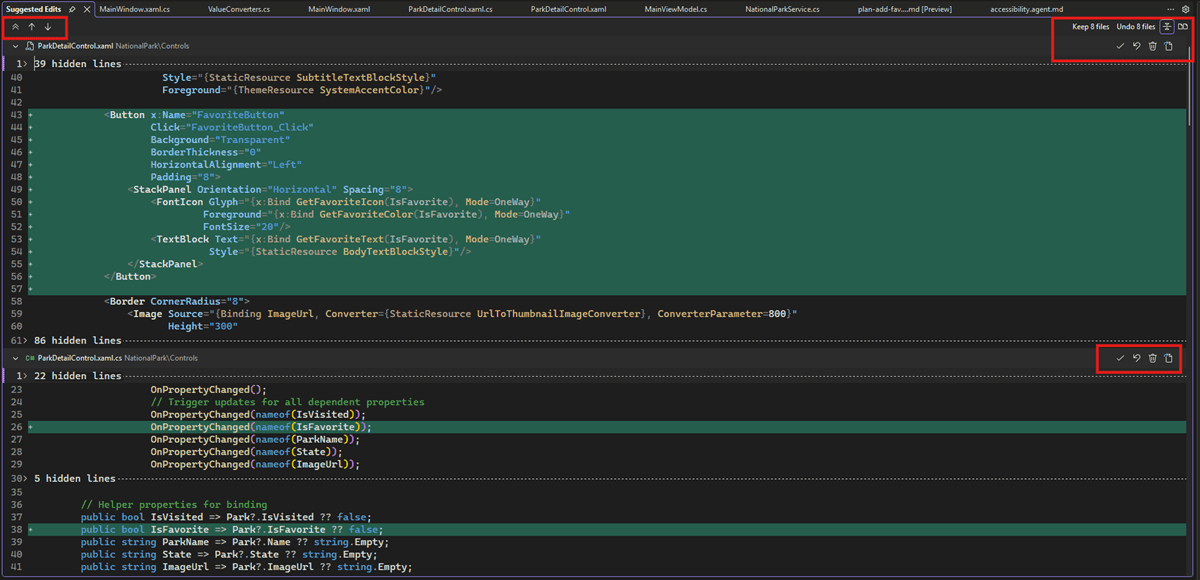
- Copilot’s new multi-file summary diff lets reviewers accept or undo changes across all files, per file, or per diff chunk instead of chasing edits one file at a time.
- Planning mode creates reviewable implementation plans before code changes and stores plans as Markdown under
.copilot/plans/. - The context-window indicator exposes how much chat context has been consumed and offers summarization when the conversation is getting too large.
- Treat the release as a governance upgrade for agentic IDE work, not a reason to remove pull requests, tests, or human code review.
Practical LinkLoot angle
The most useful workflow is a four-step agent loop: use Planning mode for the task outline, verify the plan file in .copilot/plans/, let Agent mode implement, then inspect the multi-file summary diff before accepting anything. That gives teams an auditable artifact before the edit and a consolidated review surface after the edit.
| Feature | Best use | Limitation to watch | Source |
|---|---|---|---|
| Agent Skills panel | Checking which Copilot skills are available before an agent run | Skill content still needs repository review because skills can shape agent behavior | Microsoft Learn |
| Planning mode | Breaking down larger or unfamiliar changes before edits begin | A plausible plan can still miss project constraints or security requirements | Microsoft Learn |
| Multi-file summary diff | Reviewing broad Copilot edits without opening every file manually | Summary review should not replace tests, static analysis, or PR review | Microsoft Learn |
| Context-window indicator | Deciding when to summarize long Copilot sessions | Summarization may compress away details, so verify assumptions after compaction | Microsoft Learn |
For LinkLoot readers building AI workflows, this is closest to a practical control layer: define what the agent is allowed to do, keep the plan in versionable text, and review every generated patch as a change set. Pair it with a CI gate and a lightweight security checklist before merging AI-authored changes.
What to verify before you act
Before adopting the May update for production repositories, check whether your team’s Visual Studio channel has version 18.6.0 or newer and whether Copilot features are enabled for your plan and tenant. Review any existing .copilot instructions or skills because the new panel makes them easier to manage, but it does not automatically prove they are safe or current. Run a small branch-only trial: ask Copilot to plan a low-risk refactor, inspect the saved Markdown plan, implement it, and compare the multi-file summary diff against your normal PR diff and test output.
Source check
Microsoft’s release notes confirm the Visual Studio 2026 May update, its May 12 and May 20 release dates, and the Copilot workflow features listed above. The New Stack independently covered Visual Studio 2026’s AI-native positioning and developer reaction, supporting the broader point that this release should be judged by whether its AI workflow controls hold up in real development work.
Microsoft lists Agent Skills management, Planning mode, a context-window indicator, and a multi-file summary diff for Copilot changes.
If you are comparing IDE-based agents with broader automation stacks, see LinkLoot’s guide to AI agent tools and the workflow patterns in AI workflow automation.
Try the related loot
This JS Agent Turns Any Website Into an AI Copilot