
Cursor rolls out Projects with a coordinator for long-running agent work


Cursor Projects is rolling out in beta with persistent shared context, delegated cloud and local agents, and subscriptions that react to Slack, schedules, and pull requests.
Cursor is rolling out Projects in beta, a workspace for long-running software work that keeps context, delegates tasks to multiple agents, and continues after the developer closes the laptop. The rollout changes Cursor from a prompt-by-prompt coding tool into a coordinator for features, migrations, maintenance, and other work that spans many sessions.
Cursor Projects keeps a shared project memory
Each Project maintains files that sync across the cloud and local machines used by its agents. Those files can contain research, generated artifacts, codebase knowledge, and instructions for how the team tests or ships the project. Cursor says the shared context grows as agents work, so later agents do not start from an empty briefing.
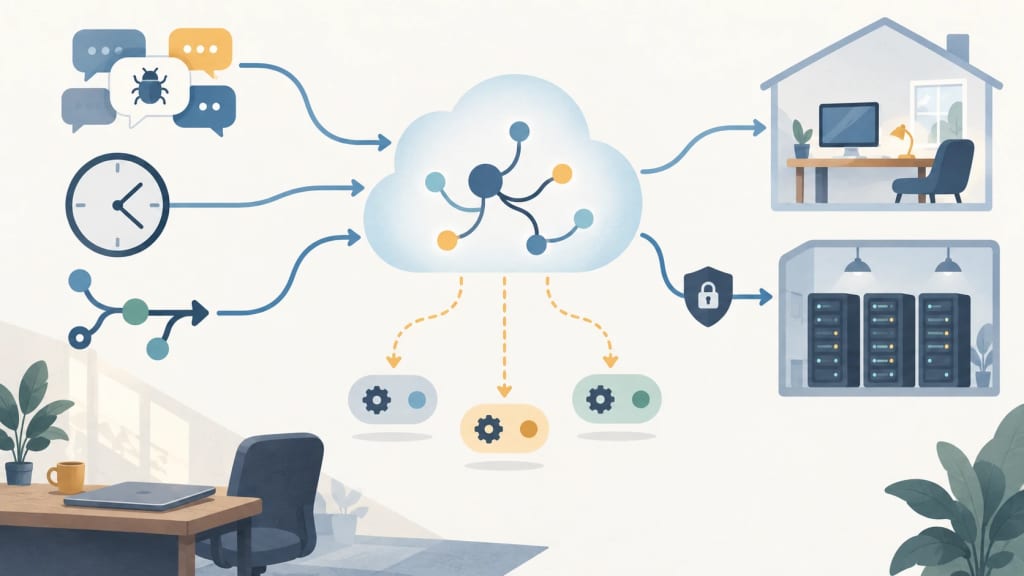
The coordinator agent plans and delegates rather than writing the implementation itself. It can create and manage parallel agents, then return the resulting work for review. Cursor positions this model for a feature, a migration, or a complete application rather than a single isolated edit.
Background work can react to Slack, schedules, and PRs
Projects can subscribe to external signals. A coordinator can watch a Slack channel, follow pull requests, or run on a schedule, then start work when an event arrives. Cursor gives a bug-report channel as an example: a new report can trigger a delegated investigation without a fresh user prompt.
Cloud execution continues while the user is offline. When a task needs access to a local service or machine, the coordinator can start a local agent for testing. Cursor’s separate Self-Hosted Machines release extends that model to workers inside a team’s network, while the agent loop remains in Cursor’s cloud.
What the beta means for engineering teams
The practical change is continuity. A team can ask a Project to keep a migration moving, repair CI failures on its own pull requests, or maintain a recurring workflow. The shared files also create a place for test commands, deployment notes, and project-specific operating rules that would otherwise be repeated in every session.
That continuity adds a review obligation. A coordinator may launch many agents and respond to external events, so teams should define repository permissions, branch boundaries, secrets access, test gates, and approval points before enabling unattended subscriptions. Self-hosted execution keeps tool calls near internal systems, but it does not turn generated changes into trusted changes automatically.
Projects is in beta and rolling out to all Cursor users from the left-hand navigation. Availability of individual integrations, agent capacity, and subscription behavior may vary by account and deployment setup. Teams evaluating it should confirm which events can trigger work and where each worker executes before connecting production repositories.
Sources and practical next step
Cursor’s changelog is the primary source for the beta rollout, coordinator behavior, shared context, cloud execution, and event subscriptions. VibeHacker independently reported the September 10 launch and described the coordinator as a persistent layer for delegated cloud and local agents.
For a broader agent workflow, see LinkLoot’s AI workflow automation guide. The useful first experiment is a non-production repository with read-only integrations, explicit test commands, and human approval before merge or deployment.
Try the related loot
Predict ADMET properties to prioritize drug candidates early