Figma Make connects visual edits to local codebases


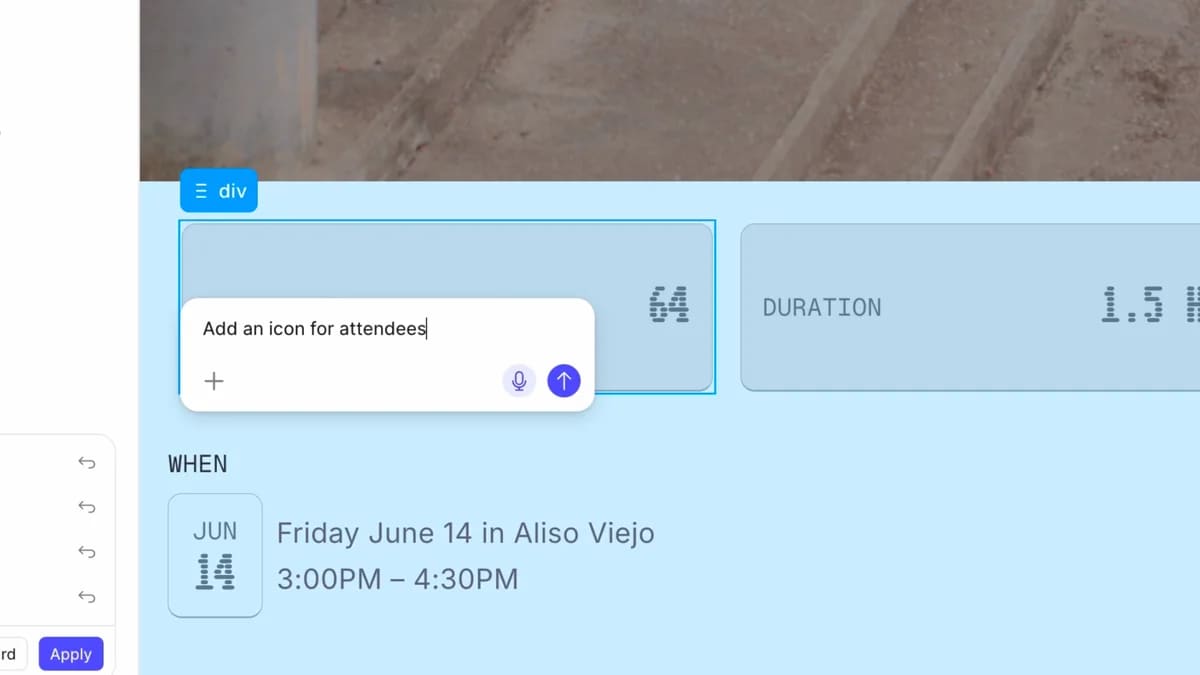
Figma Make's limited beta connects to local codebases so teams can make visual UI edits, generate code changes, commit them, and open pull requests from inside Figma.
Figma Make is adding a limited beta that connects visual editing to a local codebase. Figma says users can select UI elements, annotate or chat about changes, let an AI coding agent edit the underlying code, then commit changes and open a pull request from Make. The beta launched on May 28, 2026, is Mac-only in the Figma Beta desktop app, and does not consume AI credits during the beta.
Key takeaways
- Figma Make can connect to a local codebase and apply visual or chat-driven UI changes through an AI coding agent.
- The beta includes direct editing, annotations, Figma MCP context, branch/PR workflow, GitHub-native support, and SSH support for other Git providers.
- Figma says the beta is limited to selected Mac users in the Figma Beta desktop app, with other platforms planned later.
- During beta, the new local-code features do not consume AI credits, but Figma says AI credit pricing details are expected later.
- The strongest fit is established product teams with real design systems and reviewable Git workflows, not throwaway prototypes.
Practical LinkLoot angle
This is useful because it moves design-to-code from export theater toward reviewable changes in a real repo. A designer or PM can propose spacing, copy, component, or interaction changes visually, but the result still lands as branch history and a pull request. That keeps engineering review, CI, code ownership, and security checks in the loop.
| Workflow | Best use | Limitation | Source |
|---|---|---|---|
| Visual element edits | Spacing, layout, component swaps, and small UI changes | Requires access to the codebase and beta desktop app | Figma |
| Annotation prompts | Explaining interaction or animation changes directly on the UI | Still needs human review for behavior and edge cases | Figma release notes |
| Branch and PR flow | Letting design changes enter normal engineering review | GitHub support is native; other Git providers connect through SSH | Figma |
| Existing design systems | Applying changes with real component and token context | Weak design systems may produce messy code edits | VentureBeat, CMSWire |
The decision point is governance. If your team already reviews frontend changes through GitHub, Figma Make can become a faster way to draft those changes. If your product lacks a reliable design system, test coverage, or clear component ownership, the tool may simply generate more review work.
What to verify before you act
Check beta eligibility first. Figma says access is not guaranteed after joining the waitlist, and the current beta is Mac-only in the Figma Beta desktop app. Also verify whether your repo setup works with Make's local environment, dependency installation, dev server flow, and Git provider connection.
Before connecting production code, test against a sandbox repo with representative components, tokens, CI checks, and pull request rules. Review whether generated edits follow your frontend architecture, keep accessibility intact, and avoid bypassing design-system constraints. The feature is most useful when a visual change can be reviewed like any other code change, not when it creates a parallel source of truth.
Source check
Figma confirms the local-code beta, direct editing, annotations, chat-driven edits, Figma MCP context, branch and PR workflow, GitHub support, SSH support for other Git providers, beta timing, Mac limitation, and beta credit policy. Figma's release notes corroborate the May 28 release and list the closed-beta feature set. CMSWire and VentureBeat independently report the visual-code editing angle and the design-to-engineering workflow implications.
It lets selected users connect Make to a local repo, make visual or chat-driven UI edits, and turn those edits into code changes and pull requests.
For adjacent tools and agent workflows, see LinkLoot's guide to AI agent tools.
Share your own knowledge as loot
Request access to the guided creator beta and get feedback on your first submission.