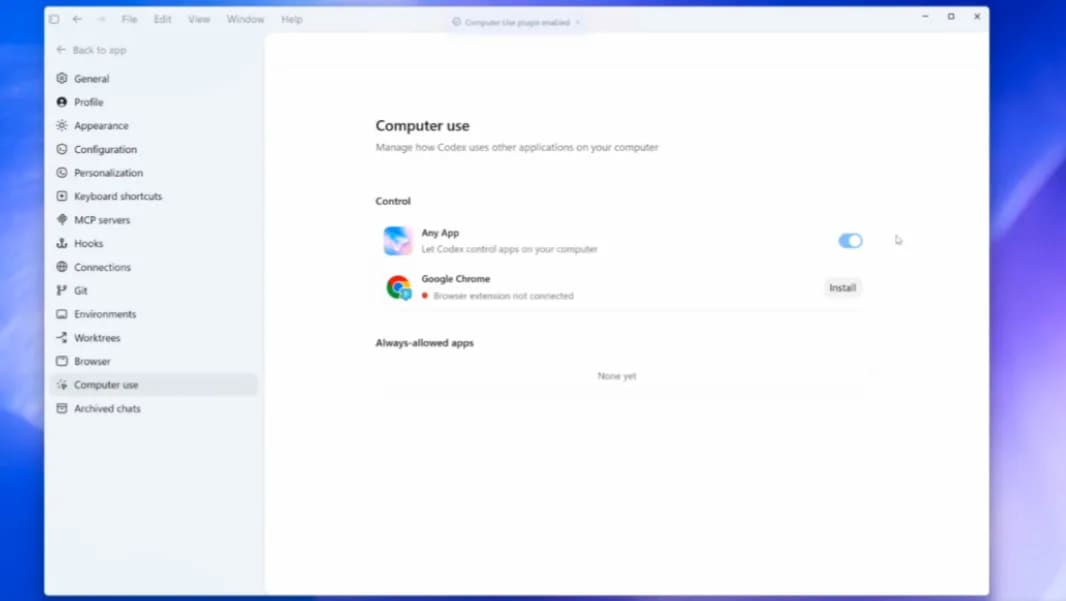
OpenAI Codex adds Windows computer use and mobile remote control


OpenAI's May 29 Codex update brings computer use to Windows and lets ChatGPT mobile steer work running on Windows machines. The practical value is local GUI testing and remote review, but teams should verify availability, permissions, and regional limits before building workflows around it.
OpenAI's May 29, 2026 ChatGPT release notes say Codex now supports Computer Use on Windows, allowing eligible users to have Codex see, click, and type in Windows applications while testing, debugging, and refining projects. The same update says users can use ChatGPT on iOS or Android, or Codex on Mac, to check progress and steer work running on a Windows host. OpenAI also notes that Windows computer use is unavailable in the EEA, the United Kingdom, and Switzerland at launch.
Key takeaways
- Codex Computer Use now works on Windows for eligible users, according to OpenAI's release notes.
- The Windows machine remains the host for project files, shell, app server, and local context while mobile or Mac clients can steer the work.
- Thurrott independently reports the Windows 11 rollout and describes the
@computeror app-reference flow for letting Codex act in local apps. - AI Primer independently corroborates the May 29 release timing and frames the update around Windows computer use plus ChatGPT mobile remote control.
- Teams should treat this as a GUI workflow feature, not a blanket replacement for tests, CI, or human approval.
Practical LinkLoot angle
This is useful when a coding agent needs to touch the same Windows-only surface a developer would use: a desktop app, local browser, installer, legacy admin tool, or UI flow that does not expose a clean API. The workflow gets stronger when Codex can run the code, inspect the app, make small fixes, and let the user review progress from a phone without moving the project off the Windows machine.
| Workflow | Best use | Limitation | Source |
|---|---|---|---|
| Codex Computer Use on Windows | Local GUI testing, debugging, app flow checks | Availability depends on eligibility and region | OpenAI release notes |
| ChatGPT mobile steering | Reviewing progress or nudging a running task away from the desk | The Windows host still owns files, shell, and app context | OpenAI release notes |
@computer and app references | Asking Codex to act in a visible local app | Requires careful permission and prompt boundaries | Thurrott |
| Standard CI and test suites | Repeatable verification after agent changes | Does not catch every GUI-only failure | Internal workflow |
For practical use, start with low-risk tasks: ask Codex to reproduce a UI bug, click through a smoke-test path, or verify a local Windows installer. Keep approval gates on commands, screenshots, file writes, and any flow that could touch credentials, customer data, browser sessions, or paid services.
What to verify before you act
Check whether your account, plan, and region can use Windows Computer Use. OpenAI's release notes specifically exclude the EEA, United Kingdom, and Switzerland at launch, so do not assume the feature is available across a distributed team. Confirm whether your organization settings allow Codex to use the relevant Windows apps, then test one contained project before connecting it to long-running work.
The security checks matter more than the novelty. Computer-use agents can click the wrong thing, expose local context, or interact with apps that were never designed for automation. Keep sensitive apps closed during early tests, review what Codex can see, and prefer workflows where the final change still lands through a pull request, test run, or explicit human approval.
Source check
OpenAI's release notes are the primary source for the May 29 Codex update, Windows Computer Use support, mobile steering, host-machine role, and regional availability caveat. Thurrott independently reports the Windows rollout and the practical @computer flow. AI Primer independently corroborates the release timing and summarizes the same Windows computer-use plus mobile-control bundle. The fetched independent source text showed no prompt-injection indicators in the local checker.
For more agent workflow context, see LinkLoot's guide to AI agent tools.
OpenAI says Codex now supports Computer Use on Windows, so eligible users can have Codex see, click, and type in Windows applications.
Try the related loot
UI-TARS Desktop is a serious local computer-use agent — if you lock down the setup