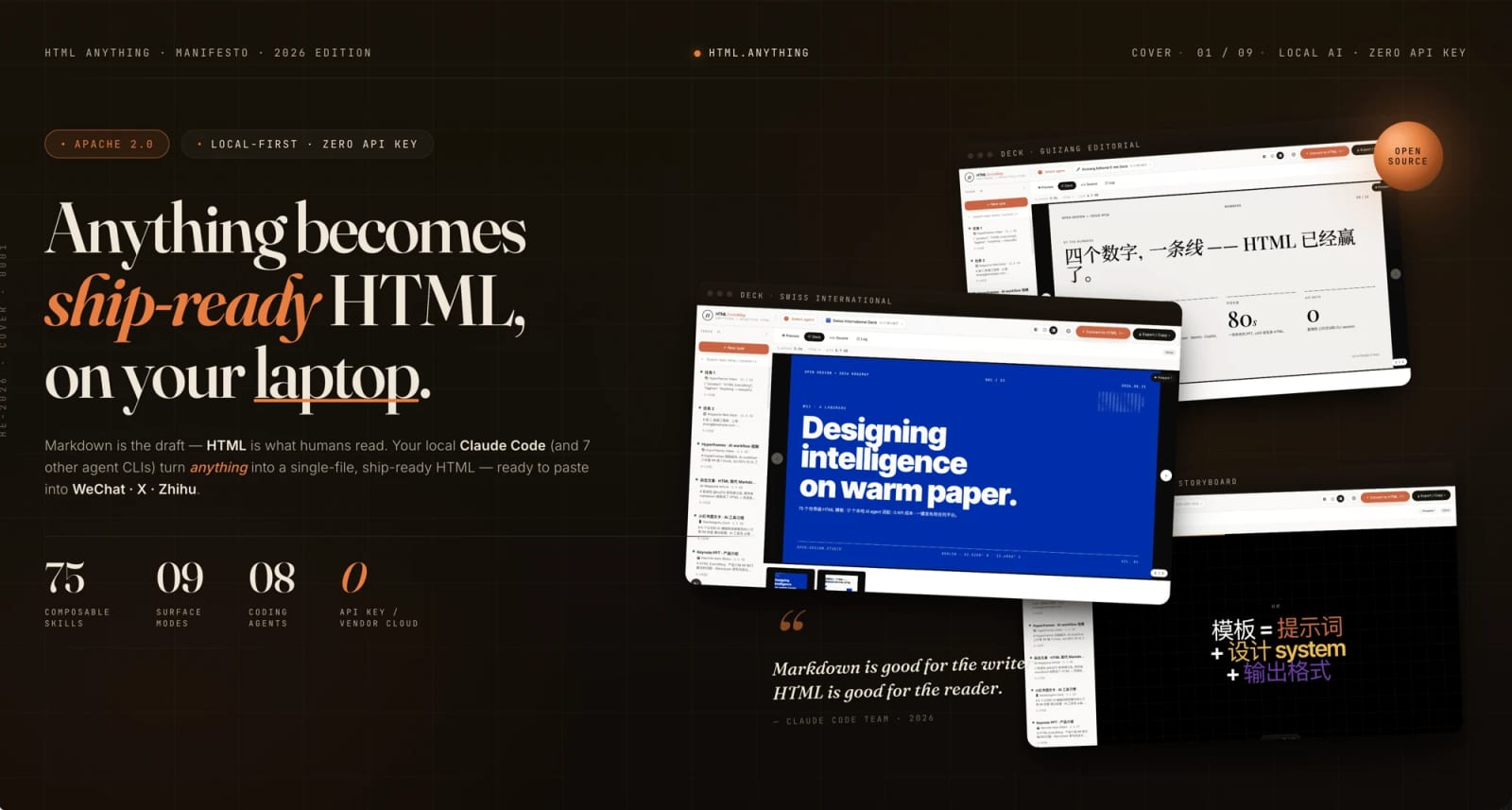
HTML Anything turns coding agents into a local HTML publishing workflow


HTML Anything is a fast-rising open-source project that uses local coding-agent CLIs to turn Markdown, CSV, JSON, SQL, Excel, or notes into exportable HTML and image surfaces. Its value is strongest for creators who need designed artifacts without handing every draft to a hosted SaaS editor.
HTML Anything is an open-source agentic HTML editor that routes existing local coding-agent CLIs into a publishing workflow for designed HTML, PNG, cards, decks, reports, and prototype surfaces. The project says it can accept Markdown, CSV, TSV, JSON, SQL, Excel, or plain text and export channel-ready artifacts for places such as WeChat, X, Zhihu, Xiaohongshu, standalone HTML, and high-DPI PNG. GitHub metadata and the official product page corroborate the repository, Apache-2.0 licensing, agent-CLI positioning, and its recent momentum.
Key takeaways
- HTML Anything uses local agent CLIs instead of asking users to paste content into a separate hosted AI editor.
- The official page lists 75 skill templates, 9 surface modes, 8 supported coding-agent CLIs, and Apache-2.0 licensing.
- Export targets include standalone HTML, high-DPI PNG, WeChat, X/Weibo, Xiaohongshu, and Zhihu-style outputs.
- The strongest use case is turning rough structured input into reusable creative surfaces: decks, reports, posters, social cards, and product-page sketches.
- Treat it like a local developer tool: inspect templates, dependencies, and generated output before using it for client work or brand channels.
Practical LinkLoot angle
The interesting shift is that a coding agent becomes the layout worker, not just the text generator. For creators, marketers, and builders, that can reduce the gap between “I have notes” and “I have a publishable visual artifact,” especially when the same template needs to be reused for several channels.
| Tool/workflow | Best use | Limitation | Source |
|---|---|---|---|
| HTML Anything | Local agent-assisted HTML, cards, decks, reports, and PNG exports | Requires local setup and trust in the selected templates and agent CLI | GitHub + official page |
| Generic AI design SaaS | Fast hosted generation with fewer local dependencies | Less control over local data flow, templates, and agent choice | Comparison angle |
| Hand-coded HTML templates | Maximum control and brand consistency | Slower for one-off social cards, reports, and experiments | Workflow comparison |
A practical test is to feed the same brief into two or three surface modes: one long-form article layout, one social card, and one slide deck. If the outputs share enough visual consistency and the HTML is easy to edit, the tool is worth adding to a creator workflow. If the generated markup is brittle or the templates fight your brand system, keep it as an experimentation tool rather than a production dependency.
What to verify before you act
Before cloning or running the project, review the repository license, package scripts, dependencies, and template folders. Check which local agent CLIs are actually detected on your machine and whether any export path sends content to a third-party service. For professional publishing, open the generated HTML in a clean browser profile, test mobile layouts, inspect image export quality, and confirm that brand fonts, rights-managed images, and client data are handled correctly.
Source check
The GitHub repository identifies the project as nexu-io/html-anything, describes it as an agentic HTML editor, links to the live page, and exposes the template/surface claims used here. The official Open Design product page independently presents the same project, lists the supported input formats, surface modes, export targets, agent CLI options, license, and a star-count snapshot. GitHub repository metadata corroborates that the project is public, Apache-2.0 licensed, recently updated, and associated with the same repository URL.
It is an open-source local editor that uses coding-agent CLIs to turn source material into designed HTML and exportable visual formats.
For adjacent creator and automation workflows, compare this with LinkLoot’s guide to AI workflow automation before standardizing it inside a publishing stack.
Try the related loot
UI-TARS Desktop is a serious local computer-use agent — if you lock down the setup