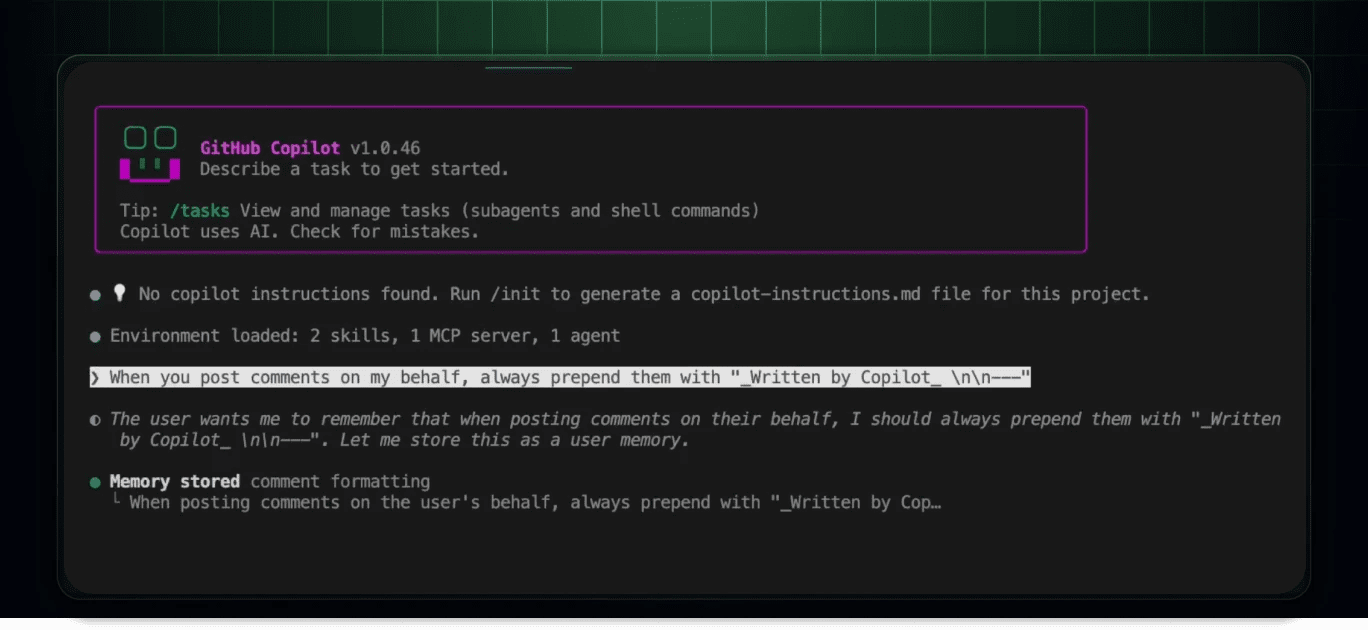
GitHub Copilot Memory now keeps user preferences for Pro and Pro+


GitHub has expanded Copilot Memory so Pro and Pro+ users can store personal preferences that follow them across repositories and Copilot experiences.
GitHub Copilot Memory now supports user-level preferences in early access for Copilot Pro and Pro+ users. GitHub says Copilot can store stated or inferred preferences such as tone, communication style, and pull-request structure, then reuse them across future Copilot experiences. The supporting docs also confirm that Copilot Memory covers repository-level facts and user-level preferences, with review and deletion controls in settings.
Key takeaways
- Copilot Memory is no longer limited to repository context.
- Pro and Pro+ users can let Copilot remember personal working preferences across repositories and agents.
- GitHub positions the feature as early access, so behavior and rollout scope may still change.
- Users can review and delete stored memory preferences from Copilot settings.
Why it matters
This is one of those quiet workflow upgrades that can compound over time. If Copilot consistently remembers how you want pull requests framed, how concise you want explanations, or what tone you prefer in collaboration, you spend less time re-teaching the assistant and more time shipping.
The real value is not “memory” as a buzzword. It is whether the feature reduces repetitive prompt setup without leaking the wrong habits into the wrong context. For solo developers, that can mean faster handoffs between repos. For consultants and multi-project operators, it could make Copilot feel more stable across very different workloads.
A practical test is to define one or two explicit preferences first, then compare results across GitHub.com, the IDE, and any agent-style Copilot workflows you already use. If the output becomes more consistent without overfitting, this update is useful. If it starts carrying assumptions too aggressively, you may want stricter review habits or lighter memory usage.
| Setup layer | What it stores | Best use |
|---|---|---|
| Personal Copilot Memory | Your preferred tone, structure, and style | Cross-repo consistency for one user |
| Repository instructions | Shared project-specific rules | Team conventions and codebase context |
| One-off prompts | Immediate task detail | Edge cases, experiments, or temporary constraints |
What to verify before you act
Check whether your current plan and surface actually expose the feature yet. GitHub calls this early access, so availability can lag by account, region, or client.
Also verify how much of the “inferred” behavior you are comfortable with. A memory system that learns from your actions is only helpful if you can easily inspect, correct, and remove the stored preferences when they drift.
If you work across client projects, test separation carefully. GitHub says user-level preferences should follow you without affecting other users in the same repository, but it is still worth validating that your personal defaults do not create awkward assumptions in shared environments.
Practical LinkLoot angle
For creators, indie hackers, and dev teams running lots of parallel repos, the best use case is standardization. You can use Copilot Memory to reinforce a preferred PR structure, review tone, or documentation style, then pair it with a reusable prompt library for repo-specific edge cases.
That makes this update more useful than a generic “Copilot got smarter” headline. It points toward a layered workflow: personal defaults in memory, project-specific instructions in the repo, and task-specific prompts only when needed.
If you are building that kind of stack, this guide is the natural follow-up: /guides/ai-agent-tools.
GitHub added user-level preference memory for Copilot Pro and Pro+ users, beyond repository-level memory.
Try the related loot
Give Coding Agents a Free UI Design and PR Finish Gate with UIZZE