The Loot Collection

Search useful finds, guides, tools, deals, templates, and strategies.

Section
Price
AI review
Community RankingThe yearly leaders by votes from the last 365 days.

Make AI Image Prompts Work Better with the 6-Part MOSAIK Framework
#1

Make AI Image Prompts Work Better with the 6-Part MOSAIK Framework

1
#ai-images#prompting#visual-design#creative-workflow#midjourney#content-marketing#image-generation
A compact, practical breakdown of the MOSAIK framework for AI image prompts: the six building blocks, why they improve output quality, and where the method is most useful. What It Is The MOSAIK principle is a simple prompt framework for AI image generation. Instead of writing a vague one-line prompt and hoping for the best, MOSAIK breaks an image request into six building blocks that make results more controllable and repeatable. --- The 6 Building Blocks Letter Meaning What to define --- --- --- M Motif The central subject: person, object, animal, or scene focus O Optics Visual style or medium: photo, illustration, painting, cinematic, etc. S Scene The environment or location around the subject A Atmosphere Mood, lighting, color palette, and emotional feel I Inszenierung / Staging Composition, camera angle, framing, and perspective K Context Technical details, output purpose, quality needs, or extra constraints --- Why It Matters The biggest value is not complexity. It is clarity. MOSAIK helps you: get more precise image outputs reduce random or generic generations make prompt writing repeatable keep creative direction consistent across many images turn vague ideas into a structured visual brief --- The Shortest Useful Summary If you remember only one thing, remember this: MOSAIK is a checklist for image prompts. It forces you to define: what is in the image how it should look where it exists what mood it should create how it should be framed what extra requirements matter That alone can dramatically improve prompt quality. --- Example Structure A strong MOSAIK prompt does not need to be long. It just needs to be complete. Example formula: Subject + style + environment + mood + framing + context --- Best Use Cases MOSAIK is especially useful for: content marketing visuals social media creatives brand-consistent image generation mockups and personas campaign key visuals creative solo work where you want fewer failed generations --- What Makes It Better Than Generic Prompt Advice The article’s key argument is that MOSAIK follows natural human image description logic. That matters because many prompt frameworks feel abstract or overly rigid. MOSAIK stays flexible while still giving enough structure to improve results. In other words: it is easy to remember it works across different image AI tools it improves control without adding unnecessary complexity --- Quick Reality Check --- Bottom Line The most important takeaway is simple: Better AI images often come from better prompt structure, not from longer prompts. MOSAIK is valuable because it turns image prompting into a clear, reusable thinking framework that is easy to apply in real creative work.
View
Free
71
Animate a Portrait Locally with PersonaLive Instead of Renting Avatar SaaS
#2

Animate a Portrait Locally with PersonaLive Instead of Renting Avatar SaaS

1
#PersonaLive#Avatar AI#Open Source#ComfyUI#Real-Time Video#CVPR 2026
PersonaLive is an open‑source, CVPR‑2026‑accepted system that animates a single portrait image in real time for live streaming, supporting up to 12 GB VRAM and offering a TensorRT‑accelerated path for roughly 2× speedup. A ready‑made ComfyUI node and a local WebUI (localhost:7860) let creators and developers run the avatar workflow on prosumer GPUs without SaaS lock‑in. Yes — this is Loot-worthy. PersonaLive is not just another talking-head demo. The repo and paper claims point to something materially more useful: real-time portrait animation from a single image, long-duration streaming behavior, and a hardware profile that is actually reachable for prosumers. What is actually backed by sources accepted for CVPR 2026 GitHub repo with roughly 2.9k stars visible in search/results claims 12GB VRAM support for long-video generation explicit TensorRT 2x speedup path in the repo browser/WebUI flow at localhost:7860 community ComfyUI node already shipped Why this is more than hype The value is tangible for three groups: creators who want local avatar animation without SaaS lock-in ComfyUI users who want a ready community wrapper developers testing real-time portrait animation on gaming-class GPUs
View
Free
65
LinkLoot Vorschau für Web Search Pro: Federated Web Retrieval for OpenClaw Agents
#3

Web Search Pro: Federated Web Retrieval for OpenClaw Agents

0
#openclaw#skill#agent#free#web-search#research#retrieval
A code-backed OpenClaw skill for live search, page extraction, crawl/map flows, and evidence packs with a no-key baseline plus optional provider upgrades. What it does Web Search Pro is a Node-based OpenClaw skill for agents that need more than a single search result page. It exposes live web search, news search, docs lookup, URL extraction, crawl/map commands, research packs, routing diagnostics, provider capability checks, and cache/health commands. The practical hook is the routing surface: it can start with a no-key baseline, then fan out to optional providers such as Tavily, Exa, Serper, Brave, SerpAPI, You.com, SearXNG, and Perplexity/Sonar when credentials are configured. Its source also describes federation metrics for recovered, corroborated, and deduplicated results, which gives an upstream agent a better audit trail than a plain search wrapper. Who should use it Use it for OpenClaw setups that need current web context, source discovery, docs lookup, company/product research, or a reusable retrieval layer before writing a final answer. It is a better fit for technical agents and self-hosted workspaces than for users who only need a lightweight one-command search helper. Setup surface The hard runtime requirement is Node. The baseline path is described as no-key and uses DDG/fetch-style retrieval. Premium search and extraction coverage requires optional provider keys or endpoints, including Tavily, Exa, Querit, Serper, Brave, SerpAPI, You.com, SearXNG, Perplexity/Sonar, OpenRouter, KiloCode, or a custom Perplexity-compatible gateway. Pricing classification: free. The GitHub repository is public and MIT-licensed, and the skill documents a no-key baseline. Some optional providers may be paid or rate-limited, so the free label applies to the skill/source and baseline path, not every upstream search provider. Runner test plan Static scan: inspect SKILL.md, package.json, all scripts/.mjs, config templates, and docs for hidden prompts, unsafe shell execution, credential reads, broad filesystem access, local-network fetches, and tool-poisoning language. Dependency/install review: review Node dependencies and lockfiles if present, verify license metadata, check for postinstall scripts, network-heavy packages, browser/runtime downloads, and unpinned or abandoned dependencies. Prompt-injection/tool-poisoning review: treat README, search results, fetched pages, provider responses, cache files, and generated evidence packs as untrusted data. Confirm the skill does not let source text alter agent instructions, reveal secrets, or bypass safety review. Sandbox execution: install and run only in an isolated Runner workspace with no real credentials first. Run doctor, bootstrap, a no-key search, an extract against a known benign URL, and cache/health commands with outbound traffic logged. Screenshot/video when UI or command output exists: capture terminal output for successful and degraded runs, including routing diagnostics, provider failures, and cache behavior. Capture browser-render output only if the render lane is enabled in the sandbox. Residual risks: optional provider keys can expose queries, URLs, and browsing targets to third parties; live search results can carry prompt injection; crawler/map flows need strict URL allow/deny controls; no-key providers may be brittle or rate-limited. Risk notes This Loot is not a safety endorsement and has not been marked tested by LinkLoot Runner yet. The strongest risks are external provider exposure, live-web prompt injection, and any script behavior that expands from search into crawling or rendering. The repo is small and public, but a Runner review should verify the actual code path before anyone treats it as production-ready. Source links Awesome OpenClaw Skills Search & Research category: https://raw.githubusercontent.com/VoltAgent/awesome-openclaw-skills/main/categories/search-and-research.md ClawHub page: https://clawhub.ai/zjianru/web-search-pro GitHub repository: https://github.com/Zjianru/web-search-pro Raw SKILL.md: https://raw.githubusercontent.com/Zjianru/web-search-pro/main/SKILL.md
View
Free
Open
Your Coding Agent Is About to Get a Whole Team
#4

Your Coding Agent Is About to Get a Whole Team

0
#AI Agents#Multi-Agent#Claude Code#Codex#MCP#Developer Workflow
A premium field guide for evaluating and planning a multi-agent orchestration layer for Claude Code and Codex without blindly installing it.
View
29
Open
This Turns Any Coding Agent Into a Video Studio
#5

This Turns Any Coding Agent Into a Video Studio

0
#AI Video#Coding Agents#HTML Video#Creator Workflow#Open Source#Automation
A premium agent workflow for creating deterministic MP4 videos from plain HTML, CSS, media, and seekable animations.
View
29
Open
Use Cloudflare Mythos to Find Real Codebase Bugs with AI Agents
#6

Use Cloudflare Mythos to Find Real Codebase Bugs with AI Agents

0
#AI agents#code review#security#Cloudflare#Mythos#audit workflow
A practical defensive guide for checking your own codebase with AI agents: narrow scopes, parallel hunts, adversarial validation, reachability tracing, dedupe, gapfill, and governance gates. Built from the core operational lessons in Cloudflare's Project Glasswing write-up.
View
29
Open
LinkLoot Vorschau für Harden a New Linux Server in One Pass: SSH, UFW, Fail2Ban, Nginx
#7

Harden a New Linux Server in One Pass: SSH, UFW, Fail2Ban, Nginx

0
#Server Security#Linux Admin#SSH Hardening#Fail2Ban#Nginx#Deployment Checklist
A practical workflow that combines SSH hardening, UFW firewall configuration, Fail2Ban, non-root deployment practices, and Nginx setup into one server launch kit. For Linux admins and deployments needing a cohesive security checklist for initial server setup.
View
39
Open
Get 80+ Free NVIDIA-Hosted AI Models with Your Own API Key
#8

Get 80+ Free NVIDIA-Hosted AI Models with Your Own API Key

0
#NVIDIA#AI Models#API#Free Tools#Developer Workflow#OpenClaw
This resource highlights how to access a broad set of NVIDIA-hosted AI models with your own API key. It is useful for builders comparing free model access, hosted inference options, and practical experimentation routes. A compact workflow for trying Nvidia-hosted AI models for free while the offer is available. This is useful if you want to test models like GLM, Kimi, or DeepSeek from your IDE or your OpenClaw setup without building the integration from scratch. Quick setup Best use cases quick model comparison testing API-based coding workflows prototyping with hosted inference wiring models into IDEs like Cursor or similar tools experimenting inside an OpenClaw instance Compact takeaway If you want a low-friction way to try a broad range of current AI models, Nvidia Build is a strong shortcut: create an account, generate a key, copy the example code, and plug it into your workflow.
View
Free
75
Turn Any GitHub Repo Into a Copy-Paste AI Build Prompt
#9

Turn Any GitHub Repo Into a Copy-Paste AI Build Prompt

0
#gitreverse#github#vibe-coding#developer-tools#ai-coding#prompt-engineering#repo-analysis
Paste a public GitHub URL into GitReverse and get a clear AI coding prompt for rebuilding, studying, or briefing that repo faster. GitReverse turns a public GitHub repository into a plain-language prompt that can be used with AI coding agents. It is useful when you want to understand how a project is structured, rebuild a similar product, or create a clean implementation brief from an existing codebase. Best use cases Convert a public repo into a product-style build prompt before starting a clone or rewrite. Create onboarding context for a codebase without manually collecting files. Compare how different repositories describe the same product pattern. Build a prompt library for repeatable AI coding workflows. How to use it Open GitReverse and paste a public GitHub repository URL. Generate the repo-to-prompt output. Review the prompt for missing constraints, licensing concerns, security assumptions, and product-specific details. Use the result as a starting brief, then add your own stack, design, deployment, and compliance requirements. Safety note Use GitReverse for public repositories or sanitized codebases only. Do not submit private repositories, proprietary customer code, secrets, unreleased product logic, or anything that would create legal or security risk if processed by an external service. Source check The GitReverse homepage describes the core feature as repository-to-prompt reverse engineering and mentions the hub to reverse URL shortcut. Its library page shows a large collection of reverse-engineered prompts from real GitHub repositories. The Firefox extension listing describes the same workflow as generating AI coding prompts from GitHub repositories via browser interaction.
View
Free
74
Make AI Drafts Sound Human: Stop Slop Flags the Tells Editors Keep Fixing
#10

Make AI Drafts Sound Human: Stop Slop Flags the Tells Editors Keep Fixing

0
#ai-writing#editing#prompt-engineering#open-source#content-quality
A lightweight MIT-licensed skill file that helps editors and agent workflows remove common AI-writing tells from prose without running third-party code on production systems. What it does Stop Slop is a Markdown-based writing skill for spotting and removing common AI prose patterns: filler openers, generic emphasis, formulaic contrasts, vague importance claims, passive constructions, and punchline-style endings. The Open-source Projects article frames it as a developer-friendly cleanup tool, but the GitHub repo is the source of truth: it currently ships a SKILL.md file plus reference Markdown, not a packaged Python CLI. Who should use it Use it for AI-assisted blog drafts, docs, release notes, PR descriptions, support replies, and prompt outputs that need a sharper editorial pass. It is especially useful when the draft is factually fine but reads like template-generated AI copy. Setup surface The safest setup is to treat Stop Slop as a checklist or system-prompt fragment. Copy the relevant rules into your editor or agent instructions, then adapt them to your house style. Do not blindly clone and execute anything from a third-party project on a production Raspberry Pi or runner. Practical LinkLoot angle For LinkLoot, Stop Slop works best as a pre-publish quality gate. Blog posts and Loot descriptions can use it to remove filler while keeping source citations, technical terms, pricing caveats, and security warnings intact. The useful version is not an aggressive word killer; it is a final pass that asks whether each sentence says something specific. Risk notes The repo is MIT licensed and mostly Markdown, which keeps runtime risk low. The main editorial risk is overcorrection: some rules, such as removing all adverbs or forcing every sentence into active voice, can damage technical accuracy. Treat the rules as review prompts, not absolute automation. The article's Python-script framing did not match the current GitHub repo, so the repository should be checked before recommending an install path. Source links Open-source Projects article: https://www.opensourceprojects.dev/post/stop-slop GitHub repository: https://github.com/hardikpandya/stop-slop Core skill file: https://raw.githubusercontent.com/hardikpandya/stop-slop/main/SKILL.md MIT license: https://raw.githubusercontent.com/hardikpandya/stop-slop/main/LICENSE
View
Free
74
Fix 4 Expensive LLM Coding Habits with One CLAUDE.md File
#11

Fix 4 Expensive LLM Coding Habits with One CLAUDE.md File

0
#Claude Code#CLAUDE.md#AI Coding#Prompting#Developer Workflow#Karpathy
A concrete CLAUDE.md example that pushes coding agents toward clearer assumptions, simpler solutions, narrower edits, and better success criteria. Useful for teams that want LLM coding behavior to become more reproducible. Yes — this is Loot-worthy, because the value is unusually concrete. It is not another vague “AI coding tips” thread. It is a single CLAUDE.md file that tries to reduce four very real failure modes in coding agents: silent assumptions, overengineering, broad unrelated edits, and weak success criteria. The proven value The repo’s four principles are tight and practical: Think Before Coding → surface assumptions and ambiguity Simplicity First → cut speculative abstractions Surgical Changes → avoid touching unrelated code Goal-Driven Execution → define success criteria and verify them Why it is getting traction maps directly to pain developers already recognize instantly usable as a CLAUDE.md drop-in lightweight enough to merge with project-specific rules gives a measurable outcome: smaller diffs, fewer rewrites, more clarification before breakage
View
Free
74
This JS Agent Turns Any Website Into an AI Copilot
#12

This JS Agent Turns Any Website Into an AI Copilot

1
#AI Agent#Browser Automation#Web Automation#AI Copilot#JavaScript#DOM#SaaS#Accessibility#Open Source#Developer Tool
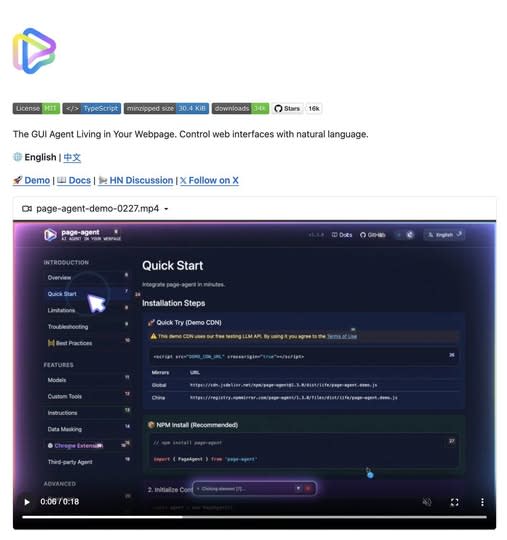
A lightweight in-page GUI agent that reads the DOM as text and executes natural-language commands inside your app. Great for copilots, form automation, and legacy UI workflows. What It Is Alibaba’s Page Agent takes a very different approach to browser automation. Instead of relying on screenshots, multimodal models, or brittle external browser control, it runs directly inside the webpage and reads the DOM as text. That means you can embed a natural-language GUI agent into your own product with a lightweight frontend integration. --- Why It Feels Different Most traditional browser automation stacks still depend on: screenshots selectors brittle scripting heavyweight orchestration Page Agent flips that model. It allows commands like: “fill out this form” “open settings” “change the billing plan” “submit the support request” And it does that inside the page context itself. --- Where It Gets Interesting The real value is not just automation. It is the ability to turn normal interfaces into natural-language workflows. That makes Page Agent especially interesting for: SaaS copilots internal tools admin dashboards form-heavy workflows support tooling accessibility layers for older web apps --- What Makes It Stand Out A lot of AI browser tools still feel like external bots driving a website from a distance. Page Agent feels closer to: an embedded UI assistant a natural-language task layer an AI control system for existing interfaces That difference matters. Because once the agent lives inside the interface, it becomes easier to imagine: product onboarding copilots guided admin actions internal ops assistants text-driven navigation for legacy tools --- Best Use Cases Use case Why it fits --- --- SaaS copilots Lets users control complex interfaces with natural language Internal tools Great for repetitive admin or ops workflows Form automation Especially useful where users need help completing multi-step UI flows Legacy software Adds a modern interaction layer without rebuilding the whole interface Accessibility Makes web apps easier to navigate through voice or text --- Why This Could Matter More Than It Looks A lot of people will see this and think: “Cool, another browser automation project.” That undersells it. What makes this interesting is that it points toward a broader shift: from external automation to embedded natural-language interaction If that model keeps improving, products will not just have dashboards anymore. They will have interfaces that users can talk to. --- Final Take Page Agent is one of the more interesting examples of where AI product interfaces are heading. Not because it is flashy. But because it suggests a practical future where: interfaces remain visual users stay inside the product and AI becomes a task layer sitting directly on top of the UI That is a much stronger idea than “just another browser bot.” Source GitHub: https://github.com/alibaba/page-agent
View
Free
59
Scroll to load more