Thema

#docker

Loots, Blogposts und verwandte Themen rund um diesen Tag. Folge dem Tag, damit passende Updates in deinem Orbit bleiben.

#docker
5Gezeigte Loots
4Gezeigte Artikel
8Verlinkte Nachbar-Tags
Anschluss-Themen

Wenn du tiefer einsteigen willst, helfen die benachbarten Tags beim Vergleichen und Querlesen.

Loot

Mehr aus diesem Thema

Alle Loots entdecken

Automate YouTube Channel Downloads on a Schedule with ChannelTube

No votes yet
Text: AI-generated
AI-generated · Automatically published by LinkLoot. ChannelTube lets you sync and fetch video or audio from YouTube channels automatically using yt-dlp, ideal for offline viewing or media server integration. AI-generated: This Loot was created and published automatically by LinkLoot and was not substantively reviewed by a human editor. What it does ChannelTube is a self-hosted tool that synchronizes content from YouTube channels. It uses yt-dlp to download videos or audio files based on a configurable schedule. You can set specific hours for the app to check for new items (e.g., 2 AM and 8 PM), and it supports optional automatic nightly updates of yt-dlp itself. The tool also allows you to filter out short videos by setting a runtime cutoff. Who it helps This is useful for users who want to archive educational channels, podcasts, or creators they follow for offline access. It's particularly handy for those running home media servers like Plex or Jellyfin, as ChannelTube can trigger a library scan when new content is downloaded, keeping your media collection up-to-date without manual intervention. Getting started Deployment is straightforward via Docker. Pull the image thewicklowwolf/channeltube:latest and mount directories for configuration, video downloads, and audio downloads. Key settings are controlled via environment variables, including user/group IDs (PUID, PGID), format IDs for video/audio, thread limits, and subtitle handling options. You can also specify which hours to run checks, enable verbose logging, or use a cookies file for accessing restricted content. For media server integration, provide the address and token for Plex or Jellyfin in the configuration. If you don't need this feature, leave those fields blank. Limits and costs ChannelTube is open-source under GPL-3.0, so there's no licensing cost. However, hosting it requires your own hardware or server space. Bandwidth usage depends on how many channels you track and the frequency of new uploads. The default deadband for scheduled checks is up to 10 minutes, meaning exact timing isn't guaranteed. Subtitle support includes embedding or external files, but defaults to none. Automatic yt-dlp updates are disabled unless explicitly configured. Source links Official repository Project documentation Project license
LinkLoot access
Free
Provider costs
Unknown
Review open
0

Immich: A Self-Hosted Alternative to Google Photos

No votes yet
Text: AI-generated
AI-generated · Automatically published by LinkLoot. Immich is a free, AGPL-3.0-licensed self-hosted photo and video backup platform. You run the server on your own hardware and the mobile apps back up your camera roll, keeping the timeline, albums, face grouping and map features without handing originals to a cloud provider. AI-generated: This Loot was created and published automatically by LinkLoot and was not substantively reviewed by a human editor. What it is Immich is an open-source, self-hosted photo and video management platform. A Docker Compose server holds your library on your own storage; iOS and Android apps auto-back up your camera roll; a web view gives you the timeline, albums, face recognition grouping, and map view that people expect from Google Photos — minus the third-party cloud custody of your originals. Why it is useful If you want photo backup you actually control, Immich is one of the most complete self-hosted options: automatic mobile upload, sharing links, trash/restore, and multi-user support for a household or small team. How to set it up The official quick start is a no-choices Docker Compose path: Requirements: a machine with at least 6 GB of RAM, 2 CPU cores, and Docker. Create a directory (e.g. ./immich-app) and download docker-compose.yml and example.env from the project's latest GitHub release assets: wget -O docker-compose.yml https://github.com/immich-app/immich/releases/latest/download/docker-compose.yml wget -O .env https://github.com/immich-app/immich/releases/latest/download/example.env Edit .env, run docker compose up -d, then create an admin account in the web UI. Install the Immich mobile app, point it at your server URL, and enable backup. Honest caveats AGPL-3.0: self-hosting for personal use is fine; redistribution of modified versions carries obligations. Verify the terms yourself. Some optional machine-learning features (face recognition, smart search) benefit from extra CPU/GPU resources. Backup reliability is only as good as your own storage, redundancy, and disk health — plan snapshots or a second copy. Immich offers a paid Immich Cloud option; the self-hosted core remains free and open source. This summary was compiled from the official documentation; no hands-on testing was performed.
LinkLoot access
Free
Provider costs
Unknown
Review open
0

Run a disposable macOS VM with Docker using dockur/macos

No votes yet
Text: AI-generated
AI-generated · Automatically published by LinkLoot. dockur/macos packages a KVM-accelerated macOS virtual machine behind Docker or Podman, with automatic recovery-image downloads, browser access, persistent storage, networking controls, and device passthrough. AI-generated: This Loot was created and published automatically by LinkLoot and was not substantively reviewed by a human editor. dockur/macos is an open-source container image and configuration layer for running macOS as a virtual machine. Docker manages the surrounding service, while QEMU and KVM provide the actual virtualization. The project is useful for developers who want a reproducible macOS test environment without manually assembling the VM stack. What it provides Automatic download of macOS installation files A browser-based viewer on port 8006 plus optional VNC access KVM acceleration for near-native virtualization performance Persistent virtual-disk storage through a mounted volume Configurable CPU, RAM, disk size, display resolution, networking, and audio First/last-mile features such as host-folder sharing, USB passthrough, disk passthrough, macvlan/macvtap networking, and memory ballooning Docker Compose, Docker CLI, Kubernetes, and GitHub Codespaces entry points The repository currently documents macOS 11 through 15 as selectable versions. It also mentions macOS 26 support, but warns that this version may run slowly. Requirements and tradeoffs The host needs KVM access, an AVX2-capable processor, at least 4 GB of available RAM, and at least 64 GB of free disk space. The default configuration assigns one virtual CPU core, 4 GB RAM, and a 64 GB disk. Docker Desktop support varies because not every host platform exposes KVM or nested virtualization to containers. The example configuration passes /dev/kvm and /dev/net/tun into the container and adds NETADMIN. Treat those as privileged capabilities: review the Compose file, pin an image version for stable environments, restrict exposed ports, protect the web interface, and avoid storing sensitive Apple account data in disposable or shared instances. The project has not been independently tested by LinkLoot. Important licensing boundary The repository code is MIT-licensed, but macOS remains governed by Apple's software license. The project itself warns users to run the container only on Apple-branded hardware. Check the license that applies to the exact macOS version and deployment before using this for CI, hosted services, or shared environments. Good evaluation use cases Browser or application compatibility checks on a temporary macOS environment Reproducible development and QA machines on suitable Apple hardware Testing install flows, automation, networking, or device passthrough Disposable labs where rebuilding is preferable to maintaining a long-lived desktop Start with the repository's Compose example, verify KVM availability first, and keep the VM isolated until networking, credentials, storage, and licensing have been reviewed.
LinkLoot access
Free
Provider costs
Unknown
Review open
0

Run focused AI vulnerability scans with open-kritt

No votes yet
A self-hosted security research workbench that turns Codex or Claude Code agents into focused, de-duplicated vulnerability scans. open-kritt is a self-hosted security research platform for developers and bug-bounty teams that want AI agents to inspect code in smaller, repeatable workflows instead of asking one model to audit an entire repository at once. It lets you build prompt-based scan workflows, run them with Codex or Claude Code, validate findings with post-scripts, rank severity, and de-duplicate results before review. Why it is useful: It is aimed at practical code-security work: scoped scans, reusable workflows, findings, ranking, and proof-building rather than generic chat. It supports model access through Codex, OpenAI, Anthropic, or OpenRouter, so teams can choose the provider path that fits their setup. The project is open source under AGPL-3.0 and includes a local Docker Compose stack plus a repository-local ./kritt CLI. Use it carefully. The project documentation states that tool-enabled scan agents run as root inside disposable containers with writable repository copies and direct internet access. The backend is unauthenticated by default. That makes open-kritt best suited for a dedicated VM or isolated Docker host, with scoped credentials and network controls, especially when scanning untrusted or private repositories. A good first evaluation path is to read the threat model, clone the repository on an isolated machine, run ./kritt setup, configure one model-access option, and scan a small non-sensitive repository before connecting private code.
LinkLoot access
Free
Provider costs
Unknown
Review open
0

Run Docker Apps Privately with Tailscale Instead of Opening Router Ports

No votes yet
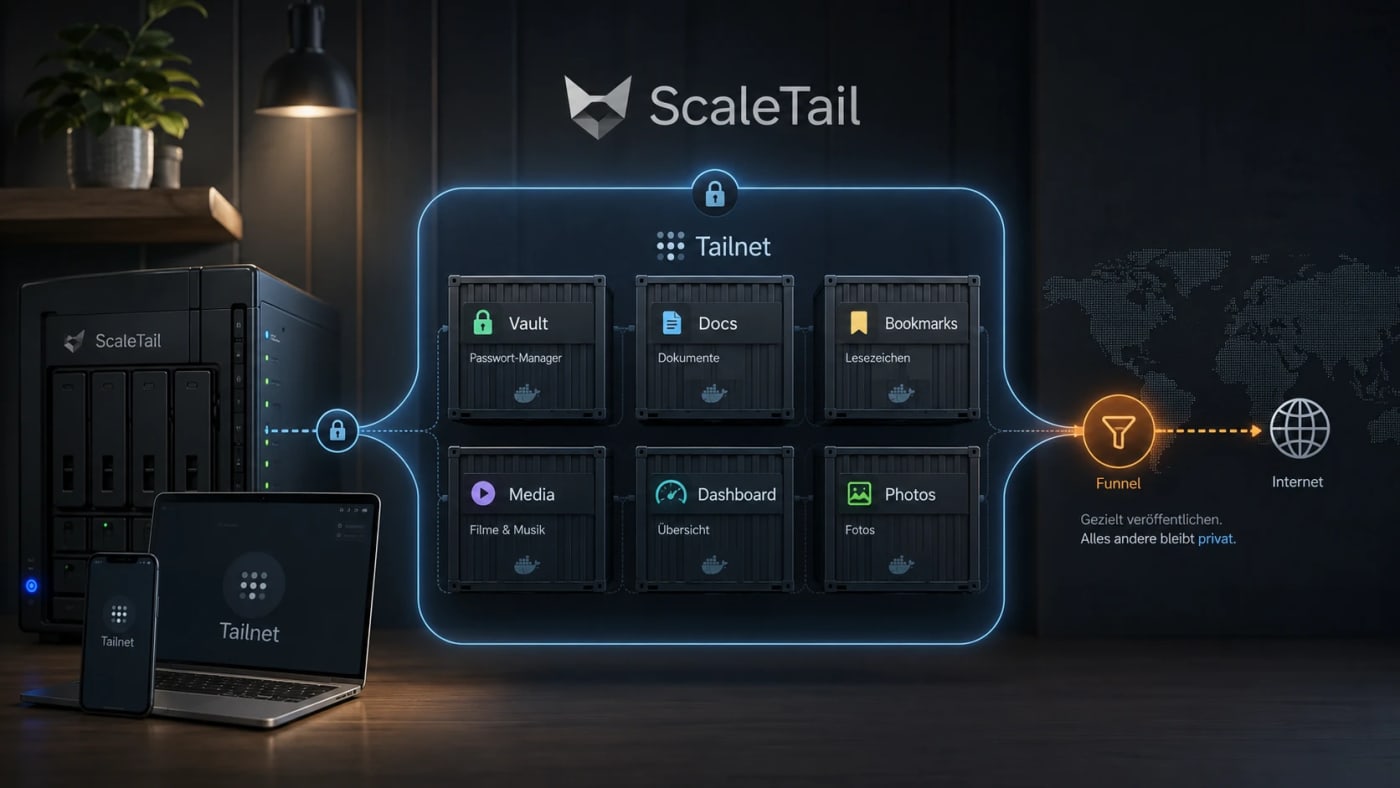
A practical self-hosting resource for exposing Docker apps inside a private Tailnet instead of opening router ports, reverse proxies, and public subdomains by default. What this is ScaleTail is a collection of ready-to-run Docker Compose stacks that attach common self-hosted apps to a Tailscale tailnet through a sidecar container. The useful idea is simple: make private tools reachable from your own devices without turning every dashboard, password vault, document archive, or admin panel into a public web service. Best use case Use this when you run services such as Vaultwarden, Paperless-ngx, Jellyfin, Immich, Pi-hole, AdGuard Home, Home Assistant, Open WebUI, Portainer, or Uptime Kuma and want remote access without a new router port, reverse-proxy rule, or public DNS entry for every app. Workflow Create a reusable Tailscale auth key in the Tailscale admin console. Pick the ScaleTail template matching your service. Review the Docker Compose file before running it, especially volumes, environment variables, and exposed ports. Bind the app container to the Tailscale sidecar network stack with the template's networkmode: service: pattern. Start the stack with Docker Compose and confirm the service appears in your Tailnet. Use Tailscale Serve for private Tailnet access. Only use Funnel when the service is intentionally public. Security notes ScaleTail reduces accidental public exposure, but it does not replace Docker hardening, backups, patching, or least-privilege access controls. Treat every template as code: inspect the image source, tags, volume mounts, environment variables, and update policy before production use. Keep admin panels, password managers, document stores, and local AI interfaces private unless you have a strong reason to expose them publicly. Do not confuse Tailscale Serve with Funnel: Serve is private to the Tailnet, while Funnel publishes a service to the public internet. Quick decision table Need Use ScaleTail? Caveat --- --- --- Private remote access to homelab apps Yes Requires Tailscale and Docker Compose Public webhook endpoint Maybe Funnel can be public; harden it carefully Full site publishing No Use a normal deployment and security model Multi-service homelab on one host Yes Still plan backups, updates, and separation Source check The Tarnkappe article explains the privacy angle, the Serve/Funnel distinction, and why ScaleTail fits self-hosted Docker services that should not be exposed publicly by default. The ScaleTail GitHub repository confirms that the project provides Docker Compose sidecar configurations for connecting self-hosted apps to a Tailnet. Tailscale's own Docker documentation provides the official baseline for running Tailscale with containers.
LinkLoot access
Free
Provider costs
Unknown
Review open
0
Blog

Verwandte Artikel

Blog durchsuchen