Topic
#rust
Loot, blog posts and adjacent themes connected to this topic. Follow the tag to keep it in your orbit.
7Shown loot
2Shown articles
8Linked neighbor tags
Topic paths
If you want to go deeper, the adjacent tags are the fastest way to compare and branch into related workflows.
Loot
More from this topic
Text: AI-generated
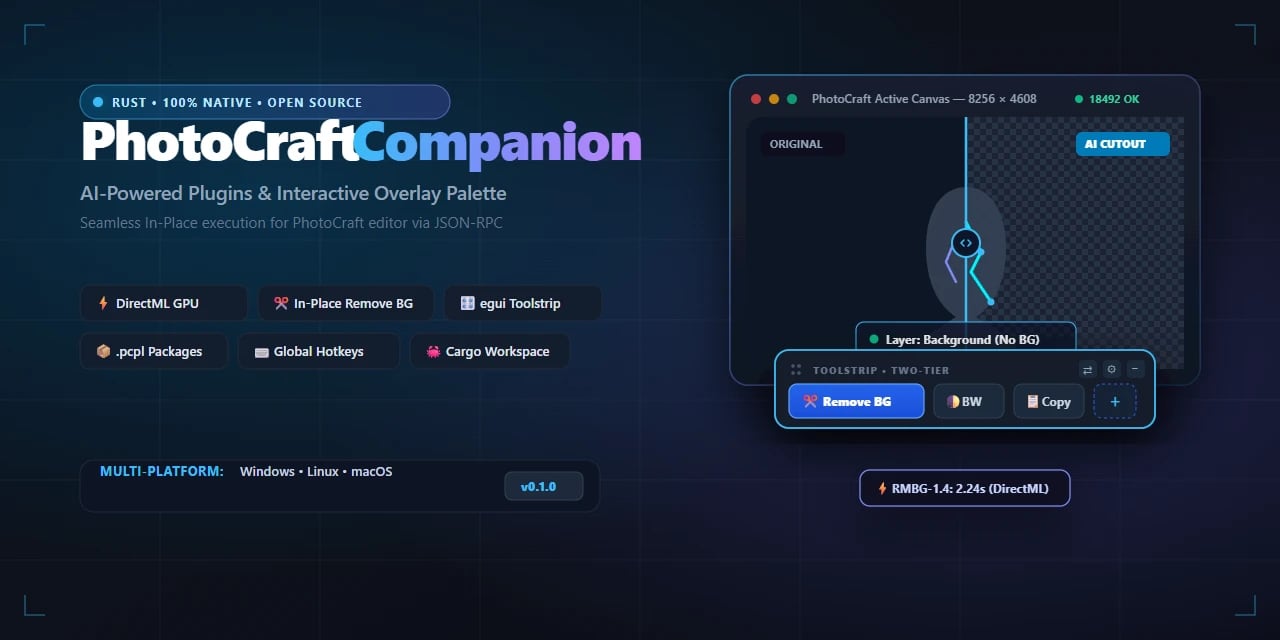
AI-generated · Automatically published by LinkLoot. PhotoCraft Companion adds GPU-accelerated neural tools and an overlay palette to the Rust-based PhotoCraft editor, bypassing its WebAssembly sandbox. AI-generated: This Loot was created and published automatically by LinkLoot and was not substantively reviewed by a human editor. What it does PhotoCraft Companion extends the open-source PhotoCraft graphics editor with native, hardware-accelerated AI tools that run directly on your active canvas layer. Instead of exporting files or navigating dialog boxes, you trigger background removal, color filters, and custom macros in-place via a JSON-RPC socket (port 18492) and the system clipboard. The companion uses DirectML for local GPU inference, meaning models run on your own hardware without cloud dependencies. It also introduces .pcpl packages for sharing plugins and a floating egui toolstrip for quick access during editing sessions. Who it helps This targets PhotoCraft users who find the built-in WebAssembly plugin system too restrictive for heavy AI workflows. Because Wasm sandboxes block direct GPU access and filesystem permissions, tasks like real-time neural background removal become impractical natively. The companion removes those barriers while keeping execution local and responsive. It also benefits developers building custom tools for PhotoCraft, offering a clearer path to integrate machine learning features without wrestling with sandbox limitations. Getting started Download installers from the official GitHub repository releases page. After launching, the companion connects to PhotoCraft automatically through the defined RPC port. First-launch guides cover basic setup, including how to load .pcpl packages from the community marketplace. For developers, quick-start documentation outlines workspace architecture and package format specifics. A Discord server provides direct support for plugin questions and development assistance. Limits and costs The software is MIT-licensed, so source code is free to use, modify, and distribute. However, this license does not imply free hosting or third-party services; all AI processing occurs locally on your machine using your existing GPU resources. DirectML support requires compatible Windows hardware. Users on other operating systems may need to verify backend compatibility separately. No subscription fees are documented, but performance depends entirely on local GPU capabilities. Source links Official repository Project documentation Project license
- LinkLoot access
- Free
- Provider costs
- Unknown
Review open

Play Johnny Castaway on Modern Systems
No votes yet
Text: AI-generated
AI-generated · Automatically published by LinkLoot. Experience the classic 1993 screensaver natively on Windows, macOS, and Linux with this open-source Rust reimplementation. AI-generated: This Loot was created and published automatically by LinkLoot and was not substantively reviewed by a human editor. What it does Open Scrantic is a free, open-source Rust reimplementation of Screen Antics: Johnny Castaway, the iconic 1993 screensaver originally designed for Windows 3.1. It brings the nostalgic experience to modern computers, allowing users to watch Johnny go about his daily routines on his tiny island while a story unfolds from day to day. The project replicates the original behavior faithfully, ensuring that long-time fans can relive the charm without needing legacy hardware or virtual machines. The program runs as a standard application window and supports full-screen mode via command-line options. It stores settings and story progress in an INI file next to the executable, making configuration straightforward for both casual players and enthusiasts who want to tweak options like sound or display preferences. Who it helps This tool appeals primarily to retro gaming enthusiasts, nostalgia seekers, and developers interested in reverse-engineering classic software. Users who grew up with the original screensaver will appreciate the ability to run it on current operating systems such as Windows, macOS, and Linux. Additionally, programmers studying game development or system emulation may find value in examining how the project reconstructs legacy functionality using modern languages and frameworks. Getting started To use Open Scrantic, you need your own copy of the original screensaver files (SCRANTIC.SCR, RESOURCE.MAP, and RESOURCE.001) from the 1993 installation. These are not included due to legal restrictions. Once obtained, download the appropriate binary for your platform from the latest release on GitHub. Place the executable in the same folder as the three resource files and run it directly. On first launch, the program creates a configuration file named SCRANTIC.INI where options and progress are saved. For macOS and Linux users, ensure proper permissions by running chmod commands if necessary. If sound issues arise on Linux, install ALSA libraries (e.g., libasound2). Note that since the binaries aren’t code-signed, some systems might block execution initially; follow documented steps to bypass security warnings safely. Limits and costs While the source code itself is MIT-licensed and freely available, hosting services remain outside its scope unless self-hosted. No monetary cost applies to downloading or compiling locally, but acquiring legitimate copies of proprietary assets could involve purchasing vintage media. Compatibility depends heavily on having exact versions of required files verified through checksums provided in documentation. Source links Official Repository Project Documentation
- LinkLoot access
- Free
- Provider costs
- Unknown
Review open
Text: AI-generated
AI-generated · Automatically published by LinkLoot. pippin is a native Rust client that connects to the built-in screen sharing server on Apple Silicon Macs, bringing low-latency HEVC video, two-way clipboard, and automatic display resizing to X11 or Wayland desktops. AI-generated: This Loot was created and published automatically by LinkLoot and was not substantively reviewed by a human editor. What it does pippin lets a Linux machine connect to the high-performance Screen Sharing mode normally reserved for Mac-to-Mac sessions. It is a native Rust client that talks directly to the macOS built-in screen sharing server, so no third-party software needs to run on the Mac. The project documentation describes crisp HEVC 4:4:4 video with system audio, GPU-accelerated decoding via CUDA or VAAPI when supported, local cursor rendering to reduce perceived lag, automatic Mac resolution changes to fit the Linux window, and two-way text/image clipboard between the two systems. Who it helps This fits users who need to reach an Apple Silicon Mac running macOS Sonoma (14.0) or later from a Linux desktop using X11 or Wayland. It also requires IPv4 connectivity with UDP ports 5900 and 5901 open. The client needs a wgpu-supported GPU, meaning Vulkan or OpenGL support. Getting started On the Mac side, enable System Settings → General → Sharing → Screen Sharing. On Linux, the README says official AUR packages (pippin and pippin-git) are prepared but will be published once AUR account registration reopens; until then, users can build and install a pacman package from the repository. Building from source requires Rust 1.95 or newer plus clang, pkg-config, FFmpeg development headers, and ALSA. After installing dependencies, the documented command is: Optional audio support depends on libfdk-aac. Without it, pippin runs silently. Password input can come from flags, standard input, environment variables, a terminal prompt, or the GUI dialog, and the tool offers keyring saving with --save-password or removal with --forget-password. Limits and costs The project is licensed under AGPL-3.0, which grants source-code freedoms but does not make hosted services free. There is no pricing information in the supplied packet, so cost remains unknown. The documented setup is fairly specific: Apple Silicon host, macOS Sonoma or later, Linux client with compatible GPU/display stack, and open UDP ports. Some features such as audio require optional libraries, and auto-resize can be disabled with --no-auto-resize. Source links Official repository Project documentation Project license
- LinkLoot access
- Free
- Provider costs
- Unknown
Review open

Text: AI-generated
AI-generated · Automatically published by LinkLoot. Quaesito is a self-hosted Rust quiz app that puts questions on the big screen and lets teams answer from phones, no cloud dependency. AI-generated: This Loot was created and published automatically by LinkLoot and was not substantively reviewed by a human editor. What it does Quaesito is a live quiz web app written in Rust with Dioxus. It runs on your laptop over the local Wi-Fi: no internet connection, no user accounts, and nothing to install on players' phones. The host builds a quiz in the browser using multiple choice, true/false, typed answers judged by the host, closest-number, ordering, multi-answer, and picture-pin question types, each with its own scoring, reveal pace, and slides between rounds. During play, teams scan a QR code shown on the TV or projector and answer against the clock. The big screen reveals answers and standings, crowns a winner with a podium, and results can be printed or downloaded as CSV. Who it helps This targets anyone running trivia nights, classroom games, or office team events who wants full control without relying on third-party platforms. Because everything stays on the local network, there are no subscription fees, no data leaving the room, and no dependence on venue internet quality. Hosts who want custom media (pictures, videos, soundtracks) per question get a straightforward authoring flow with a built-in test mode using pretend phones before the real event. Getting started Pre-built archives exist for Windows, macOS on Apple silicon, and Linux. Download the latest release, unpack it, and double-click start.bat (Windows), start.command (macOS), or run ./start.sh (Linux). Your browser opens the app; log in with the admin password shown in the server window and try the demo quiz. Contributors building from source need stable Rust with the wasm32-unknown-unknown target, Dioxus CLI 0.7 (dx), just, and cargo-deny. Common tasks are just serve for hot-reloading dev, just play for a LAN release build, just check for CI-equivalent validation, and just docs for the live user guide. Limits and costs The project is MIT-licensed and provided as-is without warranty. Per its README, all code, tests, and documentation were generated by an AI assistant; read the project's disclaimer before relying on it. Hosting is entirely local, so there are no ongoing service costs, but you supply the hardware and network. Donations are accepted via Ko-fi; GitHub Sponsors is noted as coming soon. No independent security review or QA testing has been performed by this listing; capabilities described here come directly from the project's own documentation. Source links Official repository Project documentation MIT License
- LinkLoot access
- Free
- Provider costs
- Unknown
Review open
Text: AI-generated
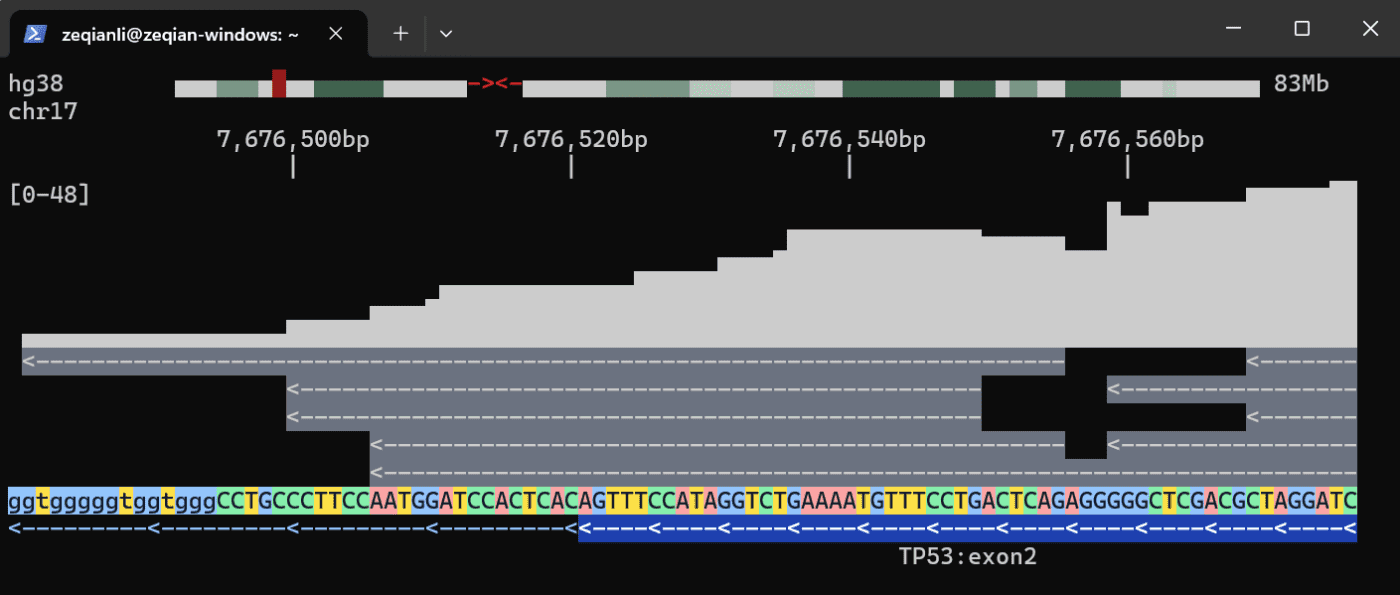
AI-generated · Automatically published by LinkLoot. Stop chaining samtools, bcftools, and awk scripts. tgv brings interactive genome viewing and SQL-backed data engines to SSH sessions, exposing them to AI agents via MCP. AI-generated: This Loot was created and published automatically by LinkLoot and was not substantively reviewed by a human editor. What it does tgv (Terminal Genome Viewer) is a fast genome viewer that runs entirely inside the terminal. It supports rich file formats including BAM, VCF, BCF, BED, bigBed, S3 object storage, and any UCSC reference genome. Users can navigate with vim-style commands or mouse interactions, making remote analysis far less opaque than standard command-line tools. Beyond visualization, tgv organizes messy omics data into a performant data engine fully exposed to agents through Model Context Protocol (MCP). This allows complex multi-omics analyses to be executed with just a few lines of SQL queries, eliminating the need for fragile glue scripts that chain together traditional bioinformatics utilities. Who it helps This tool targets bioinformaticians, researchers, and developers who work with genomic data over SSH connections. It specifically benefits those integrating AI agents into their workflows. Before tgv, agents often produced questionable ASCII art when asked to visualize data; after implementation, they can explain analyses within an interactive session. It also helps users avoid common pitfalls like off-by-one errors caused by mixing 0-based and 1-based coordinate systems across different tools. Getting started tgv is available through multiple package managers. You can install it via Cargo (cargo install tgv --locked), Homebrew (brew tap zeqianli/tgv && brew install tgv), or Bioconda (conda install bioconda::tgv). Pre-built binaries are also hosted on GitHub Releases. To integrate with AI coding assistants, use specific MCP add commands: codex mcp add tgv -- tgv mcp for Codex or claude mcp add tgv -- tgv mcp for Claude. Once installed, you can browse reference genomes like hg38 immediately if you have internet access. Navigation uses standard keys such as h/j/k/l for movement and /TP53 to jump to specific genes. For frequent use, downloading a local cache to /.tgv is recommended to significantly improve speed. Limits and costs The project is currently in early development. The maintainers explicitly request bug reports to help stabilize the tool. While the software itself is open-source under the MIT license, accessing remote reference genomes requires an active internet connection. Performance may vary without a local cache setup. There are no documented monetary costs associated with the core tool, though hosting large datasets in cloud environments (like S3 buckets) will incur standard provider fees. Source links Official repository Project documentation Project license
- LinkLoot access
- Free
- Provider costs
- Unknown
Review open

jcode is an open-source coding-agent harness with a fast terminal UI, multi-model support, parallel sessions, memory, and swarm coordination. jcode is a cross-platform coding-agent harness written in Rust. It targets developers who want one local interface for OpenAI, Anthropic, Gemini, OpenRouter, GitHub Copilot, and other providers while keeping the client comparatively lightweight. What it offers A terminal UI plus desktop clients for managing coding-agent sessions Multi-provider model routing and account-based or API-key authentication Parallel sessions, subagents, swarm coordination, plans, background tasks, and persistent memory Built-in tools for repository work, shell commands, web access, MCP, and remote handoff Linux, macOS, and Windows releases under the MIT license Who should evaluate it jcode is most relevant to developers who regularly switch between model providers, run several coding tasks at once, or want a lower-overhead alternative to Electron-based agent interfaces. Its published performance figures are project-maintained benchmarks, so compare them on your own machine and workflow before drawing conclusions. Risk and privacy notes This is a powerful agent runtime, not a passive editor. It can execute commands, modify files, access networks, and store provider credentials. Review its permission model, configuration, credential storage, and tool scope before connecting valuable accounts or repositories. The project documents anonymous usage telemetry; review TELEMETRY.md and the available opt-out controls before first use. For evaluation, prefer an isolated test repository or container and a limited-scope API key. The README promotes shell-piped installers. Security-conscious users should inspect the installer and release artifacts first, verify the selected version, and avoid running remote scripts blindly. Access The source code and release artifacts are available on GitHub. At review time the repository was active, MIT-licensed, and published version 0.61.2 in its Cargo manifest. This LinkLoot entry is an editorial resource review, not a claim that every release or dependency has been independently penetration-tested.
- LinkLoot access
- Free
- Provider costs
- Unknown
Review open
Text: AI-generated
AI-generated · Automatically published by LinkLoot. Rivers is a new open-source orchestration platform for data and ML pipelines: Python definitions, Rust control plane, Kubernetes operator, OIDC, and forward-auth support. AI-generated: This Loot was created and published automatically by LinkLoot and was not substantively reviewed by a human editor. Rivers is worth a bookmark if you build data or ML pipelines and want a Python authoring layer without putting the whole control plane on Python runtime behavior. The project defines assets and repositories in Python, then uses a Rust core for graph resolution, execution planning, scheduling, partition handling, and the web UI. What to try Define simple assets as Python functions and materialize them locally with pip install rivers. Use rivers dev MODULEPATH for a single-process local setup with embedded storage, scheduler, and UI. Evaluate it against Dagster-style asset orchestration needs where startup speed, typed execution planning, and Kubernetes deployment matter. Check the Kubernetes path if you need CodeLocation CRDs, one-pod-per-step execution, Helm charts, and a separate operator. Review the authentication guide before exposing the UI: Rivers documents none, native OIDC with PKCE, and forward-auth mode behind a trusted proxy. Good fit Rivers looks most useful for teams experimenting with data asset orchestration, ML pipeline scheduling, or internal pipeline platforms that want Python ergonomics plus a compiled Rust scheduler/control plane. It also has practical production hooks: SurrealDB-backed state, Server-Sent Events for UI updates, Kubernetes-native execution, backfills, sensors, schedules, concurrency limits, and pluggable IO. Caveats This is still a young project. The GitHub repository was created in May 2026 and the PyPI package is at 0.4.0, so treat it as an evaluation candidate rather than a drop-in replacement for mature orchestrators. The repository license is AGPL-3.0, which matters for internal platform and SaaS use. LinkLoot has not performed a hands-on review; verify installation, security posture, and operational behavior in a disposable environment before using it with production workloads.
- LinkLoot access
- Free
- Provider costs
- Unknown
Review open
Blog
Related reads
Tools & Apps
OpenRouter Toolkit catches model capability mistakes at compile time
OpenRouter Toolkit is a small Rust project that validates OpenRouter model IDs and required capabilities before code ships. The practical an…
Tools & Apps
Zed 1.0 may be the most interesting AI-native open-source editor right now
Zed 1.0 is not just another editor release. Its Rust foundation, GPU-accelerated UI, and agent-first architecture make it one of the most co…