Topic
#terminal
Loot, blog posts and adjacent themes connected to this topic. Follow the tag to keep it in your orbit.
3Shown loot
1Shown articles
8Linked neighbor tags
Topic paths
If you want to go deeper, the adjacent tags are the fastest way to compare and branch into related workflows.
Loot
More from this topic
Text: AI-generated
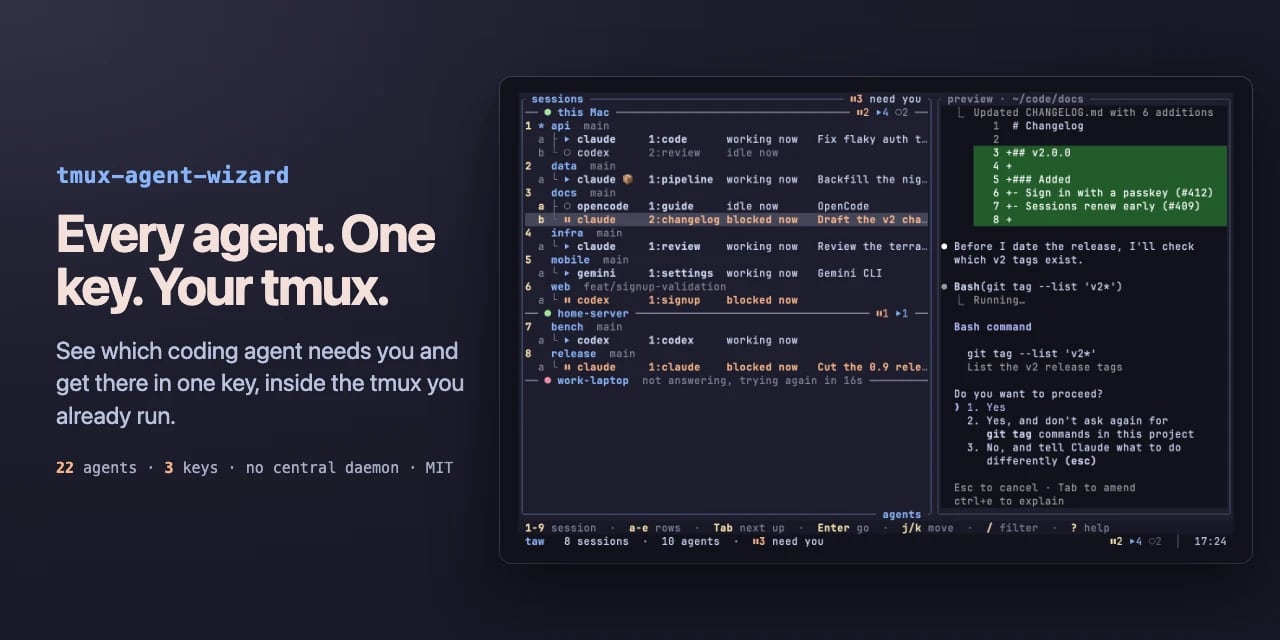
AI-generated · Automatically published by LinkLoot. A tmux plugin that reads the state of 22 coding agents across your panes and shows blocked, working, done or idle in one tree. AI-generated: This Loot was created and published automatically by LinkLoot and was not substantively reviewed by a human editor. What it does tmux-agent-wizard (taw) puts a state dashboard inside the tmux you already run. It watches every pane with herdr's detection engine and labels each agent as blocked, working, done or idle. Press prefix + A for one tree of sessions, panes and worktrees; Tab hops to the next agent that needs attention, Enter lands you in its session. If an agent blocks or finishes while you're elsewhere, a toast names it and prefix + O jumps there. It also folds in two familiar jobs: project-to-session picking from tmux-session-wizard, and save/restore of sessions, layouts and folders so agents come back into their conversations after a reboot. Your existing tmux.conf, keys, plugins and status line stay untouched. There is no central daemon — just a small watcher per pane, about 9 MB each — and no account. Who it helps Developers who juggle several AI coding agents at once: Claude Code in one window, Codex in another, OpenCode in a worktree. The pain it targets is real — one agent stuck on a permission prompt for twenty minutes while you flick through windows to notice. taw surfaces exactly which pane is waiting, including over ssh via terminal notifications or system toasts on macOS and Linux. Getting started Requirements: tmux 3.2 or newer on macOS or Linux, plus TPM. Add set -g @plugin '27medkamal/tmux-agent-wizard' to /.tmux.conf, press prefix + I, and TPM installs it. On first load taw downloads its binary from GitHub releases, checked against the release's SHA-256 checksum. Then prefix + A lists the agents already running. Optional extras: run taw integration install claude (or codex, opencode, cursor) once per agent so restore returns it to the same conversation; symlink taw into /.local/bin if you want it outside tmux. Without TPM, from source, or with the download disabled, see the project's install page. Limits and costs The detection list covers 22 agents via herdr's rules, so unusual or brand-new tools may not be recognized until the engine updates. Restore requires per-agent integration setup. Each pane runs a 9 MB watcher, which adds up on wide setups. The project is MIT-licensed and free; pricing beyond that is not stated. No security audit or human review is claimed by the documentation — the checksum verification is the only integrity step described. Source links Official repository Project documentation Project license
- LinkLoot access
- Free
- Provider costs
- Unknown
Review open


jcode is an open-source coding-agent harness with a fast terminal UI, multi-model support, parallel sessions, memory, and swarm coordination. jcode is a cross-platform coding-agent harness written in Rust. It targets developers who want one local interface for OpenAI, Anthropic, Gemini, OpenRouter, GitHub Copilot, and other providers while keeping the client comparatively lightweight. What it offers A terminal UI plus desktop clients for managing coding-agent sessions Multi-provider model routing and account-based or API-key authentication Parallel sessions, subagents, swarm coordination, plans, background tasks, and persistent memory Built-in tools for repository work, shell commands, web access, MCP, and remote handoff Linux, macOS, and Windows releases under the MIT license Who should evaluate it jcode is most relevant to developers who regularly switch between model providers, run several coding tasks at once, or want a lower-overhead alternative to Electron-based agent interfaces. Its published performance figures are project-maintained benchmarks, so compare them on your own machine and workflow before drawing conclusions. Risk and privacy notes This is a powerful agent runtime, not a passive editor. It can execute commands, modify files, access networks, and store provider credentials. Review its permission model, configuration, credential storage, and tool scope before connecting valuable accounts or repositories. The project documents anonymous usage telemetry; review TELEMETRY.md and the available opt-out controls before first use. For evaluation, prefer an isolated test repository or container and a limited-scope API key. The README promotes shell-piped installers. Security-conscious users should inspect the installer and release artifacts first, verify the selected version, and avoid running remote scripts blindly. Access The source code and release artifacts are available on GitHub. At review time the repository was active, MIT-licensed, and published version 0.61.2 in its Cargo manifest. This LinkLoot entry is an editorial resource review, not a claim that every release or dependency has been independently penetration-tested.
- LinkLoot access
- Free
- Provider costs
- Unknown
Review open

tuistore is a GPL-licensed terminal app store that helps developers search hundreds of TUI and CLI tools, inspect install methods, and install them through the package managers already available on their machine. tuistore is useful if your terminal setup keeps turning into a tab full of GitHub READMEs, package-manager guesses, and stale install snippets. It gives you a searchable TUI catalog of terminal apps and CLI utilities, then ranks install methods based on the operating system, distro family, architecture, and package managers it detects locally. The practical value is the install guardrail. Before running anything, tuistore shows the exact command, labels whether the method is official, README-derived, or inferred, and streams the output instead of hiding it behind a background installer. That makes it a good discovery tool for modern CLI stacks, but also a safer way to compare whether a tool should come from Homebrew, uv, pipx, cargo, npm, pacman, winget, or another manager. The current checked release is v0.4.5, published July 20, 2026, with the catalog expanded to 800+ tools and broader Linux distro support for Gentoo, Solus, Void, and Alpine workflows. PyPI lists version 0.4.5 as GPL-3.0-or-later and requires Python 3.11 or newer. Check before using Review any remote shell installer before accepting it, even when tuistore flags it clearly. Confirm license and branding terms if you redistribute or fork the project. Expect catalog coverage to be best for popular terminal apps; niche tools may still need manual review. On locked-down work machines, test it in a disposable dev environment before letting it manage global packages. Sources GitHub repository: project overview, install flow, catalog behavior, platform-aware method ranking, CLI commands, and license notes. GitHub v0.4.5 release: current release date, catalog-size update, and expanded Linux distro support. PyPI package metadata: published package name, current version, Python requirement, repository link, and GPL-3.0-or-later license metadata.
- LinkLoot access
- Free
- Provider costs
- Unknown
Review open
Blog