Topic
#workflow
Loot, blog posts and adjacent themes connected to this topic. Follow the tag to keep it in your orbit.
8Shown loot
2Shown articles
8Linked neighbor tags
Loot
More from this topic
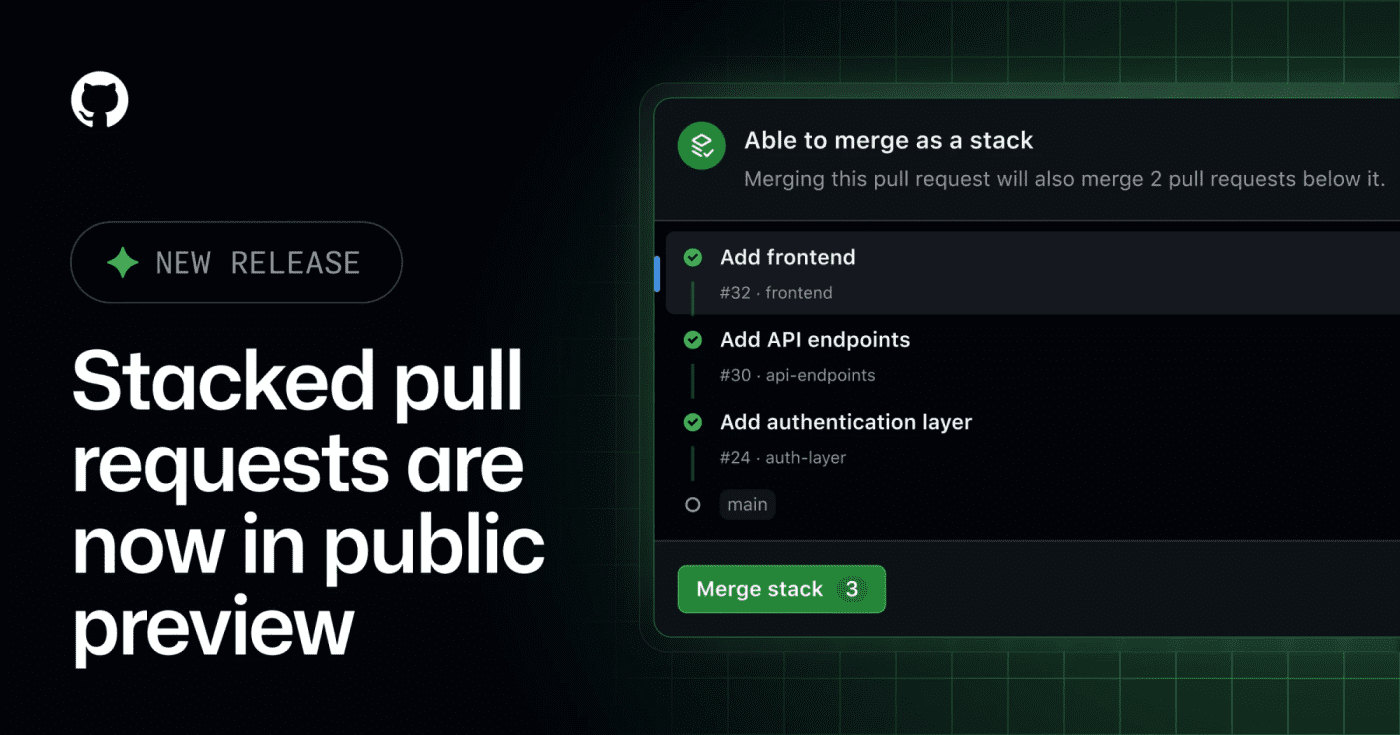
GitHub's public preview for stacked pull requests helps teams split dependent code changes into ordered, reviewable layers. GitHub has opened stacked pull requests in public preview, giving teams a native way to split a large change into smaller dependent PRs without managing the stack entirely by hand. What it is Stacked pull requests are ordered PRs where each pull request represents one focused layer of a larger change. GitHub says reviewers can inspect each layer independently, then merge the stack together when the series is ready. Who it helps This is useful for engineering teams that regularly ship refactors, migrations, feature branches with several dependencies, or AI-assisted changes that are too large for one review. It also matters for teams using Copilot workflows, because the changelog notes Copilot using a gh-stack skill in the stacked-PR flow. How to evaluate it Try it first on a non-critical branch with a small three-PR stack: setup, implementation, and tests. Check how status checks, review comments, rebases, branch protection, and merge order behave in your repository before making it part of your default review workflow. Limits and risks This is a public preview, so workflows may still change. Teams should verify compatibility with required checks, release automation, merge queues, and any bot that assumes every PR can merge independently. Sources GitHub changelog
- LinkLoot access
- Free
- Provider costs
- Unknown
Review open

Screenpipe records screen and audio locally, indexes the work trail, and exposes it through APIs/MCP so agents can retrieve context and turn repeated tasks into SOPs or automations. Screenpipe is a practical local-first memory layer for desktop agents. It captures screen and audio on the user machine, indexes the work trail, and exposes the context through an API, MCP, and agent integrations so an assistant can answer what happened, gather task context, or turn repeated work into SOPs. The useful angle is not another meeting recorder; it is an observable workflow layer for people building agents around real desktop work. A support team could reconstruct how a case was handled, a creator could recover research trails, and an operator could ask an agent to summarize what changed across apps without manually pasting every source. Start carefully. Continuous screen and audio capture needs explicit consent, sensible schedules, app/window filters, and a review of where transcripts, screenshots, embeddings, and summaries live. Treat it as a powerful local tool for personal or managed-team automation, not something to deploy casually across sensitive machines. Best first test: install it on a non-sensitive machine, run a short work session, then query the local history for tasks completed, blockers, and repeatable steps. If the output is useful, build one small automation against the localhost API before expanding scope.
- LinkLoot access
- Free
- Provider costs
- Unknown
Review open
Control coding agents visually with Juggler
No votes yet
Juggler is an open-source GUI workbench for hands-on coding-agent sessions. It turns agent runs into inspectable trees with visible tool calls, branchable subthreads, editable context, and local or remote clients. Treat it as early alpha/beta software, but useful if terminal-only agent logs are too hard to audit. Use Juggler when terminal-only coding-agent sessions are too hard to inspect. The project presents agent work as a visual tree with visible tool calls, approvals, editable context, branchable subthreads, and clients that can attach locally or remotely. Best fit: developers who want more control over Claude Code, OpenAI/Codex, Gemini, Ollama, OpenRouter, Z.ai, DeepSeek, and similar coding-agent sessions. Caveats: the author labels it alpha/beta software, the main app is AGPLv3, and teams should review network exposure before running remote sessions.
- LinkLoot access
- Free
- Provider costs
- Unknown
Review open
A community OpenClaw skill for defining agent roles, task states, handoffs, and review gates before multi-agent work gets messy. Agent Team Orchestration is a community OpenClaw skill for teams that use more than one agent on the same stream of work. It gives the orchestrator a concrete operating model: define roles, move tasks through clear states, require handoff notes, and add review gates before agent-produced work ships. What it helps with Builder and reviewer agent loops for code, docs, research, or operations work. Clear task states such as inbox, assigned, in progress, review, done, or failed. Handoff messages that include what changed, where artifacts live, how to verify them, known gaps, and the next action. Quality checks when several agents are passing work across sessions. Who should evaluate it Use this as a candidate when an OpenClaw setup already has repeated multi-agent delegation and the weak point is coordination rather than raw model capability. It is most useful for long-running workflows, parallel research, build-review loops, and agent teams that need predictable artifact paths. Skip it for simple one-off delegation or a solo assistant. The process overhead only pays off when multiple agents are producing, reviewing, or routing work across more than one task. Setup surface The ClawHub page lists the install command as openclaw skills install @arminnaimi/agent-team-orchestration. Do not install it blindly on a production Pi. Review the skill file, reference files, permissions, and any tool assumptions first, then test it in an isolated OpenClaw workspace. Risk notes This is editorial discovery, not a runner-verified recommendation. Community skills can change after publication, and orchestration skills may influence how agents spawn work, communicate, and mark tasks complete. Treat the ClawHub and index pages as source material, then perform your own review before using it with sensitive repos, credentials, or external actions. Sources Awesome OpenClaw Skills: https://github.com/VoltAgent/awesome-openclaw-skills ClawHub listing: https://clawhub.ai/arminnaimi/skills/agent-team-orchestration Skill mirror: https://clawskills.sh/skills/arminnaimi-agent-team-orchestration
- LinkLoot access
- Free
- Provider costs
- Unknown
Review open

OpenAI’s July 9 Codex app release note is a practical checkpoint for teams using Codex from mobile devices, SSH projects, Computer Use, and plugin-heavy workspaces. What it is OpenAI’s Codex changelog entry for July 9, 2026 lists a small but practical set of workflow fixes: faster Computer Use with GPT-5.6, clearer task activity while Codex works, plugin management moved into Settings, better mobile connection reliability, and fixed video rendering for SSH projects. Who should use it Use this as an upgrade checklist if your team runs Codex against remote workspaces, supervises coding agents from mobile, relies on Computer Use, or has users confused by plugin discovery and settings drift. How to evaluate it Update the Codex app and confirm the July 9 release note applies to your platform. Re-test one SSH project where video rendering or connection reliability previously failed. Run a short Computer Use task with GPT-5.6 and compare responsiveness against your last known baseline. Check whether plugin management in Settings reduces support friction for your workspace. Limits and risks This is not a new model launch or a broad API change. Treat it as a workflow reliability update, not a reason to rewrite agent processes. OpenAI does not publish detailed benchmarks in the changelog entry, so any speed or reliability improvement should be validated against your own projects before changing internal runbooks. Source OpenAI Codex changelog
- LinkLoot access
- Free
- Provider costs
- Unknown
Review open
OpenAI's Codex team shared practical GPT-5.6 guidance in a Reddit AMA: use Sol Medium for most coding, reserve Sol Ultra for costly mistakes, and keep agents on bounded goals with tests. What it is A practical reference for choosing GPT-5.6 models in Codex after OpenAI's July 10 AMA. The useful signal is workflow guidance, not another launch recap: Sol Medium for most coding, Sol Ultra for migrations and security-sensitive work, Terra for faster or usage-conscious tasks, and Luna for lighter subagent work. Why bookmark it The AMA gives direct operating guidance from the Codex team instead of benchmark-only positioning. TestingCatalog distilled the model-routing notes, Codex usage comments, desktop-app friction, and persistence tips into a scan-friendly summary. The notes are useful for teams setting default reasoning levels, test requirements, and escalation rules after the GPT-5.6 rollout. Good first use Turn the AMA notes into a small routing checklist for your coding agents: task risk, repository size, required tests, acceptable latency, and when to move from Sol Medium to higher reasoning or Sol Ultra. Risk notes Treat Reddit comments and social summaries as context, not product documentation. Verify model availability, usage allowances, pricing, and context-window behavior in your own ChatGPT, Codex, or API account before changing production defaults.
- LinkLoot access
- Free
- Provider costs
- Unknown
Review open
An OpenClaw skill candidate that bundles TODO/FIXME loop scans, parallel-vs-serial planning, file-size review, and subworkflow handoff into one local workflow surface. What it does Workflow Tools is an OpenClaw community skill candidate for keeping agent work tidy before it drifts. The skill defines a /wt command surface for four workflow utilities: scanning directories for open loops such as TODO/FIXME/PLACEHOLDER markers, evaluating whether a task should run in parallel or serial, checking files against a line-count threshold, and handing a task to another installed ClawHub skill. Pricing classification: free. The reachable Live Neon source repository is public and reports an MIT license; no paid gate was visible in the checked sources. Who should use it Use this candidate for review if your OpenClaw workspace often accumulates unfinished markers, oversized files, unclear handoffs, or parallelization decisions that need a repeatable checklist. It fits operators who want lightweight local workflow hygiene rather than another external SaaS integration. Setup surface The skill declares config files under .openclaw/workflow-tools.yaml and .claude/workflow-tools.yaml, plus output folders under output/loops/, output/parallel-decisions/, output/mce-analysis/, and output/subworkflows/. Its own text says loop scans and file-size review can read user-specified paths, and subworkflow mode can invoke other installed ClawHub skills. No installation or execution was performed on this Raspberry Pi. Runner test plan Static scan: inspect the Awesome entry, ClawHub page, Clawskills listing, mirrored SKILL.md, Live Neon source tree, raw SKILL.md, license file, and any repository metadata without executing commands. Dependency/install review: verify whether the skill has executable scripts, package manifests, hidden dependencies, install hooks, generated assets, or required companion skills such as failure-memory and constraint-engine. Prompt-injection/tool-poisoning review: check the SKILL.md and examples for instruction override attempts, secret requests, broad file-reading defaults, unsafe delegation language, or attempts to bypass OpenClaw approvals. Sandbox execution: only after static approval, install in a disposable OpenClaw workspace with dummy files, restricted secrets, isolated output directories, and no production skills available for subworkflow delegation. Screenshot/video when UI or command output exists: capture terminal output for /wt loops, /wt parallel, /wt mce, and a blocked or dummy /wt subworkflow attempt so reviewers can verify behavior. Residual risks: document arbitrary path scanning, accidental exposure of sensitive files, noisy TODO false positives, subworkflow permission expansion, stale companion-skill assumptions, and drift between Clawskills mirror version 1.4.0 and Live Neon source version 1.5.0. Risk notes This Loot is a review candidate, not a safety endorsement. Community skill text is untrusted input. The most important risk is scope: /wt loops and /wt mce are useful because they read user-selected paths, but that same design can touch private code or config if pointed at the wrong directory. Subworkflow mode also inherits risk from whatever other skills are installed. Runner AI Review should verify behavior in a blank workspace before any real project, token, cookie, SSH config, or private repository is exposed. Source links Awesome OpenClaw Skills category entry: https://raw.githubusercontent.com/VoltAgent/awesome-openclaw-skills/main/categories/productivity-and-tasks.md ClawHub page: https://clawhub.ai/leegitw/workflow-tools Clawskills listing: https://clawskills.sh/skills/leegitw-workflow-tools Clawskills SKILL.md mirror: https://clawskills.sh/skills-markdown/leegitw/workflow-tools.md Underlying Live Neon source tree: https://github.com/live-neon/skills/tree/main/agentic/workflow-tools Raw SKILL.md source: https://raw.githubusercontent.com/live-neon/skills/main/agentic/workflow-tools/SKILL.md License evidence: https://raw.githubusercontent.com/live-neon/skills/main/LICENSE
- LinkLoot access
- Free
- Provider costs
- Unknown
Review open
A free OpenClaw community skill candidate for keeping Agent Skill bundles traceable with manifests, changelogs, SHA-256 hashes, and stale-file checks across chat, CLI, IDE, and registry workflows. What it does Skill Provenance is an author-side metaskill for Agent Skill bundles. It documents a portable MANIFEST.yaml, CHANGELOG.md, per-file version metadata, and SHA-256 hash checks so a skill's SKILL.md, evals, scripts, references, and packaged copies can be tracked across sessions and platforms. The upstream source describes it as free and open with an MIT license. Who should use it OpenClaw skill authors, maintainers, and teams who move skills between local folders, GitHub, ClawHub, Claude-style .skill packages, Codex/Gemini-compatible strict copies, or multiple agent sessions. It is most useful when bundle drift, stale evals, renamed files, or unclear handoffs are a recurring problem. Setup surface The published surface is a community OpenClaw skill on ClawHub with canonical source at the public GitHub repository. The bundle includes SKILL.md, README.md, MANIFEST.yaml, CHANGELOG.md, eval files, validate.sh, and package.sh according to the fetched manifest. Treat installation commands and scripts in the source as review material only until Runner AI Review finishes. Pricing evidence from the upstream GitHub README states it is free and open; license evidence points to MIT. Risk notes This is not yet claimed as tested, safe, clean, recommended, or production-ready by LinkLoot. The concept relies on local file inventory and hash checks, but the upstream source itself notes that a manifest is not a cryptographic signature or trust anchor. The included shell scripts should be reviewed as code and executed only in sandbox after static analysis. Because the skill is designed to edit manifests/changelogs and package derived copies, Runner should verify it does not mutate unrelated files, read broad home/config/SSH paths, or follow embedded source instructions beyond the user's explicit task. Source links Awesome OpenClaw Skills list: https://github.com/VoltAgent/awesome-openclaw-skills and category listing https://raw.githubusercontent.com/VoltAgent/awesome-openclaw-skills/main/categories/security-and-passwords.md ClawHub page: https://clawhub.ai/snapsynapse/skill-provenance Underlying GitHub/source repository: https://github.com/snapsynapse/skill-provenance Source SKILL.md: https://raw.githubusercontent.com/snapsynapse/skill-provenance/main/skill-provenance/SKILL.md Source manifest: https://raw.githubusercontent.com/snapsynapse/skill-provenance/main/skill-provenance/MANIFEST.yaml
- LinkLoot access
- Free
- Provider costs
- Unknown
Review open
Blog
Related reads
Tools & Apps
Run GitHub Actions steps in parallel without losing separate logs
GitHub Actions now supports parallel steps with background, wait, wait-all, cancel, and parallel syntax. It is useful for faster CI jobs, bu…
AI & Automation
OpenAI Expands Codex With Role Plugins and Sites
OpenAI introduced role-specific Codex plugins, Sites, and broader annotations on June 2, 2026, pushing Codex beyond coding into workplace wo…