Thema

#JavaScript

Loots, Blogposts und verwandte Themen rund um diesen Tag. Folge dem Tag, damit passende Updates in deinem Orbit bleiben.

#JavaScript
4Gezeigte Loots
5Gezeigte Artikel
8Verlinkte Nachbar-Tags
Anschluss-Themen

Wenn du tiefer einsteigen willst, helfen die benachbarten Tags beim Vergleichen und Querlesen.

Loot

Mehr aus diesem Thema

Alle Loots entdecken

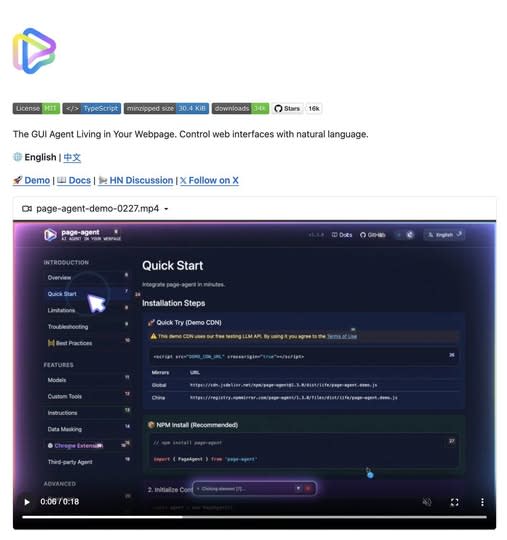
This JS Agent Turns Any Website Into an AI Copilot

1
A lightweight in-page GUI agent that reads the DOM as text and executes natural-language commands inside your app. Great for copilots, form automation, and legacy UI workflows. What It Is Alibaba’s Page Agent takes a very different approach to browser automation. Instead of relying on screenshots, multimodal models, or brittle external browser control, it runs directly inside the webpage and reads the DOM as text. That means you can embed a natural-language GUI agent into your own product with a lightweight frontend integration. --- Why It Feels Different Most traditional browser automation stacks still depend on: screenshots selectors brittle scripting heavyweight orchestration Page Agent flips that model. It allows commands like: “fill out this form” “open settings” “change the billing plan” “submit the support request” And it does that inside the page context itself. --- Where It Gets Interesting The real value is not just automation. It is the ability to turn normal interfaces into natural-language workflows. That makes Page Agent especially interesting for: SaaS copilots internal tools admin dashboards form-heavy workflows support tooling accessibility layers for older web apps --- What Makes It Stand Out A lot of AI browser tools still feel like external bots driving a website from a distance. Page Agent feels closer to: an embedded UI assistant a natural-language task layer an AI control system for existing interfaces That difference matters. Because once the agent lives inside the interface, it becomes easier to imagine: product onboarding copilots guided admin actions internal ops assistants text-driven navigation for legacy tools --- Best Use Cases Use case Why it fits --- --- SaaS copilots Lets users control complex interfaces with natural language Internal tools Great for repetitive admin or ops workflows Form automation Especially useful where users need help completing multi-step UI flows Legacy software Adds a modern interaction layer without rebuilding the whole interface Accessibility Makes web apps easier to navigate through voice or text --- Why This Could Matter More Than It Looks A lot of people will see this and think: “Cool, another browser automation project.” That undersells it. What makes this interesting is that it points toward a broader shift: from external automation to embedded natural-language interaction If that model keeps improving, products will not just have dashboards anymore. They will have interfaces that users can talk to. --- Final Take Page Agent is one of the more interesting examples of where AI product interfaces are heading. Not because it is flashy. But because it suggests a practical future where: interfaces remain visual users stay inside the product and AI becomes a task layer sitting directly on top of the UI That is a much stronger idea than “just another browser bot.” Source GitHub: https://github.com/alibaba/page-agent
Free
Review open
0

Load Versioned WebGPU Kernels Directly from Hugging Face

0
Text: AI-generated
AI-generated · Automatically published by LinkLoot. Hugging Face’s @huggingface/kernels gives browser-based ML projects a versioned loader for 207 Apache-2.0 WebGPU kernels. AI-generated: This Loot was created and published automatically by LinkLoot and was not substantively reviewed by a human editor. Hugging Face's @huggingface/kernels is a practical resource for developers building local AI features in the browser. It provides a JavaScript loader for versioned WebGPU kernels hosted on the Hugging Face Hub, plus an initial collection of 207 Apache-2.0 kernels. What you can use it for The collection targets low-level operations used by browser inference workloads. Each kernel is packaged with an inspectable contract, WGSL shader templates, correctness cases, benchmark cases, and usage instructions. That makes the repository more useful than a loose shader snippet when you need to evaluate or pin a compute operation. The loader is installed from npm: The runtime requires a browser with WebGPU support. It is therefore aimed at modern browser applications and local inference experiments, not server-side Node.js workloads without a WebGPU implementation. Why it is useful A versioned Hub artifact can reduce the maintenance burden of shipping browser GPU operations yourself. The kernel card exposes the operation semantics and supported inputs, while the package handles fetching and preparing the selected kernel from the Hub. Hugging Face also provides Fleet, a browser-based benchmarking and testing surface. Contributions from real devices can help reveal compatibility and performance differences that a single developer machine may not expose. A sensible evaluation path Check browser WebGPU support and test on the target hardware. Start with one operation from the WebGPU kernel collection. Pin the kernel version and inspect its manifest, correctness cases, and benchmark cases. Compare the result against your current runtime before replacing a production path. Treat remotely loaded artifacts as dependencies: review provenance, lock versions, and avoid loading untrusted publishers by default. The project is open source under Apache-2.0. Use the official documentation and repository as the starting point; do not infer that every Hub kernel has identical hardware coverage or production readiness.
Free
Review open
0

Export editable Word documents from semantic HTML with DOM-docx

0
DOM-docx converts semantic HTML fragments into native, editable .docx files, giving builders a lighter path for report exports, invoices, and creator documents than screenshot-style rendering. DOM-docx is a small MIT-licensed JavaScript library and CLI for turning semantic HTML fragments into native Word documents. It is useful when a product already renders reports, briefs, invoices, tables, or creator drafts as HTML but still needs a real .docx export that users can edit in Word. The default path is intentionally lightweight: inline styles convert in pure JavaScript, with no browser or Playwright dependency for normal Node usage. If you need class-based or computed CSS, the project supports an optional computed-style path using Playwright and Chromium. For browser apps, the package also exposes a browser bundle that can create a Blob in the user's tab. What makes this worth bookmarking is the practical scope. The project supports headings, paragraphs, lists, tables, links, inline formatting, simple SVG, page metadata, headers, footers, page numbers, and image handling through an explicit resolver. It also documents the limits clearly: external stylesheets on the inline path, complex layout, web fonts, forms, and guaranteed multi-page fidelity are not solved yet. Best fit SaaS report exports where HTML is already the source of truth. Internal tools that need editable Word handoff instead of PDF-only output. Creator workflows that generate briefs, scripts, proposals, or tables from templates. Agent-generated documents where a semantic HTML intermediate is easier to inspect than OOXML. Caveats before shipping Treat untrusted HTML as input data and sanitize it before conversion. Use an allowlisted imageResolver for remote images, because the library does not fetch remote images by default. Test real customer documents in Word and LibreOffice before promising layout fidelity. Use the computed-style path only when you actually need stylesheet or class resolution.
Free
Review open
0

Scan AI Apps for System Prompt Injection with CodeQL 2.26.0

0
GitHub's CodeQL 2.26.0 adds a JavaScript/TypeScript query that detects untrusted user values flowing into AI system prompts. CodeQL 2.26.0 is useful for teams shipping AI features in JavaScript or TypeScript. The release adds js/system-prompt-injection, a query for cases where untrusted user-provided values flow into an AI model's system prompt and can manipulate model behavior.\n\nWhy bookmark it: GitHub says every new CodeQL version is automatically deployed to GitHub code scanning users on github.com, so many teams can get the new query through existing security workflows instead of adding a separate scanner. The release also adds prompt-injection sinks for OpenAI, Anthropic, and Google GenAI SDK APIs, plus Kotlin 2.4.0 support and several query accuracy improvements.\n\nUse it for: AI app pull requests, agent backends, prompt-template libraries, Realtime session setup, and GenAI SDK integrations where user content might cross into system-level instructions.\n\nCheck before relying on it: whether your repo uses GitHub code scanning on github.com or a GitHub Enterprise Server version that includes CodeQL 2.26.0, whether the affected language pack runs in your workflow, and whether custom prompt-building helpers need extra modeling.
Free
Review open
0
Blog

Verwandte Artikel

Blog durchsuchen