Topic
#tool
Loot, blog posts and adjacent themes connected to this topic. Follow the tag to keep it in your orbit.
16Shown loot
0Shown articles
8Linked neighbor tags
Topic paths
If you want to go deeper, the adjacent tags are the fastest way to compare and branch into related workflows.
Loot
More from this topic

Text: AI-generated
AI-generated · Automatically published by LinkLoot. Cloudflare AI Search can now use six additional Workers AI text-generation models without requiring a separate provider key. AI-generated: This Loot was created and published automatically by LinkLoot and was not substantively reviewed by a human editor. Cloudflare has added six Workers AI models to AI Search, giving teams more control over the model used to answer questions from an indexed knowledge base without managing another provider credential. What it is The added model IDs are DeepSeek V4 Flash, DeepSeek V4 Pro, GPT-OSS 120B, GPT-OSS 20B, Qwen3.8 27B, and Kimi K2.7 Code. Their published context windows range from 128,000 to more than one million tokens. AI Search handles the retrieval layer, while the selected Workers AI model generates the response. You can choose the model when creating or updating an AI Search instance through the dashboard or API. Who it helps This is useful for developers already running on Cloudflare who want to compare open and hosted models for documentation search, support assistants, internal knowledge tools, or agent retrieval without distributing additional API keys. How to evaluate it Create a test instance or duplicate a non-production configuration. Run the same representative question set through two or three models and record answer accuracy, citation quality, latency, token use, and failure rate. Include questions with missing evidence to check whether the model invents an answer instead of admitting that retrieval found nothing. Limits and risks A large context window does not guarantee better retrieval or factuality. Models also differ in tool behavior, language coverage, latency, and output length. Removing an external provider key simplifies credential management but increases dependence on Cloudflare's model catalog and service controls. Review Workers AI pricing, plan eligibility, regional processing, retention terms, and rate limits before moving sensitive or high-volume workloads. Keep authorization checks outside the model and avoid indexing secrets merely because the retrieval system is private. Access and pricing The models run through Workers AI. Exact cost and plan requirements vary by model and account, so confirm the current Workers AI rate card before estimating production spend. Sources Cloudflare announcement Supported AI Search models
- LinkLoot access
- Free
- Provider costs
- Unknown
Review open


Text: AI-generated
AI-generated · Automatically published by LinkLoot. Vercel has temporarily halved GPT-5.6 Sol token prices for requests billed directly through AI Gateway. AI-generated: This Loot was created and published automatically by LinkLoot and was not substantively reviewed by a human editor. What it is Vercel is applying a 50% discount to GPT-5.6 Sol requests billed directly through AI Gateway until September 18, 2026. The promotion covers default, Flex, and Priority service tiers as well as cached tokens, cache writes, long-context requests, regions, and supported modes. Who it helps The offer is most useful for teams already evaluating GPT-5.6 Sol for coding agents, document analysis, or long-context workloads. Existing AI Gateway requests using openai/gpt-5.6-sol receive the lower rate without a model-ID change. How to evaluate it Compare a representative workload rather than a short synthetic prompt. Record input, cached-input, and output-token use alongside latency and task success. Confirm that requests are using Vercel’s OpenAI provider and are billed by AI Gateway. Published promotional prices per million tokens are $2.50 input and $15 output for Default, $1.25 and $7.50 for Flex, and $5 and $30 for Priority. Vercel also provides a browser playground for testing before integration. Limits and risks The discount does not apply to bring-your-own-key requests. BYOK traffic continues to use the pricing attached to the customer’s provider account. Costs return to the applicable standard rate after the promotion, so production budgets should use post-promotion pricing and include spend alerts. AI Gateway adds another service to the request path. Review data handling, retention, regional routing, availability requirements, and provider fallback settings before sending sensitive material. Access and pricing An AI Gateway account and API key are required. The discount is automatic for eligible directly billed requests and expires September 18, 2026; no coupon code or claim step is listed. Sources Vercel promotion and pricing table Vercel AI Gateway
- LinkLoot access
- Free
- Provider costs
- Unknown
Review open

Text: AI-generated
AI-generated · Automatically published by LinkLoot. Cloudflare's new Browser Run Playground lets developers trial screenshots, PDFs, extraction, and AI-structured scraping from the dashboard before writing integration code. AI-generated: This Loot was created and published automatically by LinkLoot and was not substantively reviewed by a human editor. What it is Cloudflare Browser Run now has a dashboard Playground for testing Quick Actions against a live browser. You can submit a URL or raw HTML, adjust viewport and page-load settings, preview output, and copy working request code. Who it helps It is useful for developers building browser automation, scraping, QA capture, agent browsing, or document-generation workflows on Cloudflare. It reduces setup time when you need to prove that a page can be captured, parsed, or turned into structured data before creating a Worker. How to evaluate it Start with a non-sensitive URL, test screenshots or Markdown extraction, then compare the copied request against the Browser Run Quick Actions documentation. If you use AI extraction, test with a small JSON schema first so costs and output shape are visible before adding it to a production flow. Limits and risks The Playground is not a free sandbox. Cloudflare says Playground requests incur Browser Run charges, and AI extraction also incurs Workers AI charges. Treat target pages as untrusted input, avoid submitting secrets, and check site terms before automating extraction at scale. Sources Cloudflare changelog
- LinkLoot access
- Free
- Provider costs
- Unknown
Review open
Text: AI-generated
AI-generated · Automatically published by LinkLoot. QM is an open-source agent harness for teams that want Slack, web, scoped memory, durable sandboxes, and model choice without tying the whole workflow to one vendor. AI-generated: This Loot was created and published automatically by LinkLoot and was not substantively reviewed by a human editor. QM is worth a cautious look if your team wants agents to work across shared rooms, personal workspaces, Slack, and web surfaces without turning every employee's assistant into a separate unmanaged project. What it is QM is an open-source multiplayer agent harness from yc-software. Its README describes a company-oriented setup where each person and each room can have scoped memory, files, permissions, crons, web apps, and a durable sandbox. Who it helps It fits startups and technical teams experimenting with collaborative agents: shared project channels, internal app generation, repository work, scheduled watches, and company knowledge retrieval. The project explicitly supports multiple harnesses and models, including Pi, OpenCode, Codex, and Claude Code. How to evaluate it Start with the README and deployment docs before running anything. Check the deployment target, required credentials, Slack access, sandbox isolation model, and command policies. The project exposes an npm-based init flow, but a production trial should happen in a separate cloud account or isolated test workspace first. Limits and risks QM is infrastructure, not a small browser tool. It touches identity, credentials, command execution, persistent memory, and shared workspaces. Review SECURITY.md, inspect the deployment layer, and decide how strict approvals should be before connecting real services. Access and pricing The repository is public and lists an MIT license. Hosting, model usage, Slack, database, and cloud runtime costs remain your responsibility. Sources QM GitHub repository Hacker News discovery thread
- LinkLoot access
- Free
- Provider costs
- Unknown
Review open

Text: AI-generated
AI-generated · Automatically published by LinkLoot. Wrangler 4.116.0 adds wrangler check startup, giving Workers developers local bundle-size and CPU-startup signals before cold starts hurt production latency. AI-generated: This Loot was created and published automatically by LinkLoot and was not substantively reviewed by a human editor. Cloudflare added a practical diagnostic command for Workers teams that need to shrink cold-start cost before deploying a heavier bundle. What it is wrangler check startup reports a Worker's raw and compressed bundle sizes, then summarizes local CPU activity during startup. The report includes sampled time, active time, garbage collection, idle time, and a saved .cpuprofile file for deeper inspection in Chrome DevTools or VS Code. Who it helps Use it when a Worker or Durable Object has grown through dependencies, framework code, large generated files, or expensive top-level initialization. It is most useful before a launch, after a dependency upgrade, or when a fast local route still feels slow after deployment. How to evaluate it Update to Wrangler 4.116.0 or later, run the startup check locally, then inspect the .cpuprofile if the summary points to heavy startup work. Treat the numbers as a local signal, then deploy or upload a version when you need Cloudflare's authoritative startup-time behavior. Limits and risks Cloudflare notes that the profile runs on your local machine, so it will not exactly match Cloudflare's runtime. The command is a diagnostic tool, not a production latency guarantee. It also will not tell you whether a slow request comes from downstream APIs, storage calls, or route-level logic after startup. Sources Cloudflare changelog
- LinkLoot access
- Free
- Provider costs
- Unknown
Review open
Text: AI-generated
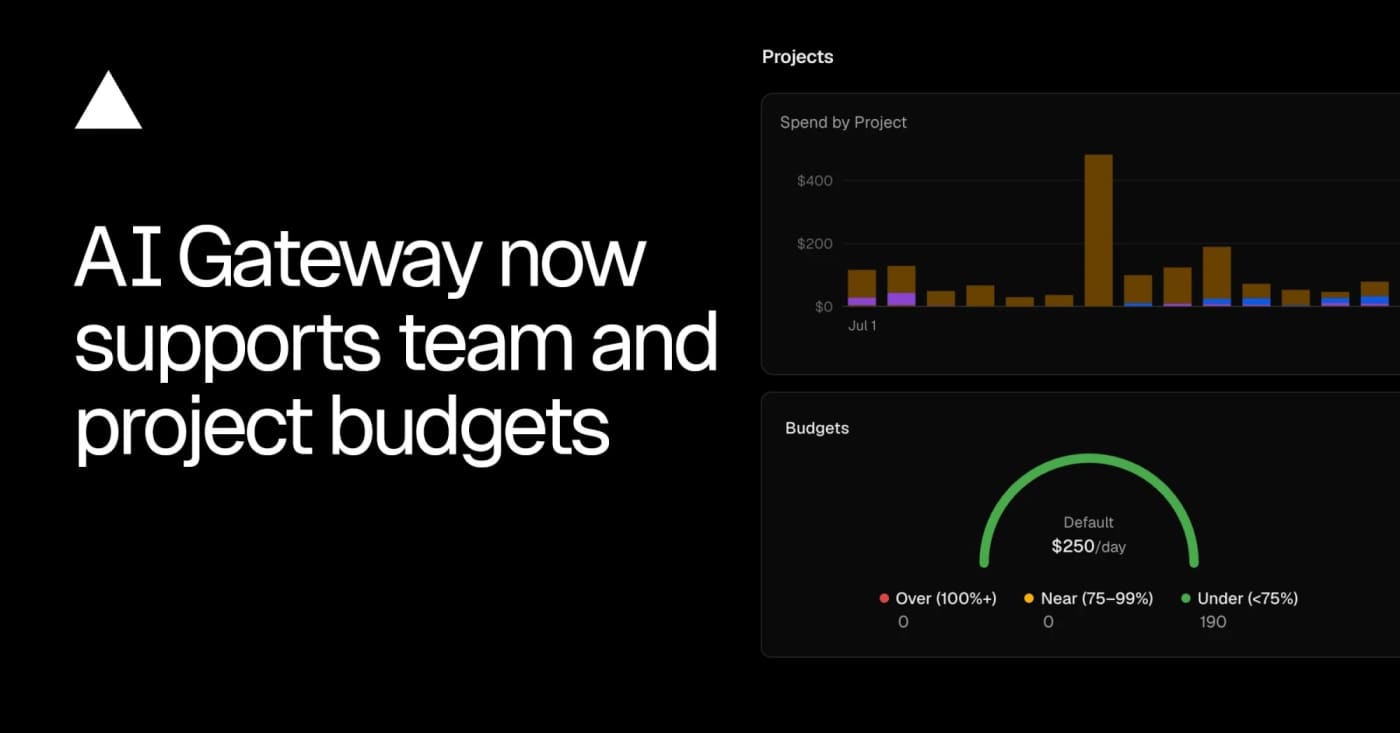
AI-generated · Automatically published by LinkLoot. Vercel AI Gateway now supports team, project, and API-key budgets with alerts and request blocking when a cap is reached. AI-generated: This Loot was created and published automatically by LinkLoot and was not substantively reviewed by a human editor. Vercel AI Gateway now has scoped spend budgets, which makes it worth a look for teams running agents through one shared model gateway. What it is Vercel added budgets that can cap AI Gateway spend at the team, project, or API-key level. A request can be checked against multiple budgets, and the gateway rejects it when any applicable limit is exhausted. Who it helps This is useful for product teams, agencies, and internal platform owners who let several agents, apps, or experiments share the same model gateway. It gives finance and engineering a clearer stop-loss than watching one API key after the fact. How to evaluate it Start by mapping current gateway traffic to projects and keys, then create low-risk alert-only thresholds before using hard caps on production workloads. The changelog shows CLI commands for setting team and project budgets, listing configured limits, and removing them. Limits and risks Budgets can block requests once a limit is reached, so production agents need fallbacks, user-visible errors, or a runbook for raising limits. Vercel also notes that BYOK spend is not counted against budgets by default, which matters if teams mix provider keys with gateway-managed spend. Sources Vercel AI Gateway budgets changelog
- LinkLoot access
- Free
- Provider costs
- Unknown
Review open

MinIO AIStor Memory is a new enterprise storage layer for agent memory, workspaces, and secrets that is worth evaluating before production agent stacks sprawl across separate databases and vaults. MinIO AIStor Memory is useful for teams moving AI agents from experiments into governed production workflows. It treats agent memory, workspaces, and secrets as a managed storage problem instead of scattering them across transcripts, vector stores, object buckets, metadata databases, and ad hoc vault wiring. What it is AIStor Memory is a MinIO product layer for durable agent memory. MinIO says it captures agent interactions, organizes them into structured memory, and retrieves relevant knowledge for later runs while keeping the data on enterprise-controlled infrastructure. Who it helps It is most relevant for platform, AI infrastructure, and security teams that need agents to resume work, share organizational context, and preserve provenance without handing long-term memory to a hosted black box. How to evaluate it Start with the product page and press release, then map it against your current agent stack: where memory lives, where work-in-progress files live, where secrets are accessed, and which audit controls already exist. Compare it with your current object store, vector database, secrets manager, and sandbox runtime. Limits and risks This is an enterprise product, not a drop-in open-source library. Validate pricing, deployment model, identity controls, retention rules, and how secrets are separated from retrievable memory. Agent memory can also preserve bad decisions, prompt-injection artifacts, or stale assumptions if governance is weak. Sources AIStor Memory product page MinIO announcement
- LinkLoot access
- Free
- Provider costs
- Unknown
Review open
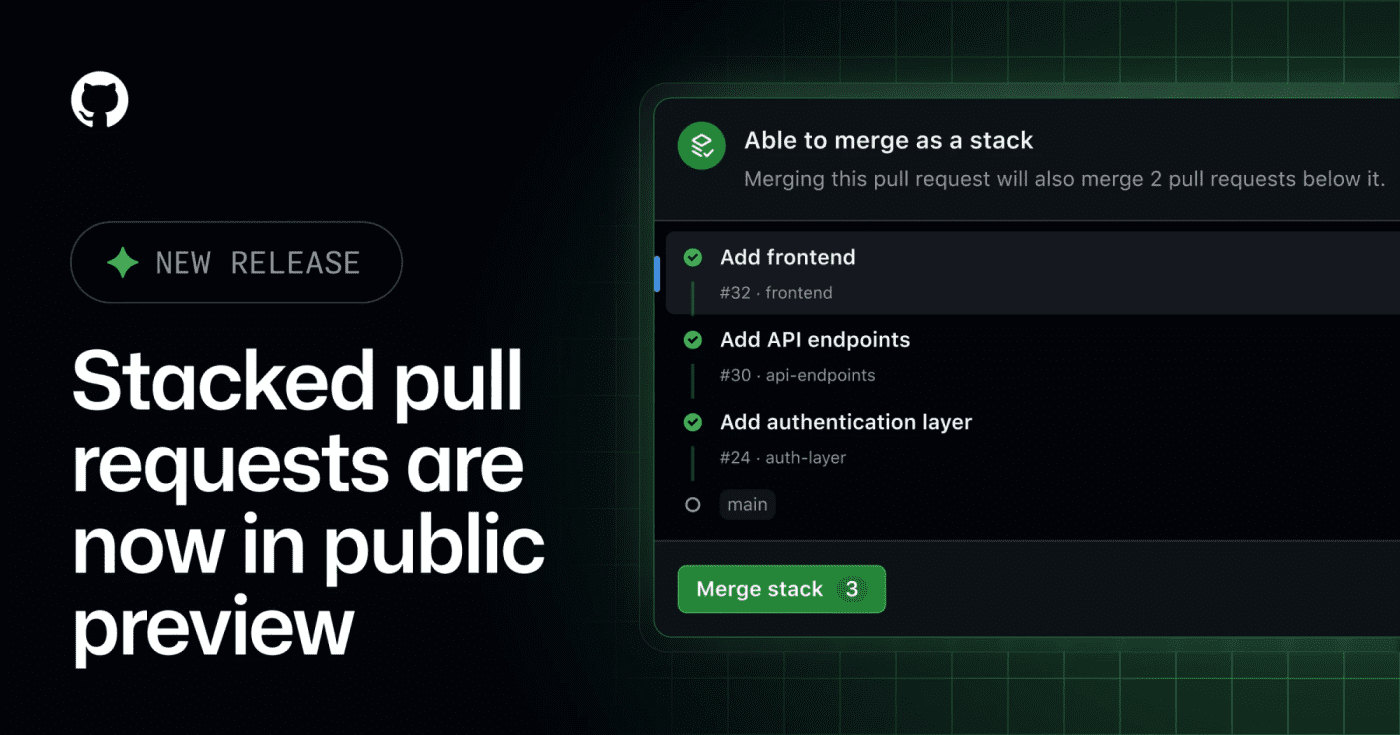
GitHub's public preview for stacked pull requests helps teams split dependent code changes into ordered, reviewable layers. GitHub has opened stacked pull requests in public preview, giving teams a native way to split a large change into smaller dependent PRs without managing the stack entirely by hand. What it is Stacked pull requests are ordered PRs where each pull request represents one focused layer of a larger change. GitHub says reviewers can inspect each layer independently, then merge the stack together when the series is ready. Who it helps This is useful for engineering teams that regularly ship refactors, migrations, feature branches with several dependencies, or AI-assisted changes that are too large for one review. It also matters for teams using Copilot workflows, because the changelog notes Copilot using a gh-stack skill in the stacked-PR flow. How to evaluate it Try it first on a non-critical branch with a small three-PR stack: setup, implementation, and tests. Check how status checks, review comments, rebases, branch protection, and merge order behave in your repository before making it part of your default review workflow. Limits and risks This is a public preview, so workflows may still change. Teams should verify compatibility with required checks, release automation, merge queues, and any bot that assumes every PR can merge independently. Sources GitHub changelog
- LinkLoot access
- Free
- Provider costs
- Unknown
Review open
pxpipe is an open-source local proxy that renders bulky Claude Code context as PNG pages so teams can test whether static prompt and history blocks cost less as images than as text. pxpipe is useful if your Claude Code bills are dominated by large, repeated context: system prompts, tool docs, long histories, generated diffs, or reference files that the model only needs to inspect rather than quote exactly. What it is pxpipe is an open-source local proxy for Claude Code. It converts bulky text context into dense PNG pages before the request reaches the model, while keeping recent messages and generated output as normal text. Who it helps It is mainly for developers running long Claude Code sessions through paid API usage, especially where the same large context appears across many requests. It is less useful for short chats, exact-code review, or tasks where every character must remain machine-readable. How to evaluate it Start with the offline export mode from the repository before running any proxy. Render a representative prompt, inspect the generated image, then run a small comparison on a non-critical task. Check cost, answer quality, citation accuracy, line-number fidelity, and whether the model misses small symbols or commit hashes. Limits and risks This is a compression tradeoff, not free quality. Dense screenshots can lose exactness, and code tasks often punish small visual-reading errors. Do not send secrets through an unreviewed proxy. Review the source, lock the package version, and test with disposable API credentials before connecting it to real work. Sources pxpipe GitHub repository The Decoder coverage
- LinkLoot access
- Free
- Provider costs
- Unknown
Review open

Cloudflare published integration paths for using AI Search from the Vercel AI SDK, LangChain, and the Cloudflare Agents SDK. Cloudflare AI Search is now easier to plug into agent and RAG apps because Cloudflare added official guides and framework integrations for common agent stacks. What it is Cloudflare’s July 30 changelog adds an Agents section for AI Search, including examples for the Vercel AI SDK, LangChain, and the Cloudflare Agents SDK. The AI SDK path uses the ai-search-provider package, while LangChain gets a CloudflareAISearchRetriever through langchain-cloudflare. Who it helps This is useful for developers who already index content in Cloudflare and want grounded answers inside an agent loop. It is especially relevant if you are building Workers-based assistants, support bots, internal knowledge tools, or RAG flows that should return source chunks instead of opaque completions. How to evaluate it Start with one small AI Search instance and wire it into a single answer path. Check whether the retrieved chunks are exposed cleanly in your UI or logs, then test failure modes: empty search results, stale indexed content, permission boundaries, and prompt-injection attempts inside retrieved documents. Limits and risks This is a practical integration update, not a new foundation model or major platform shift. You still need to manage Cloudflare credentials, indexing quality, source filtering, and retrieval safety. Treat indexed external content as untrusted input when passing it into an agent. Access and pricing Cloudflare links AI Search to its normal plan and sales pages. Check your account’s AI Search availability and billing before moving beyond a prototype. Sources Cloudflare changelog Cloudflare AI Search docs
- LinkLoot access
- Free
- Provider costs
- Unknown
Review open
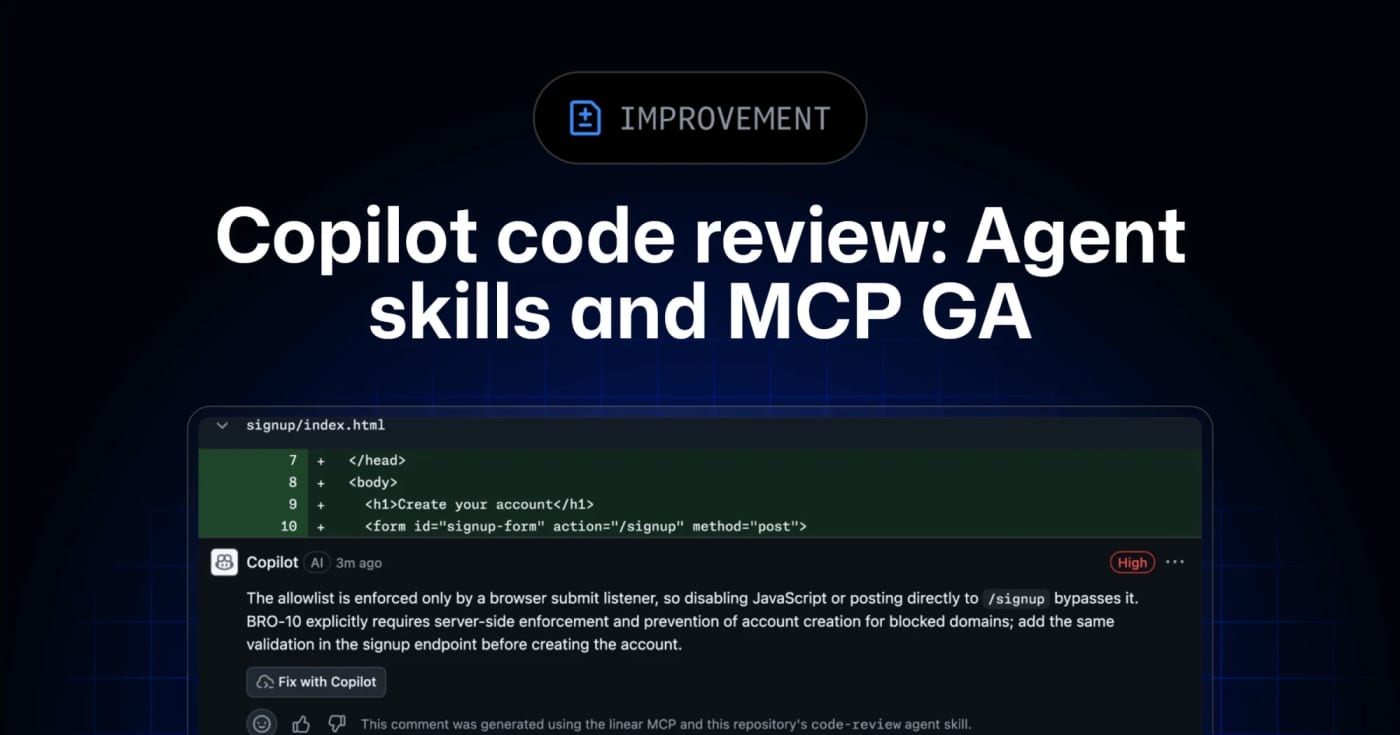
GitHub’s Copilot code review can now use repository agent skills and read-only MCP servers, giving teams a practical way to inject standards and project context into automated reviews. GitHub has moved agent skills and MCP support for Copilot code review to general availability across Copilot Pro, Pro+, Business, and Enterprise. What it is Copilot code review can now use repository-level agent skills and MCP server context when reviewing pull requests. Skills live under .github/skills with a SKILL.md file, while MCP servers can bring in read-only context from tools such as issue trackers, docs systems, service catalogs, or incident systems. Who it helps This is useful for engineering teams that already rely on internal review checklists, service ownership rules, security conventions, or issue metadata. Instead of hoping a generic reviewer catches local standards, teams can encode focused instructions and let Copilot reference external context during review. How to evaluate it Start with one narrow skill, such as API compatibility, migration checks, or test expectations for a specific package. Keep the first MCP connection read-only and low-risk, then inspect whether Copilot’s comments clearly attribute skill or MCP usage. For Business and Enterprise environments, check policy controls and billing behavior before enabling automatic reviews broadly. Limits and risks Copilot code review is still advisory. GitHub’s docs warn that it can miss issues or make mistakes, and human review remains required. MCP tool calls for code review are read-only, but teams should still audit what context each server exposes. Medium review effort and agentic capabilities can also consume more AI credits and GitHub Actions minutes. Sources GitHub changelog announcement GitHub Docs: Copilot code review
- LinkLoot access
- Free
- Provider costs
- Unknown
Review open
OneCLI is an open-source credential gateway that lets agents call services through placeholder keys while the gateway injects real secrets at request time. OneCLI is worth evaluating if your agents need API access but you do not want raw keys sitting in prompts, project files, shell history, or agent memory. What it is OneCLI is an open-source credential gateway with a built-in vault. You store real API credentials once, give an agent a placeholder key, and route outbound HTTP calls through OneCLI. The gateway matches the target host and path, decrypts the right secret, and injects it into the request so the agent never sees the real credential. The repository describes a Rust gateway, a Next.js dashboard, AES-256-GCM encrypted storage, host/path matching, per-agent access tokens, and optional Bitwarden-style vault integration. Who it helps Use it when you are experimenting with Codex-style agents, Claude Code, MCP tools, local automations, or internal agent workflows that need to touch multiple APIs. The cleanest fit is a local or small-team setup where credential exposure is the main risk and you want one place to rotate keys, scope agent access, and inspect what each agent is doing. How to evaluate it Start in a throwaway local workspace. Read the README, inspect the Docker compose setup, review how secrets are encrypted, and test with a non-critical API token first. Confirm whether the gateway behavior fits your agent stack before connecting production accounts. Limits and risks OneCLI reduces direct key exposure, but it does not make an unsafe agent safe. A compromised or prompt-injected agent may still call allowed services through the gateway. You still need scoped API keys, logging, rate limits, approval gates for destructive actions, and a clear rotation plan. The HTTPS interception model also deserves careful review before team or production use. Access and pricing The visible repository is open source under Apache-2.0. The project also links to a website and docs; check the current hosted or team offering separately if you need managed deployment. Sources OneCLI GitHub repository OneCLI website
- LinkLoot access
- Free
- Provider costs
- Unknown
Review open
GitHub's new issue automation controls let teams inspect rationale, confidence, and suggested metadata changes from Copilot cloud agent and Agentic Workflows. GitHub Issues now has a practical review layer for agent-driven triage. It is useful if you let Copilot cloud agent or GitHub Agentic Workflows label, assign, type, close, or update issue fields and want fewer unexplained changes in busy repositories. What it is GitHub added rationale, confidence, and approvals for supported issue automation actions. Agents can attach a reason to a change, rate confidence as high, medium, or low, and leave lower-confidence actions as suggestions instead of applying them immediately. Who it helps Maintainers, support teams, and product squads that use issue automation can use this to keep triage fast without making every metadata change invisible. It is especially relevant for public repositories, large backlogs, and workflows where spam detection, priority labels, or owner assignment need review. How to evaluate it Start with one workflow that touches low-risk fields such as labels or issue type. In GitHub Agentic Workflows, GitHub says issue intents are optional and enabled by default, and can be required per safe output. For Copilot cloud agent, GitHub says no update is needed; test from the Automations pane in the repository Agents tab. Use has:suggestions in issue search to find pending review items, then compare agent rationale against your existing triage rules. Limits and risks GitHub explicitly says approvals are a workflow convenience, not a security control. They do not create a server-side permission boundary, and an agent with permission to change issues can still apply changes directly if configured to do so. Treat this as observability and review UX, not a substitute for least-privilege access. Sources GitHub changelog GitHub Docs: rationale, confidence, and approvals
- LinkLoot access
- Free
- Provider costs
- Unknown
Review open

An open-source Python framework for generating, evaluating, and improving multi-agent workflows from goals and feedback. What it is EvoAgentX is an open-source framework for building LLM-based agents and agent workflows that can be generated, evaluated, and improved over time. Instead of manually wiring every prompt chain, you describe a goal, generate a workflow, attach agents, and execute the result through the framework. Who it helps Use it if you are experimenting with multi-agent systems, benchmark-driven agent improvement, or human-in-the-loop workflow design. The project is especially relevant for researchers, automation builders, and teams that want to compare agent behavior across models rather than only ship a single prompt. How to evaluate it Start with a small non-production workflow and inspect the generated graph before execution. Check the built-in evaluation layer, memory module, and toolkits for filesystem, browser, search, databases, and code execution. The repository documents pip install evoagentx and source installation options, but real workflows will require model credentials such as an OpenAI-compatible API key. Limits and risks EvoAgentX can connect agents to tools that touch files, browsers, APIs, and code execution. Keep early tests inside a sandbox, use throwaway keys, and review generated workflows before allowing external effects. Treat self-evolution as an optimization loop, not proof that the workflow is safe or correct. Sources Primary source: https://github.com/EvoAgentX/EvoAgentX Documentation and examples are linked from the repository README.
- LinkLoot access
- Free
- Provider costs
- Unknown
Review open
An open-source super-agent harness for research, coding, sub-agents, memory, sandboxes, and skills. What it is DeerFlow is ByteDance's open-source super-agent harness for longer jobs that need more than a single chat turn. It combines sub-agents, memory, sandboxes, skills, and a message gateway so an agent can research, code, create artifacts, and continue work across multi-step sessions. Who should use it Use it if you are evaluating agent infrastructure for deep research, coding workflows, report generation, or multi-agent task execution. It is most relevant for builders who already understand the cost and risk of letting agents use tools, files, shells, or browser/search providers. How to evaluate it Start with the official repository and installation guide. Run it locally or in Docker before exposing it to shared users. Use make setup and make doctor to generate config and catch setup problems. Test one contained workflow first: research summary, codebase inspection, or document generation. Keep sandbox mode and provider limits tight until you understand the execution path. Limits and risks DeerFlow is powerful because it can coordinate tools, models, files, and sub-agents. That also means misconfiguration can create security risk. Review the .env, model-provider config, shell/file-write permissions, sandbox settings, and any skill code before running it on sensitive projects. The repo also notes that DeerFlow 2.0 is a ground-up rewrite, so teams using older DeerFlow material should check whether guidance applies to the current branch. Source links Primary source: https://github.com/bytedance/deer-flow Discovery/context: https://github.com/topics/ai-agents
- LinkLoot access
- Free
- Provider costs
- Unknown
Review open
GitHub’s new REST endpoint lets enterprise billing teams pull per-user states for multi-user budgets instead of checking every user one by one. GitHub added a REST endpoint for enterprise owners and billing managers who need to monitor multi-user budgets, including AI-credit and premium-request budgets. What it does The endpoint returns per-user budget state for a multi-user customer scoped budget. Teams can page through users, filter by a specific user, sort results, and filter by threshold percentages so they can find people who are close to a limit without building one API call per user. Who should use it Use this if your organization runs GitHub Copilot or other GitHub metered products under enterprise budgets and needs faster spend checks across many users or cost centers. How to evaluate it Confirm your account is a GitHub Enterprise Cloud enterprise owner or billing manager. Check whether the budget is a multi-user customer scoped budget. Test threshold filters against a non-critical budget before wiring alerts. Decide whether you need separate monitoring for user overrides, because the response can include an override budget ID. Limits and risks The docs state that this endpoint does not work with GitHub App user tokens, GitHub App installation tokens, or fine-grained personal access tokens. Treat the required enterprise billing credentials as sensitive, and do not put the token in client-side scripts or shared dashboards. Sources GitHub changelog: https://github.blog/changelog/2026-07-10-per-user-states-for-multi-user-budgets-in-the-rest-api/ GitHub REST API docs: https://docs.github.com/en/enterprise-cloud@latest/rest/billing/budgets?apiVersion=2026-03-10
- LinkLoot access
- Free
- Provider costs
- Unknown
Review open
Blog
Related reads
No blog posts for #tool yet
There is no published article with this tag right now. Browse the blog for adjacent themes or follow the tag for future updates.